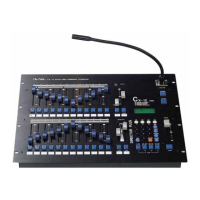
CX-12 DIRECTOR PLUS
OPERATING DESCRIPTION................. Creating a scene
A A scene can only be created through the set of channels. See channel operation,
or the following example.
B. Set the level of channels desired.
C. Save channels to a scene No.
1. Press PROG key------------>LCD shows: 1.Scene 2. Sequence
2. press function key #1(Scene) -----> LCD shows: 1.Load 2.Save 3.Clear 4.More
3. Press function key #2 (Save)
4. Key in the desired scene No. to be saved
(choose from 01~96 on the number keys)
5. Press enter. Scene is displayed
Example: Create scene #1 with the following channels
CH1=100% CH12=100% CH11=100%
CH12=100% CH15~18=100% CH25~30=100%
STEPS
1. Adjust master fader VR to 100%
Make sure the program is in CH mode (see LCD screen), if not press the SC/CH
key.
2. Press page #1----->LCD shows: PAGE START CH01
3. Adjust fader VR #1,2,11,12,15~18 to 100%
4. Press page #2----->LCD shows: PAGE START CH25
5. Adjust fader VR #1,2,11,15~18 to 0% - bottom
6. Adjust fader VR #1~6 (CH25~30) to 100%
To save channels’ level to scene No.;
7 .Press PROG key-----> LCD shows:1.Scene 2.Sequence
8. Press function key #1(Scene)-----> LCD shows :1. Load 2. Save 3. Clear 4. More
9. Press function key #2. (Save)--->LCD shows: SAVE SCENE 01
10. Press desired scene #................................. press key numbers #0 and #1
11. Press ENTER. All pevious channels are now saved in scene #1 (sc-1)
12. Continue as described above to create up to 96 scenes.


 To Next Page