21
www.LiteGait.com
1-800-332-9255
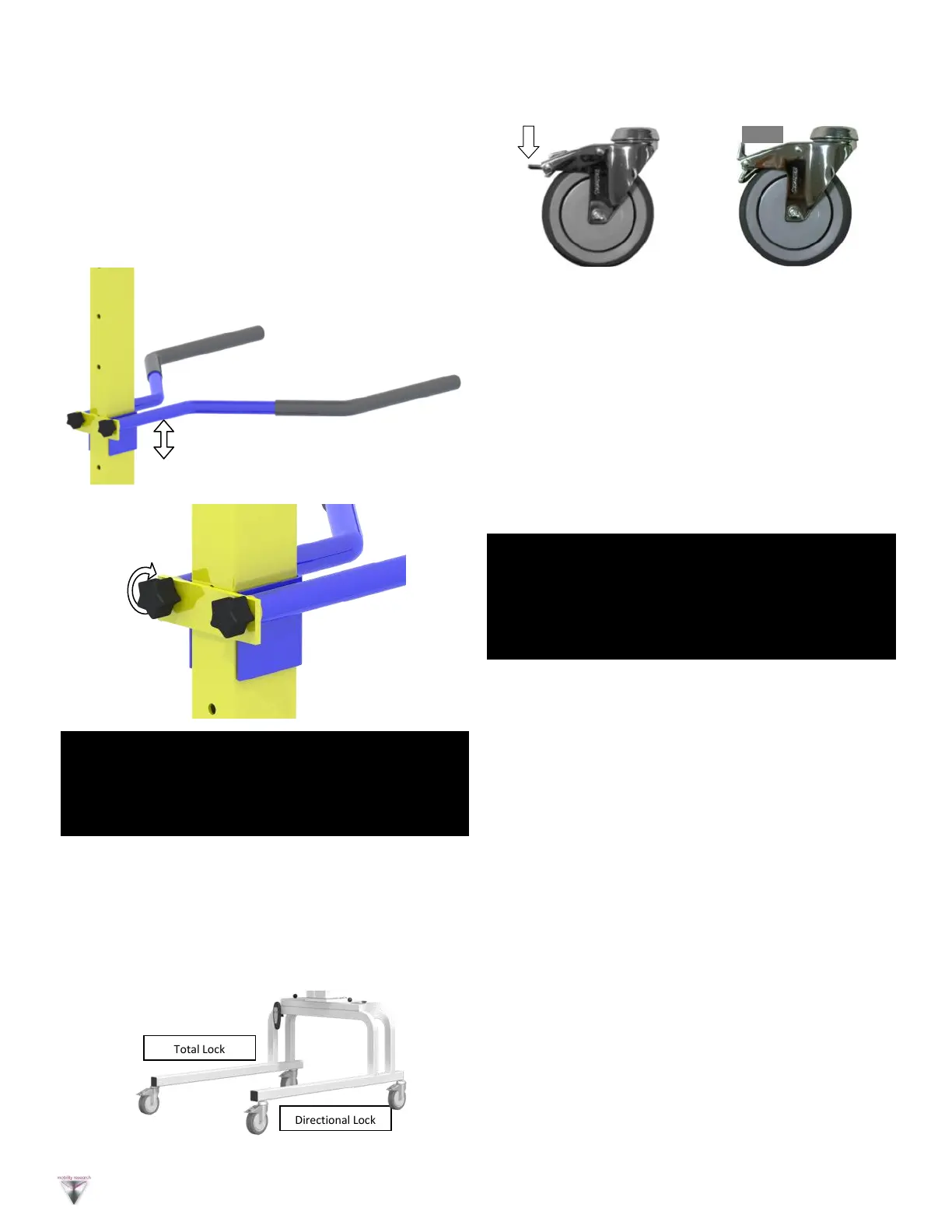
Directional Lock
Total Lock
Press tab to lock Locked Caster
Locking and Unlocking Casters
Directional Locking Casters
Directional lock casters are indicated by a green sticker in
the locking lever. To lock the directional locking casters,
press the tab and align the caster with the frame. Once
Aligned this locks the swivel of the casters and is
beneficial for walking in a straight path or placing
LiteGait® over a treadmill. Once the unit is positioned
over a treadmill, all four caster brakes need to be locked
Directional Locking Casters with Treadmill
Position LiteGait® near the treadmill (or where you
wish the patient to begin walking).
Roll LiteGait® towards the front of the treadmill, until
the casters line up parallel to the treadmill (or
parallel to the path the patient will follow—a
hallway for example).
Press the directional locks to lock swivel of casters
LiteGait® can now be easily rolled back and forth over
the treadmill or on a straight path in the therapy room or
hallway.
NOTE: While locking the caster prevents rolling of the unit, it
DOES NOT prevent the unit from sliding on a sloped, slippery
floor. The unit should only be used on a flat floor away from
stairs or ramps. NEVER leave a patient unattended in the
unit.
Total Locking Casters
Total locking casters are indicated by a red sticker on the
locking lever. To lock the total locking casters, press the
tab until the brake snaps into place. The caster will lock
the swivel of the caster and rotation of the wheel.
Locking all four casters will make the device stationary.
BRAKE
NOTE: Your LiteGait® may look different than images above
VI. Base and Casters
LiteGait® is equipped with four casters. There are two
total locking casters and two directional lock casters.
Each leg has one type of casters, the total locking are
mounted on the left leg the directional locking are
mounted on the right leg.
V. Adjusting Handle Bars
Raising and Lowering the Handle Bar
Loosen each knob in equal portions. The knobs should
only need to be turned once to free the handle bars.
Once the knobs are loosened slide the handle bars to
the desired height. Hand tighten both knobs equally.
Again, the knobs should only need to be tightened one
rotation.
WARNING: LiteGait® Handle Bars are designed to be used as
a balance aid while using the LiteGait. Excess loading of the
handle bars may damage handle bars. Avoid Having patients
lift their weigh using the handle bars.
NOTE: Your LiteGait® may look different than images above


 To Next Page