4
Automatic Standby
Automatic Wake Up
After the helmet powers on and stays stationary for a while, it will automatically begin saving power by going into
sleep mode. When the tail light is o, without user interaction, the helmet is in sleep mode.
To wake up the helmet, shake it several times until the tail lights illuminate.
Note: If the helmet does not wake up, make sure the battery levels are adequate.
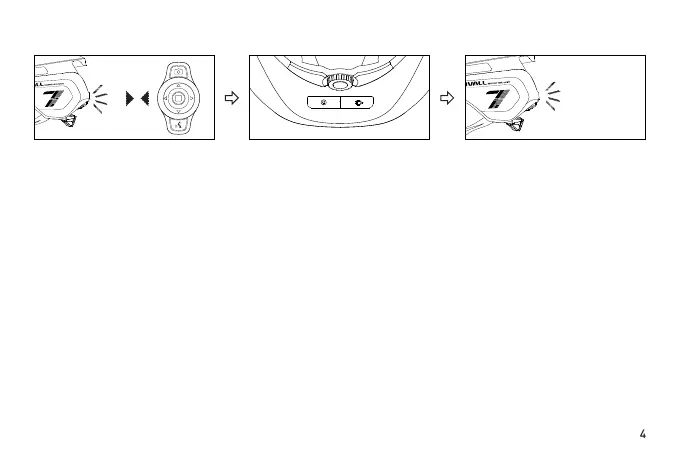
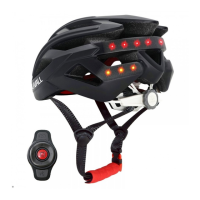
Put the power-on BR80 close to
the main control of the helmet,
and the warning light flashes
three times per second, indicating
that there is a BR80 that needs to
be connected to the helmet.
Press the power button of the
helmet within 10s to conrm the
connection of the BR80.
Then the tail light of the helmet
will continue to flash in the light
mode before connection. After
connected successfully, the left
turn signal or right turn signal can
be realized by the BR80.
2) Replacing device (When the original BR80 lost or damaged)
Note:
A. The left and right turn signal of the helmet can be controlled by the BR80’s left (L) and right (R) buttons;
B. Except for the left (L) and right (R) buttons of BR80 and the red conrmation button in the middle of BR80,
other keys are not needed for the time being.


 To Next Page