English 3
1
•
INK CARTRIDGE
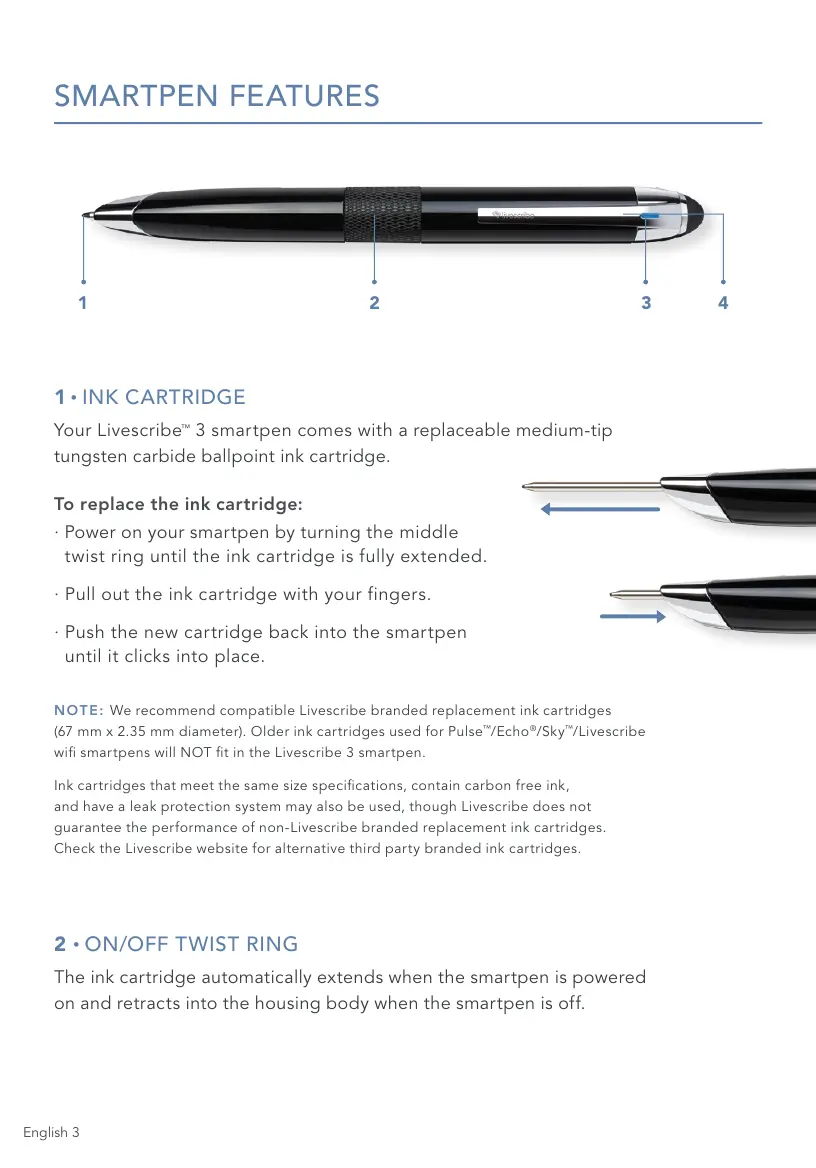
Your Livescribe
™
3 smartpen comes with a replaceable medium-tip
tungsten carbide ballpoint ink cartridge.
To replace the ink cartridge:
· Power on your smartpen by turning the middle
twist ring until the ink cartridge is fully extended.
· Pull out the ink cartridge with your fingers.
· Push the new cartridge back into the smartpen
until it clicks into place.
NOTE: We recommend compatible Livescribe branded replacement ink cartridges
(67 mm x 2.35 mm diameter). Older ink cartridges used for Pulse
™
/Echo
®
/Sky
™
/Livescribe
wi smartpens will NOT t in the Livescribe 3 smartpen.
Ink cartridges that meet the same size specications, contain carbon free ink,
and have a leak protection system may also be used, though Livescribe does not
guarantee the performance of non-Livescribe branded replacement ink cartridges.
Check the Livescribe website for alternative third party branded ink cartridges.
2
•
ON/OFF TWIST RING
The ink cartridge automatically extends when the smartpen is powered
on and retracts into the housing body when the smartpen is off.
1 2 3 4
SMARTPEN FEATURES



 To Next Page