3
Getting Started
4
Getting Started
Equipment with
A/V jacks
DVD Player/Recorder
Video
Camera
EXTERNAL DEVICES
Set-top box
Satellite Receiver
Satellite
antenna
cable
VCR
TV JACK
A/V OUT
Video
L
R
White(L)White(L)
Yellow(Video)Yellow(Video)
Red(R)Red(R)
AV Cable
(not included)
VIDEO
L
R
AV IN
Y
P
B
P
R
COMP
L
R
Equipment with
A/V jacks
Video
Camera
EXTERNAL DEVICES
Satellite
antenna
VCR
White(L)
White(L)
Red(R)
Red(R)
Audio Cable
(not included)
Component Cable
(not included)
TV JACK
Component
R
L
P
R
P
B
Y
P
R
/C
R
P
R
/C
R
P
B
/C
B
P
B
/C
B
YY
NOTE
The “Y, PB and PR ” connectors on your component devices (PVR or DVD) are sometimes marked
with Y, B-Y and R-Y or Y, CB and CR. (Colors for inputs and cables must correspond on both
devices.)
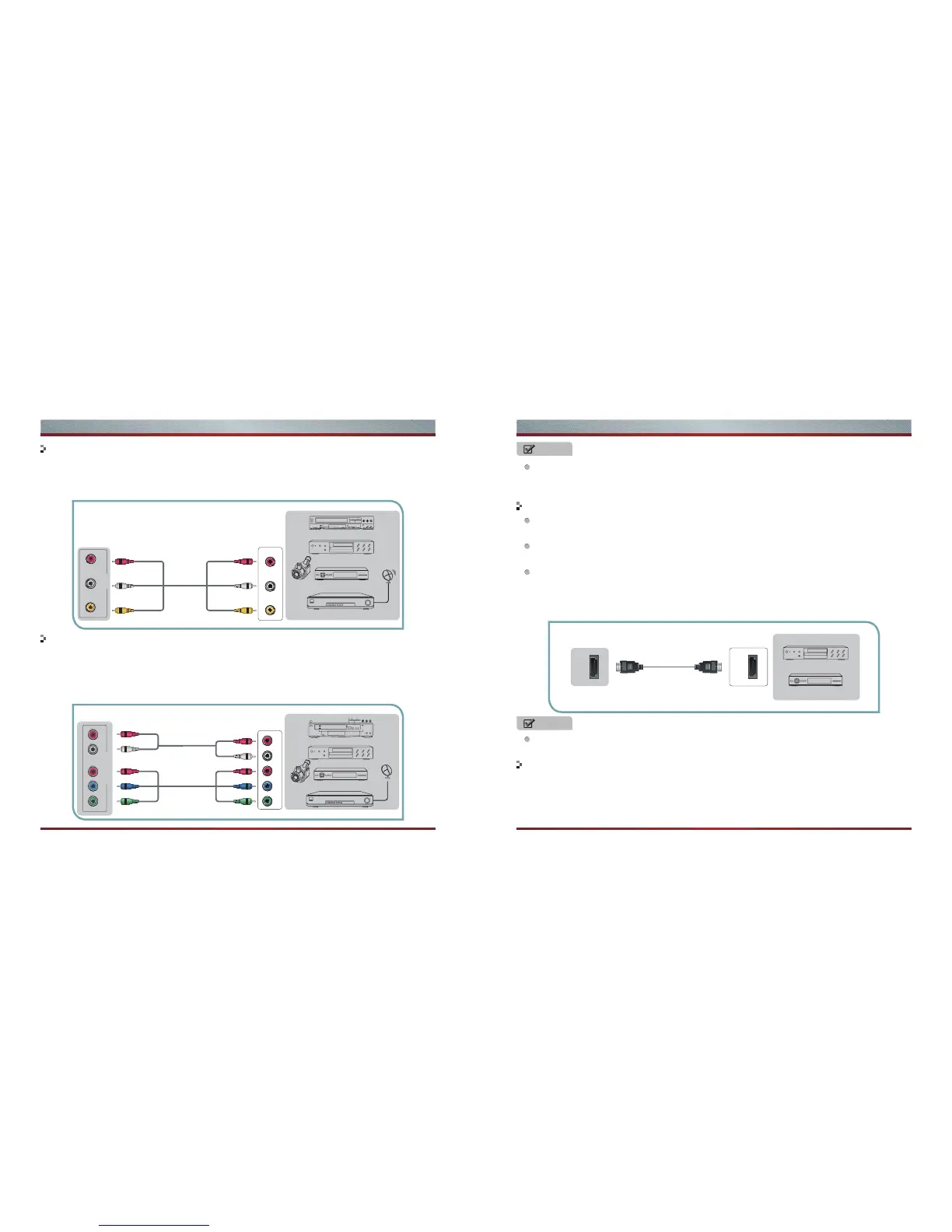
1. Connect video terminal to an appropriate external terminal on A/V device such as a VCR, DVD or
Camcorder with a video cable.
2. Connect“R -AUDIO - L” on your set to the corresponding audio terminal with audio cables on the A/V
device.
1. Use an HDMI cable to connect the A/V device’s HDMI output jack to the TV’s HDMI jack.
2. Plug the connected devices into the mains socket before switching on the TV .
3. Select the corresponding source from the TV.
1. Use a VGA cable to connect the PC’s VGA output jack to the TV’s VGA jack. Use an audio cable to
connect the PC’s audio output jack to TV’s PC AUDIO IN jack.
2. Plug the connected devices into the mains socket before switching on the TV.
3. Select the corresponding source from the TV.
1. Component video(Y, Pb, Pr)transmits video as separate Y, Pb, Pr signals. Use this connection for
high-definition video signals from a DVD or other equipment.
2. Connect Component inputs (“PR ”,“PB ”, “Y”) and audio(R/L) of your set with Component video and
audio cables to the corresponding component video and audio (R/L)out connectors on the PVR or
DVD. Audio input of Component shared with audio jack of AV IN.
Connect to AV devices
Connecting Component Devices (DVD/PVR)
Connect to devices with HDMI interface
Connecting a PC with VGA Cable
NOTE
The HDMI connector provides both video and audio signals, it’s not necessary to connect the audio
cable.
Support digital connections between HDMI - enabled AV devices such as PVR, DVD, Blu-Ray, AV
receiver and digital devices.
Some devices such as PVR or DVD player require HDMI signal to be set to output in the device's
settings.
Please consult your device user manual for instructions.
HDMI
HDMI
TV JACK
EXTERNAL DEVICES
DVD Player/Recorder
Set-top box
Equipment with HDMI jacks
HDMI Cable
(not included)



 To Next Page