EasyManua.ls Logo

LM Technologies LM048 - User Manual

LM Technologies LM048
26 pages
Print Icon
To Next Page IconTo Next Page
Loading...
Bluetooth RS232 Serial Adapter Manual
Document Version: 1.0
Firmware Version: 6.5x
LM048
LM058
Downloaded from Elcodis.com electronic components distributor

Other manuals for LM Technologies LM048

Question and Answer IconNeed help?

Do you have a question about the LM Technologies LM048 and is the answer not in the manual?

Overview

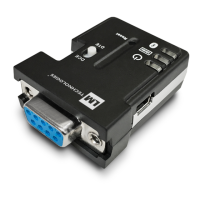
The LM Technologies Bluetooth RS232 Serial Adapter (models LM048 and LM058) is a device designed to replace conventional RS232 serial cables, enabling wireless communication between devices with standard 9-pin serial ports. It provides an easy-to-use, invisible connection with enhanced freedom of movement.

Function Description

The adapter emulates a serial cable by wirelessly transferring all RS232 control signals (RTS, CTS, DTR, and DSR) over a Bluetooth link. This capability is particularly useful for serial printers that report error conditions like "Out of Paper" or "Power failure" by de-asserting DTR or RTS lines. The adapter can be used in pairs as a serial cable replacement or to communicate with other Bluetooth serial adapters, laptops, PDAs, or mobile phones.

Important Technical Specifications

  • Bluetooth Standard: Specification v2.1+EDR
  • Profiles Supported: Bluetooth Serial Port Profile and Generic Access Profile
  • Frequency: 2.400 to 2.4835 GHz
  • Hopping: 1,600 hops/second, 1MHz channel space
  • Modulation: GFSK-1 Mbps, DQPSK-2 Mbps, and 8-DPSK-3 Mbps
  • Tx. Power: Max. 18 dBm (Class 1)
  • Rx. Sensitivity: -86 dBm typical
  • Coverage: Up to 100 meters (open space)
  • Connection: Point-to-Point (piconet)
  • RS-232 Interface: D-SUB 9-pin female
  • RS-232 Signals: TxD, RxD, GND, RTS, CTS, DTR, DSR
  • Baud Rates Supported: 1.2, 2.4, 4.8, 9.6, 19.2, 38.4, 57.6, 115.2, 230.4, 460.8, 921.6 Kbps
  • Antenna: Chip antenna (LM048), External SMA Antenna (LM058)
  • Antenna Gain: Max. 1 to 2 dBi
  • Power Supply: +4 to +12 V DC
  • Current Consumption: Max. 90 mA
  • Operation Temperature: -20°C to +75°C
  • Dimensions:
    • LM048: 46.3 mm (W) x 34 mm (D) x 16 mm (H)
    • LM058: 35 mm (W) x 65 mm (D) x 16 mm (H)
  • Factory Settings (COM Port):
    • Baud rate: 19200 bps
    • Data bit: 8
    • Parity: none
    • Stop bit: 1
    • Flow control: None

Usage Features

The adapter offers several features for flexible use and configuration:

  • No External Host/Software Required: Operates independently without the need for an external host or software for basic functionality.
  • Configuration: Supports configuration of the local device.
  • Flow Control: Supports both RTS/CTS data flow control and DTR/DSR handshaking.
  • Wireless Signal Transfer: Unique ability to transfer RTS, CTS, DTR, and DSR signals wirelessly over the Bluetooth link, crucial for devices like serial printers.
  • Slide Switch: Allows swapping TXD/RXD, RTS/CTS, and DTR/DSR signals, enabling the adapter to be set as either a DTE (towards antenna connector) or a DCE (towards RS232 connector).
  • Power Supply Options: Can be powered via an AC/DC converter (+5 to +12 V DC/300 mA), a mini-USB cable, or Pin 9 of the RS232 DB9 connector.
  • LED Status Indicators:
    • All LEDs on/off three times: Device boot OK.
    • Data LED on: Transmitting/Receiving data.
    • Link LED off: No pairing established.
    • Link LED fast (0.1 sec) blinking: Pairing.
    • Link LED fast (0.3 sec) blinking: Discoverable and waiting for a connection (slave mode).
    • Link LED slow (0.9 sec) blinking: Inquiring (master mode).
    • Link LED very slow (1.2 sec) blinking: Connecting (master mode).
    • Link LED steadily on: Connection established.
  • HyperTerminal Configuration: Users can reprogram adapter settings using HyperTerminal with specific settings (19200 bps, 8 data bits, no parity, 1 stop bit, no flow control).
  • AT Command Set: A comprehensive set of AT commands allows for detailed configuration in command mode (when disconnected). These commands are case-insensitive and include:
    • +++: Switch from online Data mode to online Command mode (with 1000 ms guard time).
    • AT: Check serial UART port settings.
    • AT+VER: Inquire current firmware version.
    • AT+ENQ: List all settings with brief descriptions.
    • AT+ACON: Enable/disable auto-connection (causes reboot).
    • AT+ACON+: Automatically connect to a specified or any ready adapter (default).
    • AT+ACON-: Disable auto-connection, requiring AT+CONN for manual connection.
    • AT+ACON?: Inquire current auto-connection setting.
    • AT+CONN: Establish a connection (manual master role only).
    • AT+CONN=xxxxxxxxxxxx: Connect to a specified Bluetooth device address.
    • AT+CONNn (n=1-8): Connect to a device found via AT+FIND?.
    • AT+DROP: Drop the current connection.
    • AT+ADDR?: Inquire local Bluetooth address.
    • AT+BOND: Specify a unique remote Bluetooth serial adapter for connection/filtering.
    • AT+BOND=xxxxxxxxxxxx: Specify slave Bluetooth device address for bonding.
    • AT+BOND-: Restore status to connect with any remote address.
    • AT+BOND?: Inquire designated address for pairing.
    • AT+FIND: Search for Bluetooth devices in the neighborhood (manual master role only).
    • AT+FIND?: Start inquiry.
    • AT+FIND-: Cancel ongoing inquiry.
    • AT+ROLE: Specify master or slave role (reboots and clears paired records if changed).
    • AT+ROLEM: Set to master role.
    • AT+ROLES: Set to slave role (default).
    • AT+ROLE?: Inquire current role.
    • AT+NAME: Specify adapter name (0-9, A-Z, a-z, space, -, max 16 chars, default "Serial Adapter").
    • AT+NAME=xxxxx: Set adapter name.
    • AT+NAME?: Inquire local adapter name.
    • AT+PIN: Specify PIN (default "1234", 4-8 digits).
    • AT+PIN=xxxx: Set PIN.
    • AT+PIN-: Cancel authentication by PIN.
    • AT+PIN?: Inquire current PIN.
    • AT+RCFG: Enable/disable remote configuration.
    • AT+RCFG+: Enable remote configuration.
    • AT+RCFG-: Disable remote configuration (default).
    • AT+RCFG?: Inquire current remote configuration setting.
    • AT+DCOV: Specify discoverability.
    • AT+DCOV+: Device is discoverable (default).
    • AT+DCOV-: Device is non-discoverable.
    • AT+DCOV?: Inquire current discoverability status.
    • AT+RESP: Specify if result messages are prompted (OK/ERROR, CONNECT/DISCONNECT).
    • AT+RESP+: Prompt result messages (default).
    • AT+RESP-: Do not prompt result messages.
    • AT+RESP?: Inquire current response setting.
    • AT+FLOW: Enable/disable RTS/CTS signals handshaking (causes reboot).
    • AT+FLOW-: Disable RTS/CTS flow control (default).
    • AT+FLOW+: Enable RTS/CTS flow control.
    • AT+FLOW?: Inquire current flow control setting.
    • AT+BAUD: Specify COM port baud rate (e.g., AT+BAUD14 for 19200 bps default).
    • AT+BAUD?: Inquire current baud rate.
    • AT+PAR: Specify parity bit setting.
    • AT+PAR0: None parity bit (default).
    • AT+PAR1: Odd parity.
    • AT+PAR2: Even parity.
    • AT+PAR?: Inquire current parity setting.
    • AT+SLEEP: Enable/disable auto-power saving.
    • AT+SLEEP-: Disable auto power saving (default).
    • AT+SLEEP+: Enable auto power saving.
    • AT+SLEEP?: Inquire current sleep setting.
    • AT+STOP: Specify one or two stop bits.
    • AT+STOP1: One stop bit (default).
    • AT+STOP2: Two stop bits.
    • AT+STOP?: Inquire current stop bit setting.
    • AT+ESC: Disable/Enable escape sequence "+++" handling.
    • AT+ESC-: Disable escape sequence handling.
    • AT+ESC+: Enable escape sequence handling (default).
    • AT+ESC?: Inquire current escape setting.
    • AT+ECHO: Enable/disable echo of command characters.
    • AT+ECHO-: Disable echo.
    • AT+ECHO+: Enable echo (default).
    • AT+ECHO?: Inquire current echo setting.
    • AT+RSSI: Inquire RSSI value for current connection (connected state only).
    • AT+MODEM: Enable/disable RS232 modem signals (used with AT+FLOW).
    • AT+MODEM-: Disable Modem Signals (default).
    • AT+MODEML: Enable Local loopback.
    • AT+MODEMR: Enable Remote transfer.
    • AT+MODEM?: Inquire current modem setting.
    • AT+RESET: Restore default settings and reboot.
  • Modem Signal Settings: Configurable for 3-wire (Tx, Rx, GND), 5-wire (Tx, Rx, GND, RTS, CTS), or 7-wire (Tx, Rx, GND, RTS, CTS, DTR, DSR) configurations, with options for local flow control and wireless transfer of DTR/DSR.
  • Windows Configuration Software (LM149): Provides an easy-to-use graphical interface for setting up LM048/LM058 adapters. Features include:
    • Viewing current device information.
    • Programming device settings.
    • Pairing/Unpairing adapters.
    • Restoring factory default settings.
    • Configuration options for COM port, baud rate, parity, flow control, stop bits, device name, PIN code, discoverable mode, device mode (master/slave), auto-connect, escape mode, echo mode, auto power, command response, remote configuration, and authentication.
  • Master/Slave Role Configuration: Can be set as a master (to initiate connections) or a slave (to wait for connections). Master role allows manual connection setup and device discovery.
  • Master-Slave Adapter Pairing: Can be configured to automatically connect to each other after initial setup using the configuration utility software.

Maintenance Features

  • Reset Button:
    • Short press: Disconnect and reconnect a wireless connection.
    • Press for over three seconds: Restore factory settings.
  • Warranty: One (1) Year International warranty covering materials and manufacturing defects, requiring proof of purchase and online registration for help system access.
  • Support: Available through the manual, the LM149 configuration software user manual, and the LM Technologies website (FAQ and troubleshooting).
  • Disposal Notice: Product should not be mixed with unsorted municipal waste; separate collection systems exist for waste electrical and electronic equipment. Old equipment can usually be returned free of charge for recycling and reuse to avoid environmental damage and preserve natural resources.

LM Technologies LM048 Specifications

General IconGeneral
BrandLM Technologies
ModelLM048
CategoryAdapter
LanguageEnglish

Related product manuals