EasyManua.ls Logo

LOBSTER Elite grand five le - User Manual

LOBSTER Elite grand five le
18 pages
Print Icon
To Next Page IconTo Next Page
Loading...
grand five le owners manual
lobster elite
play more. win more.
®
TM
®
Question and Answer IconNeed help?

Do you have a question about the LOBSTER Elite grand five le and is the answer not in the manual?

Summary

Customer Information and Safety Warnings

Check for Damage

Inspect the machine for damage upon arrival and before first use.

Shipping Box Storage

Advise to keep the original shipping box and packing materials for potential returns.

General Safety Warning

Key safety precautions to avoid injury during operation and maintenance.

Machine Setup and Operation

Intended Use Guidelines

Specifies the intended use environment and safety distance for the ball machine.

Unpacking and Assembly

Instructions for unpacking, keeping shipping materials, and assembling the machine components.

Handle Operation and Transport

Guidance on raising, folding, and using the handle for moving the machine.

Charging Instructions and Battery Care

Standard Charger Usage

Procedure for charging the battery using the standard charger and interpreting its LED indicator.

Premium Charger Usage

Procedure for charging the battery using the premium charger and its faster charge time.

Export Charging Requirements

Guidelines for charging 240v machines outside the US with the correct charger.

Battery Life Maintenance

Tips for optimal battery longevity, including charging frequency and storage.

Control Panel Overview

Control Panel Functions

Detailed descriptions of all buttons, indicators, and ports on the control panel.

Operating Instructions: Basic Modes

Court Placement and Test Function

How to position the machine and use the test function for calibration.

Random Mode Operation

Using the random function for varied ball delivery speed, spin, and trajectory.

2-Line Function Operation

Setting up alternating forehand and backhand shots with adjustable difficulty.

Sweep Mode Operation

Configuring the sweep function for random ball distribution across court width.

Operating Instructions: Advanced Modes

Depth Mode Operation

Setting depth parameters for random short-to-deep ball throws.

Manual Mode Operation

Configuring specific shot parameters for repetitive practice.

Custom Drills Creation

Programming Custom Drills

Creating custom shot sequences with adjustable parameters for personalized training.

Creating Your First Custom Drill

Step-by-step guide to setting up a custom drill, including location and shot parameters.

Drill Management: Custom and Pre-Loaded

Selecting and Running Drills

Methods for choosing and executing drills from the program screen.

Editing Existing Custom Drills

Procedure for modifying or redesigning previously created custom drills.

Pre-Loaded Drills Overview

Introduction to the 12 pre-programmed training exercises.

Pre-Loaded Court Drills: Part 1

Grinder Drill

Drill focusing on full back court play with varied spin types.

Power Baseliner Drill

Drill emphasizing full back court play with higher speed and less spin.

All-Courter Drill

Drill covering front and back court with moderate spin and speed.

Approach Drill

Drill focusing on approaching the net from the baseline.

Attack;Defend Drill

Drill designed for dynamic movement and response from the baseline.

Forehand Plus Drill

Drill challenging players to maintain court position with forehand shots.

Pre-Loaded Court Drills: Part 2

Beginner Drill

A drill designed to help beginners build confidence and improve skills.

Intermediate Drill

A drill for intermediate players to enhance court coverage and shot variety.

Advanced Drill

A drill for advanced players to improve shot tolerance and identify attack opportunities.

Moon Baller Drill

Drill utilizing high arc shots with moderate to heavy top spin.

Slicer Drill

Drill featuring low arc shots with backspin or underspin.

Lefty Drill

Drill simulating strong forehand groundstrokes and backhand volleys.

Remote Control Setup and Operation

Remote Control and App Functionality

Overview of using the optional grand remote or smartphone app for machine control.

Control Panel Button Functions

Explanation of key buttons on the control panel for remote operation.

Smartphone Remote App Setup

Apple Remote App Setup

Instructions for setting up the Lobster remote app on Apple devices.

Android Remote App Setup

Instructions for setting up the Lobster remote app on Android devices.

Optional Accessories and Maintenance

External Power Options

Details on AC power supply and external battery pack for extended use.

Storage Cover

Information about the protective storage cover for the ball machine.

Ball Consistency Recommendations

Guidance on selecting tennis balls for optimal and consistent throw results.

Server Wheels Maintenance

Instructions and resources for server wheel maintenance and replacement.

Troubleshooting and Care Instructions

Resolving Power and Error Issues

Steps to troubleshoot power-on problems and interpret machine error messages.

Cleaning and Storage Procedures

Guidelines for safely cleaning and properly storing the ball machine.

Customer Support and Warranty

Customer Service and Contact

Information on how to contact Lobster Sports for support and service.

Warranty Activation Process

Instructions for activating the 2-year and extended warranties.

Limited Warranty Details

Warranty Coverage and Remedies

Explains warranty coverage, remedies for defects, and how to obtain service.

Warranty Exclusions and Limitations

Details what is not covered by the warranty, including exclusions and limitations.

Implied Warranties and Damages

Information on limitations of implied warranties and exclusion of damages.

Warranty Registration

Registration Information

Fields for serial number, purchase date, and optional extended warranty purchase.

Overview

The provided manual describes the Lobster Elite Grand Five LE tennis ball machine, a computerized device designed for tennis practice.

Function Description

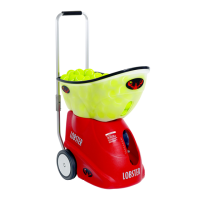
The Lobster Elite Grand Five LE is a tennis ball machine intended for use in a dedicated tennis facility. It is designed to throw tennis balls only, with players advised to stand at a minimum of 35 feet from the machine on the opposite side of the net for safety. The machine offers various modes of play, including:

  • Random: Throws balls randomly across the court with variations in speed, spin, and trajectory.
  • 2-Line: Alternates forehand and backhand shots with varying degrees of difficulty. Users can choose from narrow, medium, and wide settings.
  • Sweep: Throws balls randomly across the width (left-right) of the court. Shot parameters remain constant during play.
  • Depth: Throws balls randomly from short to deep in one row. Shot parameters remain constant during play.
  • Manual: Allows users to practice one particular shot repetitively, with adjustable location and shot parameters (speed, elevation, spin, angle, feed).
  • Custom Drills: Users can create their own training exercises with sequences of 1 to 6 balls, cycling through various combinations of court location, ball speed, and spin.
  • Pre-Loaded Drills: Offers 12 pre-programmed training exercises, each consisting of 6 sequential shots in a designated pattern, combining court location, ball speed, and spin. These include:
    • Grinder: Utilizes the full back court with different types of spin.
    • Power Baseliner: Utilizes the full back court with little spin and more ball speed.
    • All-Courter: Utilizes both the front and back court with some topspin and less ball speed.
    • Approach: Emphasizes approaching from behind the baseline into the front court with balance and speed.
    • Attack/Defend: Designed to move a player in all directions from the baseline.
    • Forehand Plus: Challenges the player to maintain dominant court position by using their forehand for every shot.
    • Beginner: Helps beginners improve and build confidence.
    • Intermediate: Helps intermediates improve court coverage and execute a variety of shots.
    • Advanced: Helps advanced players develop higher shot tolerance and identify "opportunity" balls to attack.
    • Moon Baller: Utilizes a high arc over the net with moderate to heavy topspin.
    • Slicer: Utilizes backspin or underspin with a low arc over the net.
    • Lefty: Simulates strong forehand groundstrokes and strong backhand volleys.

The machine features a control panel with an LCD screen, menu buttons, settings buttons, and 1-18 numbered buttons for selecting ball landing positions. It also has a main power switch located at the base of the machine.

Important Technical Specifications

  • Weight: Approximately 44 pounds (depending on the model).
  • Battery Life: For optimal battery life, the machine should be fully charged after each use. It should not go uncharged for more than one month.
  • Charging Time (Standard Charger): 18-22 hours for a depleted battery.
  • Charging Time (Premium Charger): 3 hours for a depleted battery.
  • Speed Range (2-line, Sweep): 50 to 80 MPH in 5 mph increments.
  • Speed Range (Depth): 45 to 75 MPH in 5 mph increments.
  • Speed Range (Manual): 35 to 80 MPH in 5 mph increments.
  • Spin: Increase and decrease top and back spin up to three levels (depending on speed).
  • Elevation (Manual): Adjustable between 2 and 80 degrees in 1-degree increments.
  • Feed Rate: Adjustable between random and 2-9 second intervals.
  • Power Supply: Operates on a battery. An optional external AC power pack can transform it into an AC-powered machine for continuous use. An external battery pack provides an additional 4-8 hours of court time.
  • Voltage (Export Machines): 240v machines require an appropriate premium charger to fit the country's voltage requirements. Using a 110v charger outside the US will damage the machine and void the warranty.

Usage Features

  • Machine Assembly: Involves detaching, flipping, and reattaching the hopper, and snapping in the elevation level pointer. Wire deflectors should not be removed.
  • Handle Operation: The handle can be raised by lifting until lock buttons click, and folded down by pressing hinge lock buttons and pushing the top section forward. The handle is for pushing/pulling, not for pulling up and down stairs.
  • Transporting: The hopper can be inverted to cover the machine, and the handle folded. The machine can be lifted by one or two people using molded handholds on the underside.
  • Charging: The machine should be fully charged before first use. Battery level is indicated as Full, High, Medium, or Low upon startup. LED indicators on the charger show charging status (red for charging, green for fully charged; blinking orange/red for very depleted).
  • Court Placement/Test Button: The machine should be placed with the white Line Marker over the baseline at the court's center. The TEST button throws one ball to a specific target area, allowing users to adjust distance and alignment using settings buttons and slight machine nudges.
  • Control Panel: Features a POWER button (push and hold to turn on/off, shows battery level), REMOTE button (turns remote receiver on/off), DRILLS, PROGRAM, MANUAL, MENU buttons (scroll through options), SETTINGS buttons (adjust highlighted options), 1-18 Numbered Buttons (select ball landing position), TEST button (alignment), PLAY/PAUSE button (start/stop), RANDOM, 2-LINE, SWEEP, DEPTH buttons (select play modes), and a Charger Port.
  • Remote Control (Optional): Grand remote or smartphone remote allows operation from a distance. Features include PLAY/PAUSE, TEST, RANDOM, 2-LINE, DRILLS, SWEEP, DEPTH, and buttons to adjust speed, spin, feed, and elevation. Using the remote during a drill can temporarily change shot parameters.
  • Smartphone Remote Control Setup: Requires purchasing and installing a grand remote for Apple or Android. Involves downloading an app, turning on the machine and pressing the remote button, connecting to the "Lobster Sports(x)" Wi-Fi network (for Apple) or pairing via Bluetooth (for Android), and then opening the app to connect.

Maintenance Features

  • Shipping Box: The original shipping box and inserts should be saved for potential future shipping to the factory.
  • Battery Maintenance: Fully charge after each use. Recharge monthly, especially during storage or non-use, to prevent reduced battery life. Replacement batteries are available and can be installed by the owner or by Lobster Sports. Video tutorials are available on the website and YouTube channel.
  • Server Wheels Maintenance: Server wheels will need replacement over time. Parts are available from lobstersports.com, and customers can replace them or send the machine for maintenance. A tutorial video is available.
  • Troubleshooting: If the machine doesn't power on, check the main power switch, battery charge, and battery wire connections. Error messages on the LCD screen help diagnose issues. Troubleshooting information and videos are available on the website.
  • Cleaning: Turn off power. Wipe the outside with mild detergent. Vacuum the inside to remove dirt and debris. Remove small debris from balls before refilling the hopper.
  • Storage: Turn off the main power switch if storing for one month or longer. Store indoors in a clean, dry location. Avoid exposure to rain, snow, or excessive heat (e.g., in a closed vehicle) to protect electronics and battery. An optional elite storage cover is recommended.
  • Warranty: 2-year warranty for defects in materials and workmanship (6 months for battery and server wheels, 1 year for chargers/accessories). Warranty activation requires registration within 30 days of purchase. Extended warranties (1, 2, or 3 years) can be purchased within 60 days of purchase for machines in the United States. Warranty does not cover parts worn under normal use (battery, server wheels).

LOBSTER Elite grand five le Specifications

General IconGeneral
BrandLOBSTER
ModelElite grand five le
CategorySports & Outdoors
LanguageEnglish

Related product manuals