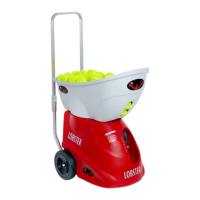
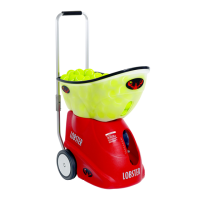
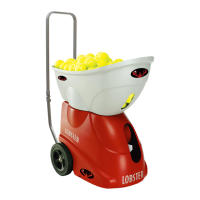
The device is a Lobster Elite tennis ball machine, designed for tennis practice in a dedicated tennis facility. It is available in Elite One, Elite Two, and Elite Three models, each offering varying features.
Function Description
The Lobster Elite tennis ball machine is designed to automatically feed tennis balls at adjustable speeds, intervals, and trajectories, allowing players to practice various shots. The machine is intended for use with conventional tennis balls only.
Usage Features
Machine Setup and Assembly:
- Intended Use: The machine is to be used in a dedicated tennis facility, with players standing at a minimum of 35 feet away on the opposite side of a tennis net for safety.
- Unpack and Keep Shipping Box: Users should retain the original shipping box and packing materials for potential future maintenance or returns.
- Machine Assembly: To assemble, raise the metal handle until it clicks, detach the hopper by lifting it, then flip and reattach the hopper by pushing it onto the red base knobs (front knob first, then back knob). Wire deflectors should not be removed.
- Handle Operation: The handle can be raised by lifting until lock buttons click. To fold it down, stand behind the machine, place hands on the plastic handle hinges, simultaneously press up on the hinge lock buttons, and gently push the top section forward. The handle is for pushing or pulling the machine and is not designed for pulling up and down stairs. Damage from such use is not covered under warranty.
- Transporting the Machine: For transport, invert the hopper to cover the machine and fold the handle. The machine weighs approximately 30-42 pounds, depending on the model. Molded handholds on the underside are provided for lifting and carrying.
Control Panel (Elite One, Two, and Three Models):
The control panel features various switches and knobs to manage machine functions.
- Power Switch (A): Turns the machine on and off.
- Elevation (B): Adjusts the ball trajectory up and down.
- Horizontal Switch (D): Turns on and off the random horizontal oscillation.
- Remote Switch (E/F): Activates the remote control. This switch is only active if a remote was purchased or the machine was upgraded.
- Reset Button (G): Pops out in case of malfunction. If this occurs, turn off the machine, push the button back in, and power up. Troubleshooting information is available in the manual.
- Feed On LED (H): Lights up when the feed motor is active.
- Feed Knob (I): Adjusts the ball feed interval between 2-12 seconds. Turning it completely counter-clockwise turns off the feed.
- Speed Knob (J): Adjusts ball speed from 10-80 mph.
- Spin Knob (K): Controls the amount of underspin and topspin.
- Status Indicator (L): LED lights indicate battery level only when the machine is powered on. When charging, refer to the LED light on the charger. The machine should be off during charging.
- Charger Port (M): Located on the red base, covered by a black slide.
Model-Specific Features:
- Elite Two and Three: Include a Vertical Switch (C) to turn on and off random vertical oscillation.
- Elite Three: Features a 2-Line Switch (E) for narrow and wide 2-line functions.
Operating Instructions:
- Court Placement: For optimal sweep, align the white line marker on the machine's bottom with the baseline at the center mark. Moving the machine closer to the net narrows the sweep, while moving it back widens it. To reposition, turn on horizontal sweep and turn it off when the desired position is reached.
- Powering the Machine: Turn on the POWER switch. Set the FEED to 2-12 seconds (12 seconds is slowest). Place 3-4 balls in the machine and wait 20 seconds for feeding to start. Adjust elevation, speed, and spin as needed. Once set, turn off the machine, load the hopper, and turn it back on. A 20-second delay allows the user to reach the other side of the court. To turn off feed when the hopper is empty, rotate the FEED knob fully counter-clockwise without turning off the machine to save battery and allow ball retrieval.
- Triple Oscillation Setup (Elite Two and Three Only): This feature provides random shots across the width and depth of the singles court. Turn on the machine, set speed to 60 mph and feed rate to 8 seconds. Turn on vertical oscillation. Watch the elevation indicator and turn vertical oscillation off at its lowest point. Adjust elevation until balls clear the net without going past the baseline. Turn on vertical oscillation for deep/short shots and horizontal oscillation for random left/right shots. Maintain 60 mph for optimum results.
- 2-Line Oscillation Setup (Elite Three Only): This function throws balls to two preset locations for alternating forehand and backhand shots, with narrow or wide options. The hopper must contain balls for this feature. Fill the hopper, turn POWER ON, set SPEED, turn HORIZONTAL SWEEP ON, and turn 2-LINE ON. For a 4-second interval, set FEED from 2-8 seconds. For an 8-second interval, set FEED from 10-12 seconds.
Remote Control Instructions:
- Elite Remote (Optional): Power on the machine via the control panel, press the REMOTE switch to ON. Turn the ball FEED dial to select a 2-10 second feed rate. From the opposite side of the court, use the handheld remote buttons to turn feed and/or sweep on/off.
- Elite10 Remote (Optional, Elite Two and Three): Power on the machine via the control panel, press the REMOTE switch to ON. Turn the ball FEED dial to select a 2-10 second feed rate. From the opposite side of the court, press the black FEED on/off button on the handheld remote to begin play.
- Reminder: Control panel switches and dials always override the remote control.
Smartphone Remote Control Instructions (Elite10 Remote for Apple Set Up, Optional for Elite Two and Three):
Requires purchasing the Elite10 remote for Apple and having it installed in the machine.
- Download the Lobster Elite remote control app from the App Store®.
- Power on the machine and press the REMOTE switch ON.
- On the device, go to "settings," click "Wi-Fi," and select the "Lobster Sports(x)" network.
- Open the Lobster Elite remote control app and allow up to 90 seconds for sync. Connection is confirmed when the CONNECT/DISCONNECT button says DISCONNECT.
- Upon first app launch, allow "elite" to use location ("Allow While Using App") and find/connect to devices on the local network ("OK").
- If the Wi-Fi network "Lobster Sports-xx" does not appear connected to the internet, select "Keep Trying Wi-Fi" (even if cellular data is used).
- When using Apple Watch, the iPhone must remain awake (Settings > Display & Brightness > Auto-Lock > Never).
- To reconnect after a disconnect, click the CONNECT button.
Ball Consistency:
Ball throw consistency depends on the consistency of the tennis balls used. New and old balls mixed will result in inconsistent throws. Pressureless balls provide the best results. Lobster recommends Tretorn Micro X balls. Damp or wet balls should never be used in the machine.
Maintenance Features
Charging Instructions:
- First Use and Optimal Battery Life: Fully charge the machine before first use and after each subsequent use. Failure to fully charge shortens battery life. All chargers use trickle charge technology to prevent overcharging.
- LED Indicator: A blinking orange/red light on the charger indicates a very depleted battery.
- Standard Charger: Plug into an AC outlet, then connect to the charger port. LED is red when charging, green when full. A depleted battery takes 18-22 hours to charge.
- Premium Fast Charger (Optional): Plug into an AC outlet, then connect to the charger port. LED is red when charging, green when full. A depleted battery fully charges in 3 hours.
- Extending Run Time with Premium Charger: For up to 2 hours extended run time, connect the charger to a mostly charged machine, turn the machine on, and play. The premium charger will not fully charge and power a dead machine simultaneously.
- AC/DC Models: Powered by both electricity and battery. The AC/DC power cord charges the battery when plugged into an outlet, even during machine use. The control panel LED indicates full charge when green. Machine runs on battery when unplugged.
- External Battery Pack: Includes a battery, cord, XLR adapter, and standard charger. Charge the battery until the charger LED turns green. Detach the XLR adapter by pressing the release button to expose the 3-prong connector, then attach to the machine's charger port.
Battery Level & Maintenance:
- Battery Level Indication: When powered on, the control panel LED indicates battery level:
- Green SOLID & Red OFF: FULL CHARGE
- Green FLASHING & Red OFF: 2/3 CHARGE
- Green OFF & Red FLASHING: 1/3 CHARGE
- Green OFF & Red SOLID: DEPLETED
- (When charging, only refer to the charger's LED light.)
- Battery Life and Maintenance: Chronically undercharging is the main cause of reduced battery capacity. Never leave the machine uncharged for over a month.
- Storage: Before storing, fully charge the battery and recharge monthly. During winter or non-use periods, monthly charging is crucial to prevent battery life reduction.
- Battery Replacement: Batteries will need replacement over time. Replacements are available on the Lobster website and can be installed by the owner or by sending the machine to Lobster for maintenance. A video tutorial is available on the support section of the website or the Lobster Sports YouTube channel.
Optional Power Accessories:
- External AC Power Supply: Provides continuous, uninterrupted use for extended court time. The machine can still run off its internal battery.
- External Battery Pack: Provides an additional 4-8 hours of court time and is compatible with all Elite series machines.
Cleaning & Storage Instructions:
- Cleaning the Machine: Always turn OFF power before cleaning. The exterior can be wiped with mild detergent. The interior can be vacuumed to remove dirt and debris (leaves, sand, etc.). Remove small debris from balls before refilling the hopper to keep the interior clean.
- Storing the Machine: Store indoors in a clean, dry location. Exposure to rain and snow will damage electronics. Never store in a closed vehicle where temperatures can reach 180°F, as excessive heat negatively affects electronics and battery. The Elite storage cover is recommended for protection.
- Storage Cover: A heavy-duty, lined, fabric Elite storage cover protects the machine from elements, dust, and moisture during storage.
Server Wheels Maintenance:
Lobster ball machines have two server wheels that throw tennis balls. These wheels will need replacement over the machine's lifespan, similar to car tires. Parts are available from lobstersports.com, and customers can replace them or send the machine to Lobster for maintenance. A tutorial video on server wheel replacement is available on the website's support section or the Lobster Sports YouTube channel.
Customer Service:
For customer service, call 800.526.4041 (8:00 am - 4:30 pm PST, Monday-Friday) or email customerservice@lobstersports.com. When contacting, include the machine's serial number, found on a white sticker affixed to the metal platform on the underside of the machine (lift the front using the molded handhold).
Shipping Damage:
If an order arrives damaged, contact Customer Service immediately for replacement. A replacement part or damage call tag may be issued. If the machine must be returned, use the original box and custom packing material.
Warranty Activation:
- 2-Year Warranty Activation: Register the machine within 30 days of purchase by filling out and returning the Warranty Registration form (last page) via email to warranty@lobstersports.com or mail to Lobster Sports, 7340 Fulton Avenue, North Hollywood, CA 91605. Include proof of purchase if bought from an authorized dealer.
- Extended Warranty Activation: An extended warranty (1, 2, or 3 years) is available for purchase in the United States and must be activated within 60 days of purchase. It extends coverage beyond the standard 2-year warranty but does not cover parts worn under normal use, specifically the battery and server wheels. See the warranty card for details.


 To Next Page
 General