2.8 Changing The Battery
SECTION 2.8
Under normal use, the Lockly battery will last up to a year. Please check battery levels regularly
and change your batteries when the low battery notification is issued. For best practice, always
use new batteries by a major brand.
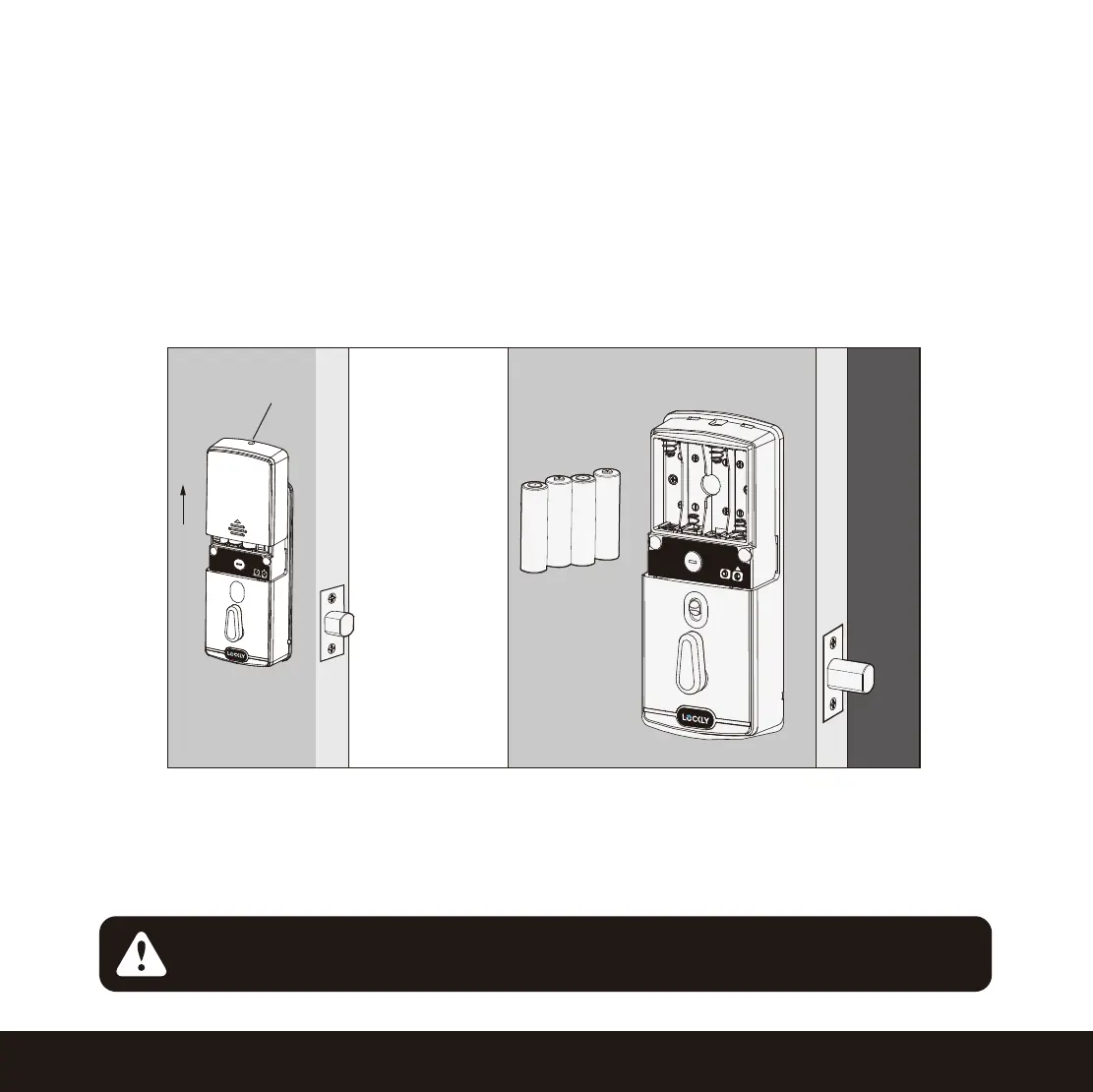
Open the battery compartment cover and insert four (4) new AA alkaline batteries as shown. Be sure
to unscrew the screw located on the top of the cover first by unscrewing counter clockwise before
sliding the cover up.
-
Make sure the batteries are oriented correctly by matching the orientation displayed.
- Replacing the batteries do not reset stored Access Codes.
- To see a list of recommended brands, please visit http://Lockly.com/battery.
8
+
+
-
+
-
-
+
-
Screw
Whenever batteries are replaced, reconnecting the smart lock to your smartphone
App is required. If you have not yet downloaded the app, visit: Lockly.com/app
NOTICE
RESET
PROGRAM


 To Next Page