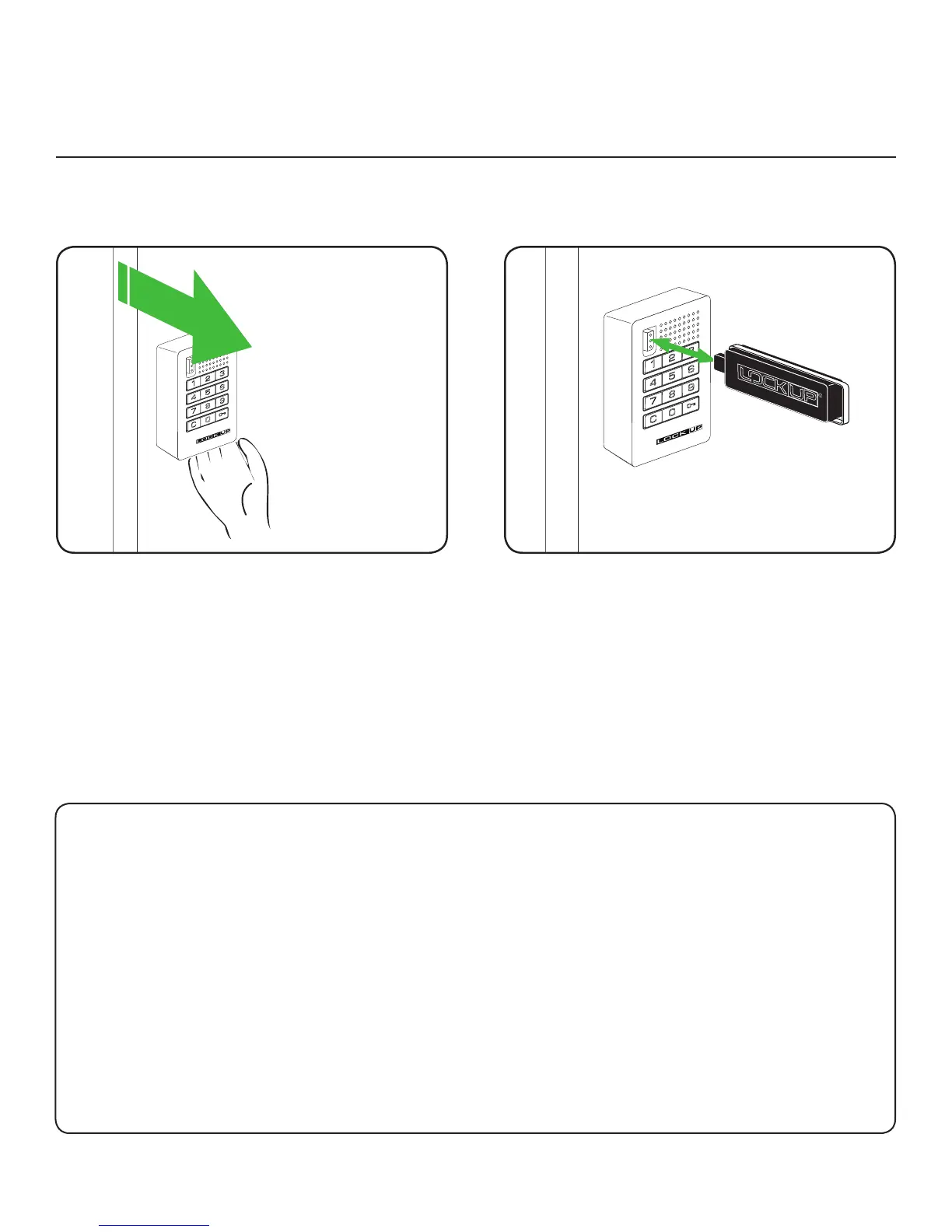
Initializing New Locks
1) Touch the Manager Flex Key (black) to the key slot
for one full second
A two tone beep will be heard and the LED light will
ash once, signaling that the lock has successfully
accepted the Manager Flex Key(s) and is now initialized.
2
1) Go to a new lock.
2) Make sure the lock is in the unlocked position
(bolt is retracted)
3) Hold locker door open
1
14
Ordering Manager Flex Key(s)
1
Contact your LockUp Product Support Specialist to order an additional Manager Flex Key.
2
Request that the additional Manager Flex Key(s) -“Match Previous” issued key(s).
3
Your additional key(s) will automatically work with your lock system.
Directly at:
LockUp
9 Willowbrook Court
Petaluma, CA 94954
Please visit us online at:
www.lockup.com/service.html
Via email: support@lockup.com
Phone: (707) 766-6000
Toll-Free Phone: (800) 590-0984 (US only)
Fax: (707) 766-6226
Toll-Free Fax: (800) 989-4221 (US only)
Note: In most instanceds this product is pre-initialized with the Manager Flex Key.
The initializing instructions are only applicable if the locks are working with the
factory default code of = button followed by ` button.


 To Next Page