EasyManua.ls Logo

Loewe Concept 1700 - TV Picture and Teletext Interaction; Mixing TV Picture with Teletext; Automatic News Flashes; Displaying Teletext Sub-titles

Loewe Concept 1700
Print Icon
To Next Page IconTo Next Page
To Previous Page IconTo Previous Page
Loading...
TV
picture
and
teletext.
Switching
back
to
the
TV
picture
is
expedient
when
you
have
called
up
a
teletext
page
with
the
numeric
keys
and
it
takes
some
time
to
find
the
page.
Press
“Programme
forwards“
@):
You
will
immediately
see
the
TV
picture;
the
selected
page
number,
preceded
by
an
arrow
>,
remains
displayed
in
the
top
left-hand
corner;
the
arrow
in
front
of
the
page
number
disappears
when
the
page
is
found.
Press
the
@)
button
again
to
switch
back
to
the
teletext
page.
Mixing
TV
picture
and
teletext
Press
“VT:
Mix/Text“
®
once;
a
teletext
page
appears
against
the
background
of
the
TV
picture.
Press
the
button
again
and
only
the
header
of
the
text
page
is
displayed
against
the
TV
picture.
Press
the
button
a
third
time
and
the
text
page
appears
again.
News
flashes
displayed
automatically
against
the
TV
picture.
News
flashes
are
teletext
pages
which
you
can
display
over
the
TV
picture
(for
ARD
and
ZDF:
page
111
for
news,
page
222
for
sports).
Select
a
news
flash
page
in
teletext
mode
with
the
numeric
keys,
e.g.
page
111;
the
news
flash
appears
against
the
background
of
the
previously
selected
TV
programme.
The
news
flash
is
cleared
from
the
screen
again
by
pressing
the
“TT:
Mix/Text“‘
©
button
-
until
the
station
transmits
a
new
news
flash
which
is
displayed
automatically
on
the
“screen.
Displaying
sub-titles.
This
is
possible
in
TV
mode
by
pressing
button
®
when
the
TV
programme
being
received
transmits
TOP.
teletext
and
sub-titles.
If
TOP
teletext
is
not
active,
select
the
page
in
teletext
mode
on
which
the
sub-
titles
are
transmitted
(generally
page
150).
Select
the
teletext
page
with
the
numeric
keys:
The
TV
picture
with
the
sub-titles
displayed
along
the
bottom
of
the
picture
will
appear.
If
you
no
longer
wish
to
see
the
sub-titles,
press
button
again
or
press
@).
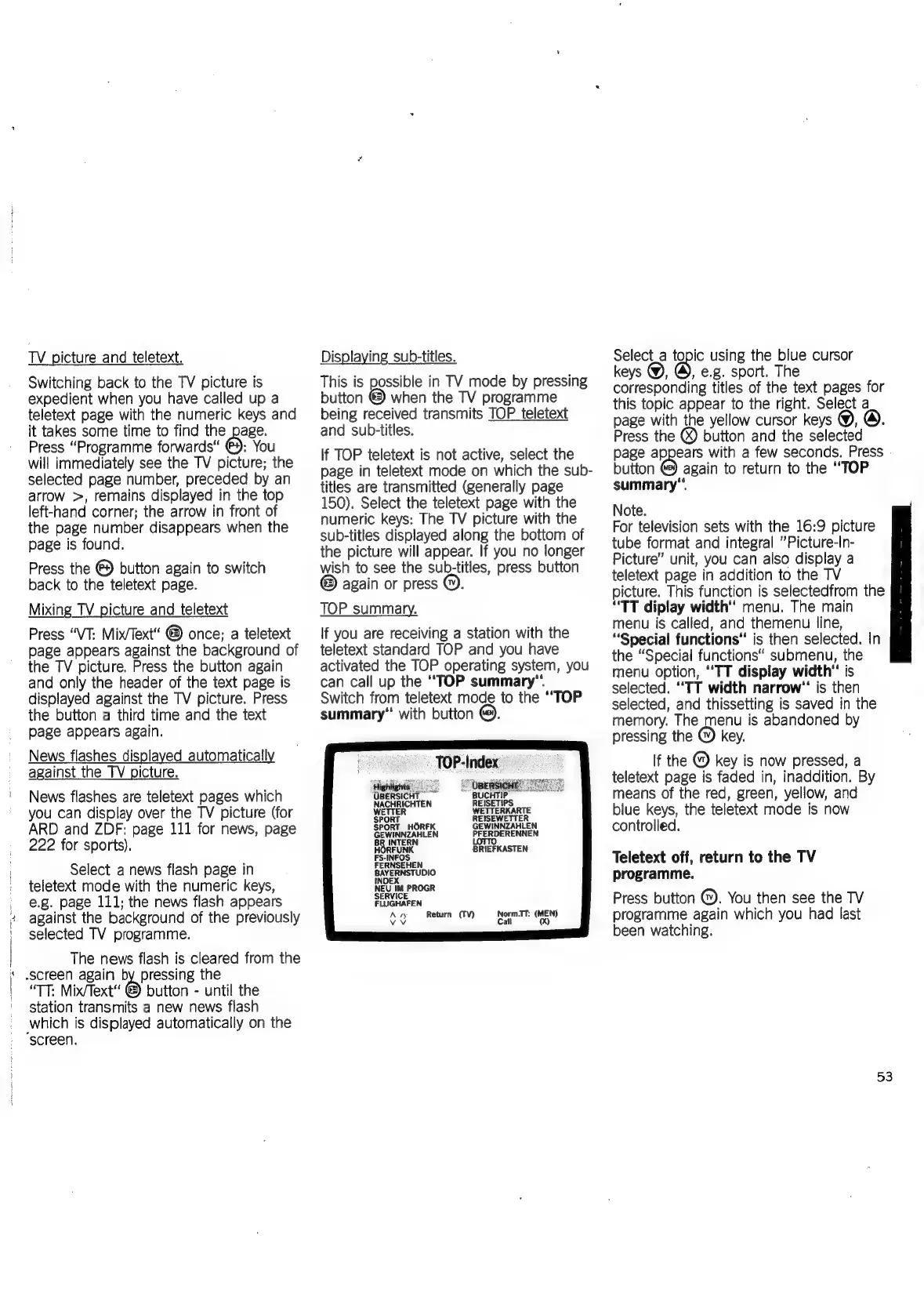
TOP
summary.
If
you
are
receiving
a
station
with
the
teletext
standard
TOP
and
you
have
activated
the
TOP
operating
system,
you
can
call
up
the
‘TOP
summary“.
Switch
from
teletext
mode
to
the
‘TOP
summary“
with
button
@.
‘OBERS!
:
NACHRICHTEN
PFERDERENNEN
LoTTO
BRIEFKASTEN
FERNSEHEN
psa
aa
NEU
IM
PROGR
SERVICE
FLUGHAFEN
Retui
Norm.IT:
(MEN
fo,
ae
|
ee
ee
Select_a
topic
using
the
blue
cursor
keys
@,
@,
e.g.
sport.
The
corresponding
titles
of
the
text
pages
for
this
topic
appear
to
the
right.
Select
a
page
with
the
yellow
cursor
keys
@,
Press
the
@
button
and
the
selected
page
appears
with
a
few
seconds.
Press
button
@)
again
to
return
to
the
‘TOP
summary“.
Note.
For
television
sets
with
the
16:9
picture
tube
format
and
integral
”Picture-In-
Picture”
unit,
you
can
also
display
a
teletext
page
in
addition
to
the
TV
picture.
This
function
is
selectedfrom
the
“TT
diplay
width’
menu.
The
main
menu
is
called,
and
themenu
line,
“Special
functions’
is
then
selected.
In
the
“Special
functions“
submenu,
the
menu
option,
TT
display
width"
is
selected.
“TT
width
narrow"
is
then
selected,
and
thissetting
is
saved
in
the
memory.
The
menu
is
abandoned
by
pressing
the
@)
key.
If
the
@
key
is
now
pressed,
a
teletext
page
is
faded
in,
inaddition.
By
means
of
the
red,
green,
yellow,
and
blue
keys,
the
teletext
mode
is
now
controlled.
Teletext
off,
return
to
the
TV
programme.
Press
button
@).
You
then
see
the
TV
programme
again
which
you
had
last
been
watching.
53

Related product manuals