3 -
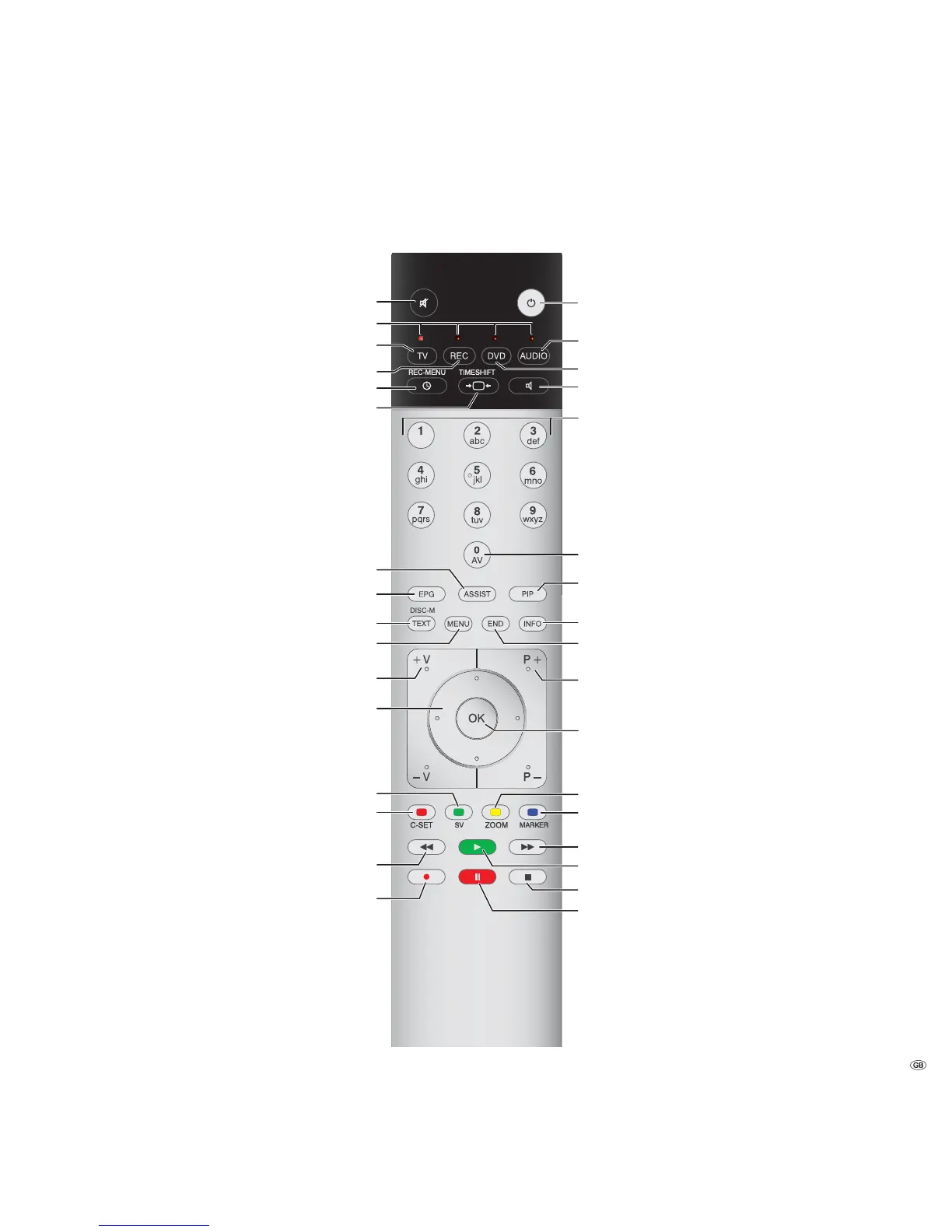
Remote control – TV functions
(1
Radio only for DVB reception, provided the station broadcasts this.
Otherwise switch-over to an audio input.
(2
When equipped with Digital Recorder, these buttons have different
functions, see Digital Recorder user guide.
Switch on /
switch off to standby mode .....................................(page 12)
Switch over to radio mode
(1 (4
............................(page 12, 36)
Switch over to operate DVD player
(4
.......................(page 64)
Audio adjustment
/with logged in amplifier: Sound via... ....................(page 20)
Select station directly;
MENU: Enter numbers of letters ..............................(page 18)
AV selection .............................................................(page 19)
PIP on/off (picture in picture)....................................(page 30)
Index on/off
(3
........ ..................................................(page 16)
MENU: Info texts on/off ...........................................(page 15)
Status display on/off
(3
.............................................. (page 25)
MENU: Hide menu...................................................(page 15)
P+/P– Select station up/down ..................................(page 18)
Station list on............. ..............................................(page 18)
MENU: Confirm/call .................................................(page 15)
Yellow button:
(3
Last station....................................(page 24)
Blue button:
(3
Programme info on/off .....................(page 24)
Select station up
(2
Still frame off
(2
Still frame on
(2
Still frame on/off
(2
(page 20) ............................................................. Sound off/on
(page 64) .................... LED display for current operating mode
(page 11, 64) ...................................... Switch over to TV mode
(page 64) ..............................Switch over to operate recorder
(4
(page 56) ................................................Timer overview on/off
(page 22) ......................................................Set picture format
(page 16) ...................................................Assist
+
menu on/off
(page 32) .......................... Electronic Programme Guide on/off
(page 34) .........................................................Teletext on/off
(3
(page 15) .............................................................. Menu on/off
(page 20) .................................... V+/V– Volume louder/quieter
(page 31) .................................. PIP: Position of the PIP picture;
(page 15) ....................................................... MENU: Select/set
Green button:
(3
(page 24) .......................................................Teletext functions
Red button:
(2
(3
(page 24) ..............................................................Freeze on/off
Select station down
(2
(3
(page 12) ................................................... /in the wizard: Back
Direct recording
(3
If MHEG-5 is selected for the location of TV set UK or IRL during the
first installation, the button has a different function.
(4
The assignment of these keys can be changed (see page 64).
The description refers to the standard setting.










 To Next Page