- 32
Operating additional equipment
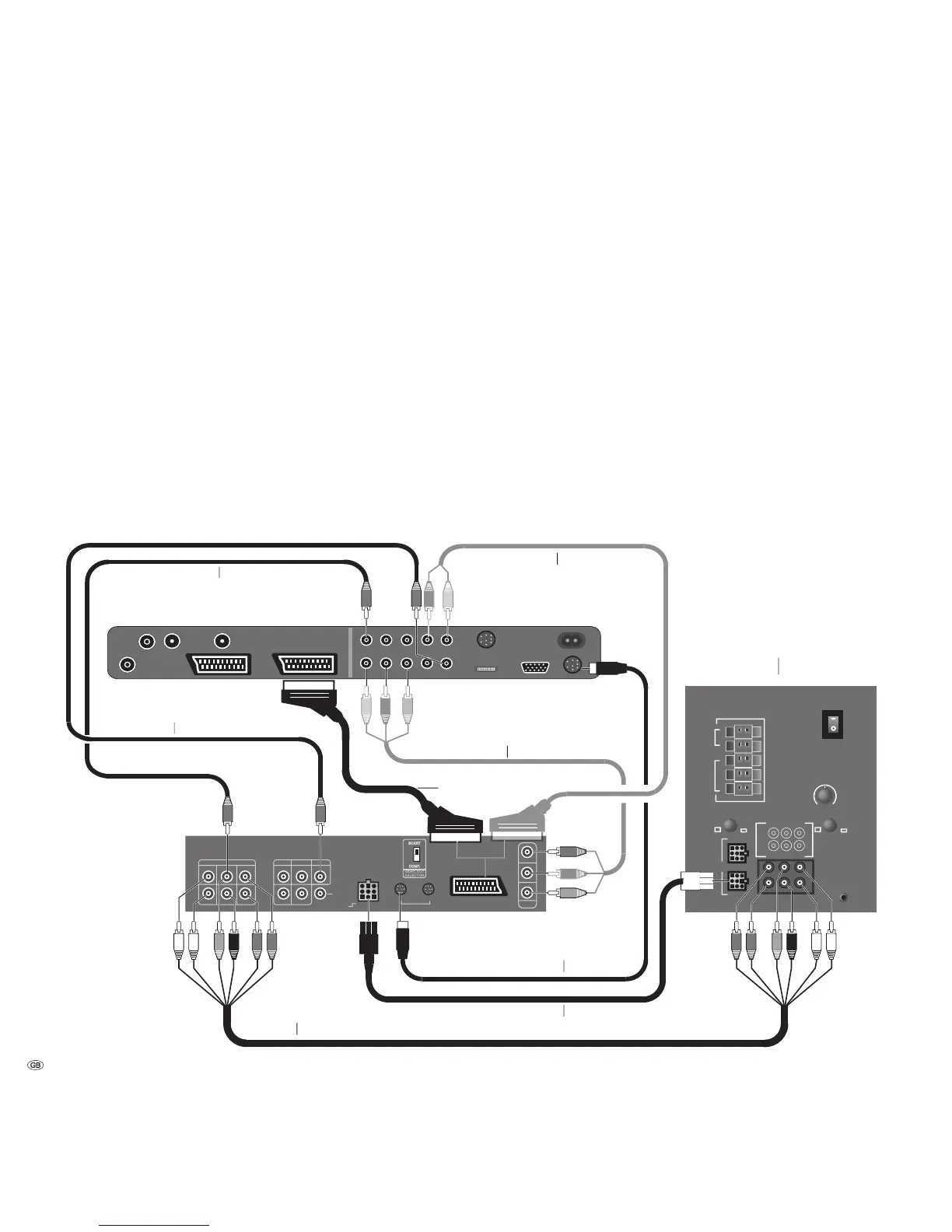
Connecting Loewe DVD Preceiver Auro
2216 PS and Individual Sound loudspeaker
system
You can play audio signals from the TV or DVD player in cinema quality with these
components. In addition to the subwoofer illustrated below the Individual Sound
system includes up to 5 loudspeakers for the front, center and surround reproduc-
tion. The centre signal can be reproduced alternatively by the TV speakers.
Connect the cubic socket on the DVD Preceiver to the “Master” cubic socket on
the subwoofer. Use the cubic plug cable enclosed with the DVD Preceiver. Plug
the white plug (without kink protection) into the cubic socket on the subwoofer.
For TV as a centre loudspeaker, connect “AUDIO IN C” on the TV set to “PRE
OUT C”on the DVD Preceiver using a cinch cable.
Connect the digital audio output of the TV set “AUDIO DIGITAL OUT” to the
“DIGITAL IN” input of the Preceiver using a cinch cable. Connect the TV socket
“SERVICE“ to the TV-L-Link socket on the Preceiver using the L-Link cable (pro-
vided with the Preceiver). Switch on the TV set and the Preceiver. Via the L-Link,
the TV recognises whether the Preceiver is connected.
Select the “Tremo“ loudspeaker system in the DVD menu of the Preceiver, set
the listener/speaker distances and adjust the speaker levels. Please consult the
Preceiver manual.
If you want to listen to the sound via the TV speakers temporarily, call the Sound
menu, select “Sound via“ and then “TV“. If you want to listen to the sound via
the Loewe Auro system, select “AURO“ under “Sound via“.
L-Link cable
Six pin Cinch
Cubic plug cable
only required for TV as centre loud speaker
EURO-AV cable
Audio cable cinch -> SCART
(available in specialised trade)
Component Video
(available in specialised trade)
Surround speaker system
Digital audio TV -> Auro











 To Next Page