Loewe SoundBox - 16 -
English
- 16 -
Instructions for Use
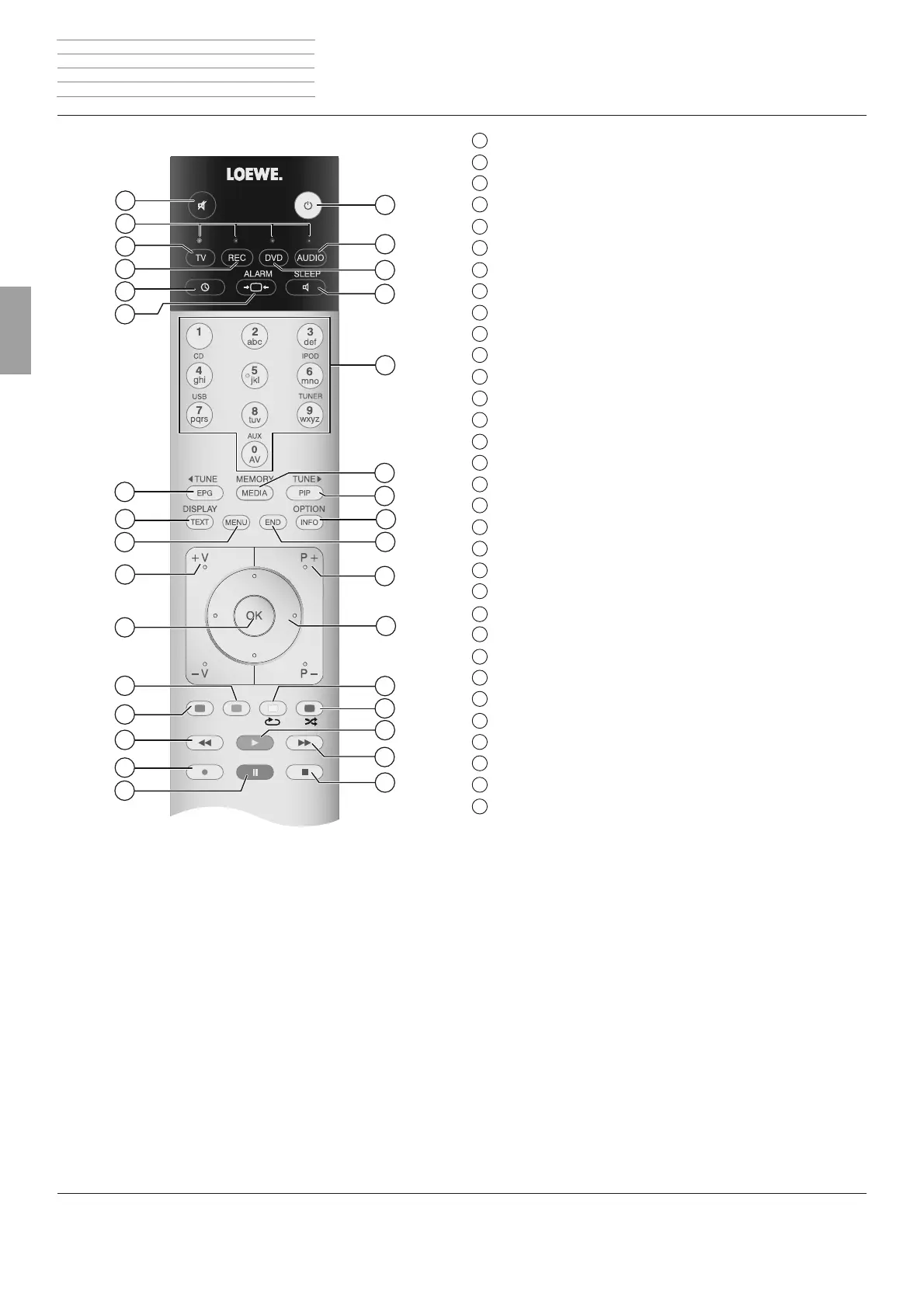
Assist remote control
1
Sound Mute/On
2
LED indicator light for current operating mode
3
Switch over to TV mode
4
Switch over to operate recorder
(1
5
Time
6
Alarm
7
FM radio: Search backwards
8
Display functions
9
iPod menu
10
V+/V– volume up / down
11
In the menu: ConÆ rm/Call up; iPod: Select/Play
12
Green coloured button: No function
13
Red coloured button: No function
14
iPod/CD/USB: short: Select title down; long: Search down
15
No function
16
Pause/Resume play
17
Stop
18
iPod/CD/USB: short: Select title up; long: Search up
19
Pause/Resume play
20
Blue coloured button: Random play
21
Yellow coloured button: Repeat
22
Folder up/down;
select in the iPod menu
23
P+/P– radio station up/down
24
No function
25
Options menu
26
FM radio: Search forwards
27
RADIO: Save radio stations
28
Audio source selection
29
Snooze/Sleep mode
30
Switch over to operate DVD player
(1
31
Switch over to operate SoundBox
32
Switch ON / OFF - in Standby mode
1
2
3
4
5
6
7
8
9
10
11
12
13
14
15
16
32
18
19
20
21
22
23
24
25
26
27
28
29
30
31
17
(1
The assignment of these buttons can be changed (page 20).
The description refers to the standard setting.
_35040_Loewe_Soundbox_Buch_DE-NL.indb 16 16.08.2011 11:00:33



 To Next Page