15 -
Local network
Playback of music files
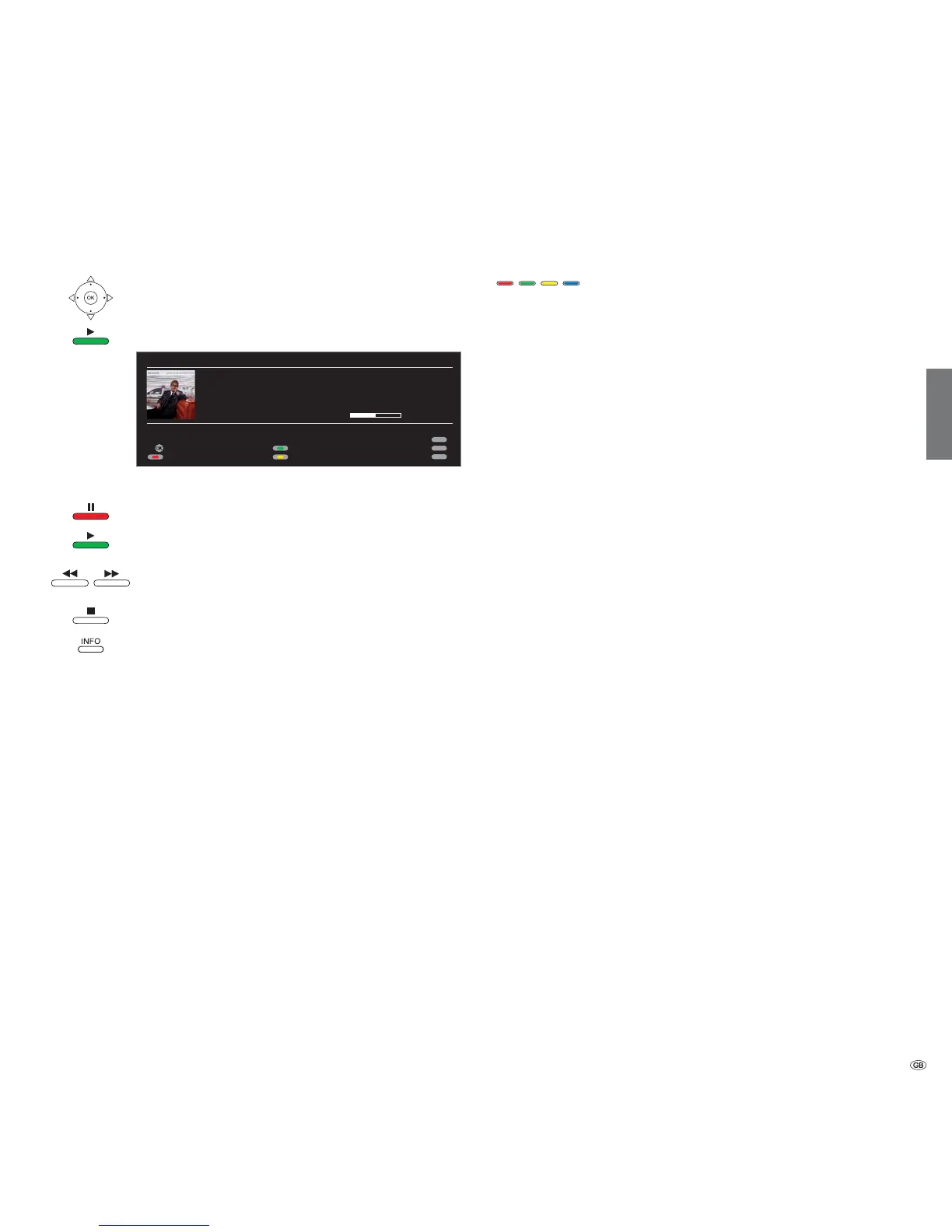
OK or
PLAY button: Play marked file.
Music playback with album cover
PAUSE button: Pause current playback.
PLAY button: Continue paused playback.
short: Playback previous / next title.
long: Rewind/fast forward.
STOP button:
End playback and return to overview.
INFO button: Show information on marked/played
music file (metadata).
A cover can be saved under the additional information (media data) of
a music file. If there are such graphics available for the piece currently
being played, then this connection is shown in the picture.
Function of coloured buttons during music playback
Red: Switch Screen off/on.
Green: Repeat individual title / all titles /
Repeat off.
Yellow: Random play of files in currently selected folder
on/off.
➠ Random and title repeat cannot be activated at the
same time.
Explanation of the symbols in the playback window
The symbols at the top right show you information about the current
playback.
Playback
Pause
_ Repeat title
Repeat all
Random play activated
The bar behind the play time shows you how far the music file has been
played.
OK
INFO
MENU
END
MediaNetwork
"Dark Diamond"
Artist: Elton John
Album: Songs From The West Coast
Play time: 00:02:13 ( of 00:04:26 )
Repeat title/all/off
Random on/off
Music list
Screen on/off
english








 To Next Page