
 Need help?
Do you have a question about the Logitech G Flight Yoke System and is the answer not in the manual?
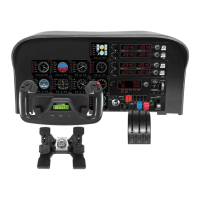
Details the left and right handles, including their controls, and the chronograph function.
Describes the lever knobs, levers, and rocker switches of the throttle quadrant.
Instructions for downloading and installing the necessary drivers and software for Windows operating systems.
Guide on assigning yoke and quadrant controls to functions within Microsoft Flight Simulator.
Details on downloading and using Logitech software for enhanced controller functionality and customization.
Table mapping yoke controls to default functions in Microsoft Flight Simulator.
Diagrams and descriptions of the throttle quadrant's axes and buttons.
Table mapping quadrant controls to default functions and assignable game options.
 General
| Connection Type | USB |
|---|---|
| Category | Flight Simulation Controls |
| Compatibility | PC |
| Button Configuration | Programmable buttons |
| POV Hat Switch | Yes |
| Mounting Options | Desk clamp |

 To Next Page