English
3
English
4
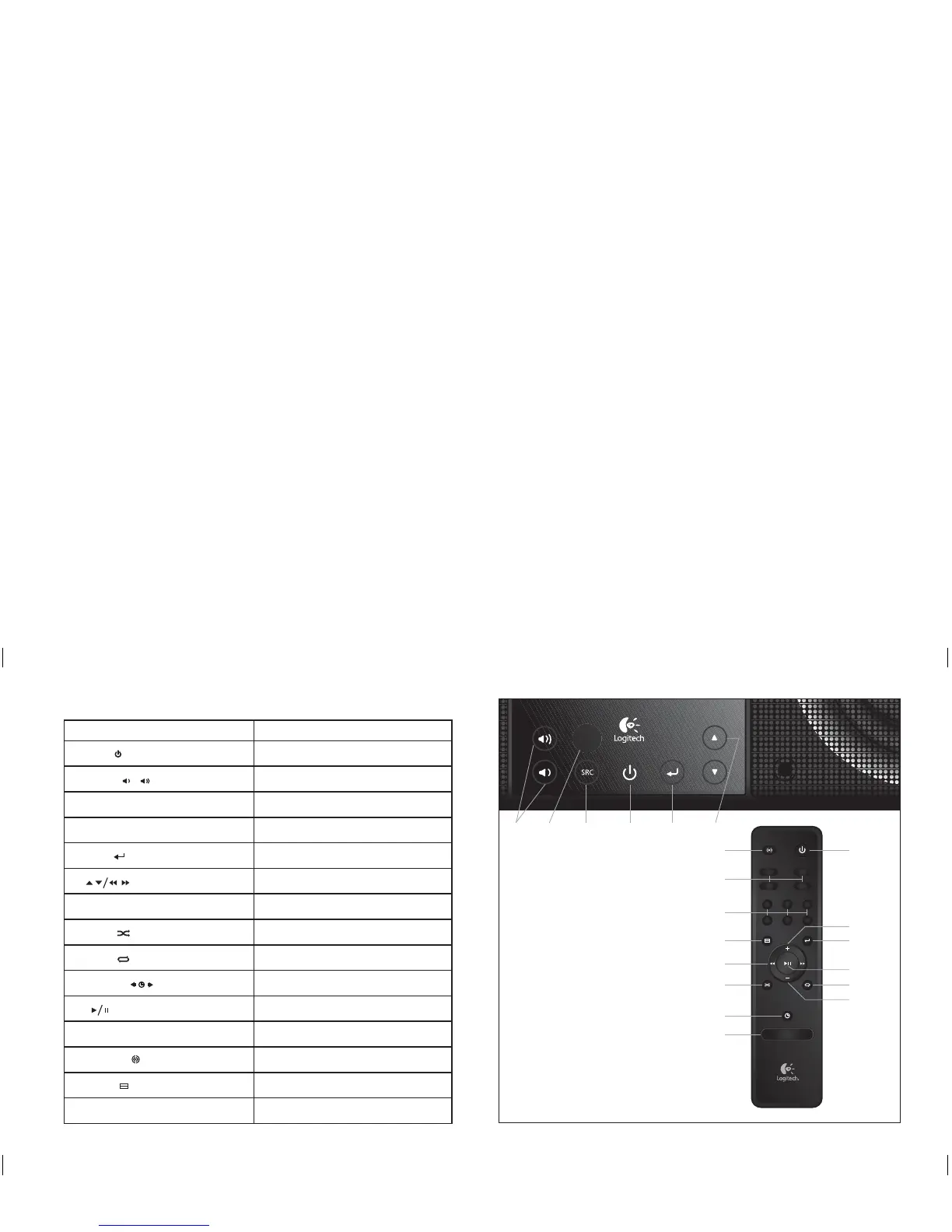
Feature Function
1. Power (
)
Toggle power
2. Volume (
/
)
Adjust volume
3. SRC button Switch source input
4. iPod, AM, FM, aux Switch source input
5. Select
(
)
Switch current display / advance menu
6. (
) Adjust radio / change iPod track
7. Preset buttons Switches to a preset playlist / radio station
8. Shuffl e
(
)
Adjusts iPod shuffl e state
9. Repeat ( ) Adjusts iPod repeat state
10. Time Set
(
)
Adjust the clock time
11. (
) Pause iPod / mute speaker
12. Sleep Activates the sleep timer
13. StereoXL
( )
Activate StereoXL
14. Menu
(
)
Go to speaker menu
15. Remote sensor Receive signals from remote
Getting to know your Pure-Fi Elite
™
Getting to know your Pure-Fi Elite
™
Getting to know your Pure-Fi Elite
™
sleep
ipod
am
aux
1
23
4
5
6
fm
123
4
56
7
8
9
10
11
12
13
14
15
6
5
1
2
2
620-000474 Pure-Fi Elite_MNL.indSec1:3-Sec1:4 Sec1:3-Sec1:4620-000474 Pure-Fi Elite_MNL.indSec1:3-Sec1:4 Sec1:3-Sec1:4 11.2.2008 13:10:5311.2.2008 13:10:53



 To Next Page