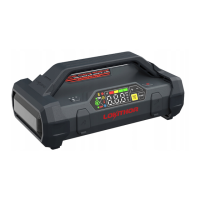
Product Overview
2
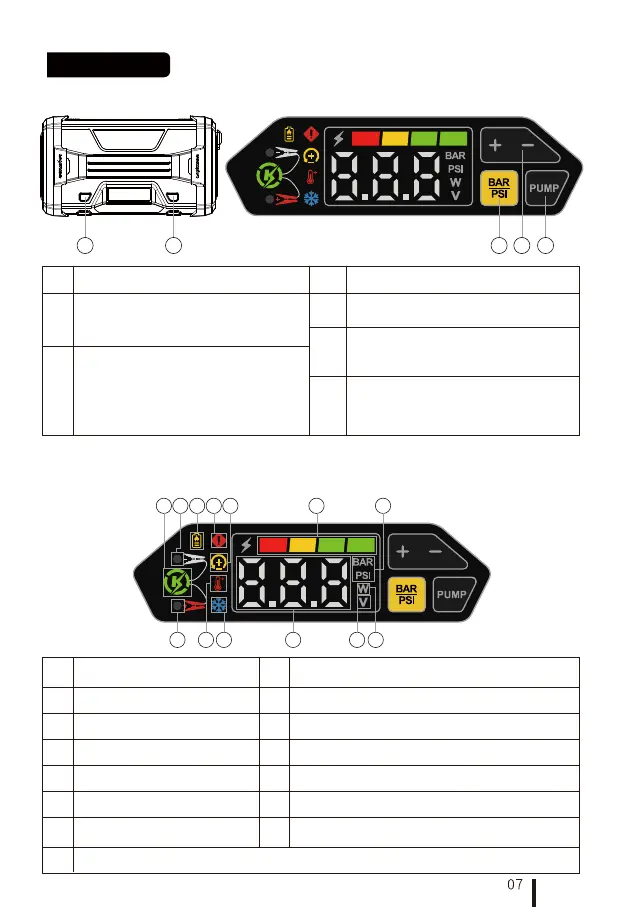
No NoFunction Function
LED light button
Power button (Sho press to turn on, long
press 2 seconds to turn o)
In working mode, sho press to adjust the
display brightness.
1
The button for presetting tire pressure:
When the tire pressure is presetting,
numbers will blink; The blinking will stop
after the setting is completed. You may
then exit the setting mode. At the same
time, the real-time tire pressure will be
displayed on the screen.
Bar/PSI Switch Button (Long press for 5
seconds to enter forced sta mode)
Air inator sta/stop button
Long press for 3 seconds to turn on,
sho press to turn o
3
4
5
1. Key Instructions
53412
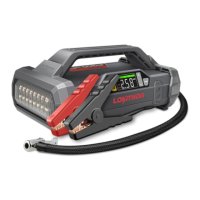
2.1 Functional Description
3
No Function Function
Voltage Indicator
7
Reverse Connection Indicator
2
No
Digital Display Area
6
Error Indicator
5
Bar/PSI: Tire pressure unit
setting indicator light
Batte Indicator
1
Power Indicator
4
2. Screen Instructions
10
Charging Reminder Indication
13
9
Low Temperature Indicator
11
Sta Up Indication
High Temperature Indicator
8
Negative Clamp Indicator
(Green: Good connection. Yellow: Poor connection)
Positive Clamp Indicator (Green: Good connection. Yellow: Poor connection)
12
1
2 3
13
4
11 12 10
56 7
8 9


 To Next Page