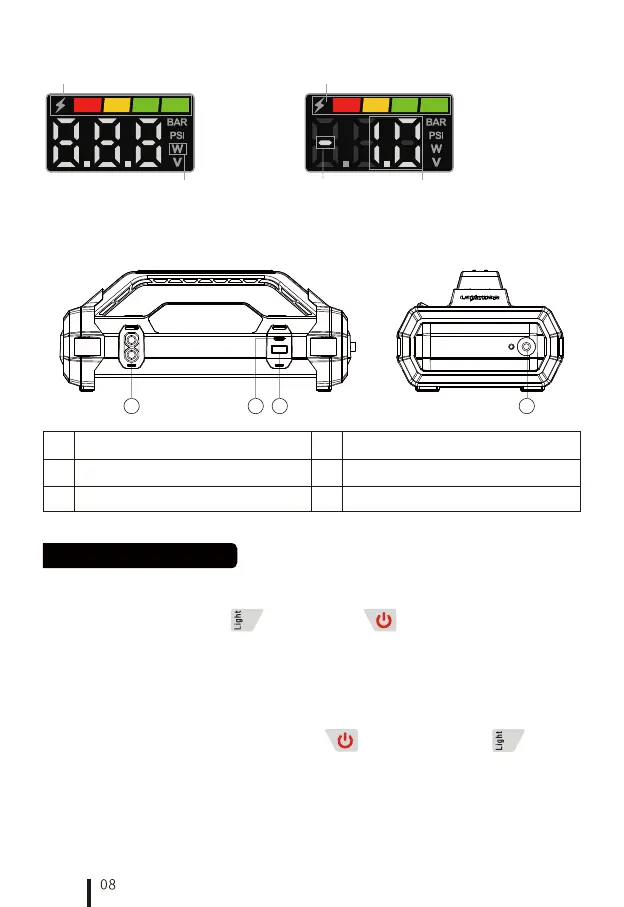
Batte Indicator
Power
When the product is discharged via USB, the screen displays
the discharge power rate and the discharge symbol "—"
2.2 Charging Display Instructions
Batte Indicator
Power
Discharge Indication
2.3 Discharge Display Instructions
3. Input/Output Po Instrustion
3
No Functional Description
USB-A discharge po
4
Air inator output po
2.1.1 Ensure that the vehicle's electrical and staing system is a 12V DC system.
2.1.2 Connect the positive and negative clamps to the corresponding terminals on the vehicle batte,
ensuring a secure connection.
2.1.3 To activate Lokithor, sho press the "Power button "or the "LED light button ". It will
initiate a 10-second countdown while it is verifying the clamp to terminal connection is good and
correct. After the countdown, if the sta indicator on the display panel ashes and shows the vehicle's
actual voltage, the vehicle is ready to sta.
2.1.4 If the vehicle stas successfully, sho press the power button to exit the staing function, and
then disconnect the batte clamps.
Sho press on the "LED light button " OR "Power button "
1. How to Power Up Lokithor
2. Using the Jump-Sta Function
2.1 Method One: 12V Auto Sta
Operation Process Instructions
2
No Functional Description
USB-C charge and discharge poEC8 staing po
1
41
2 3


 To Next Page