10
INSTALLATION
Installation area
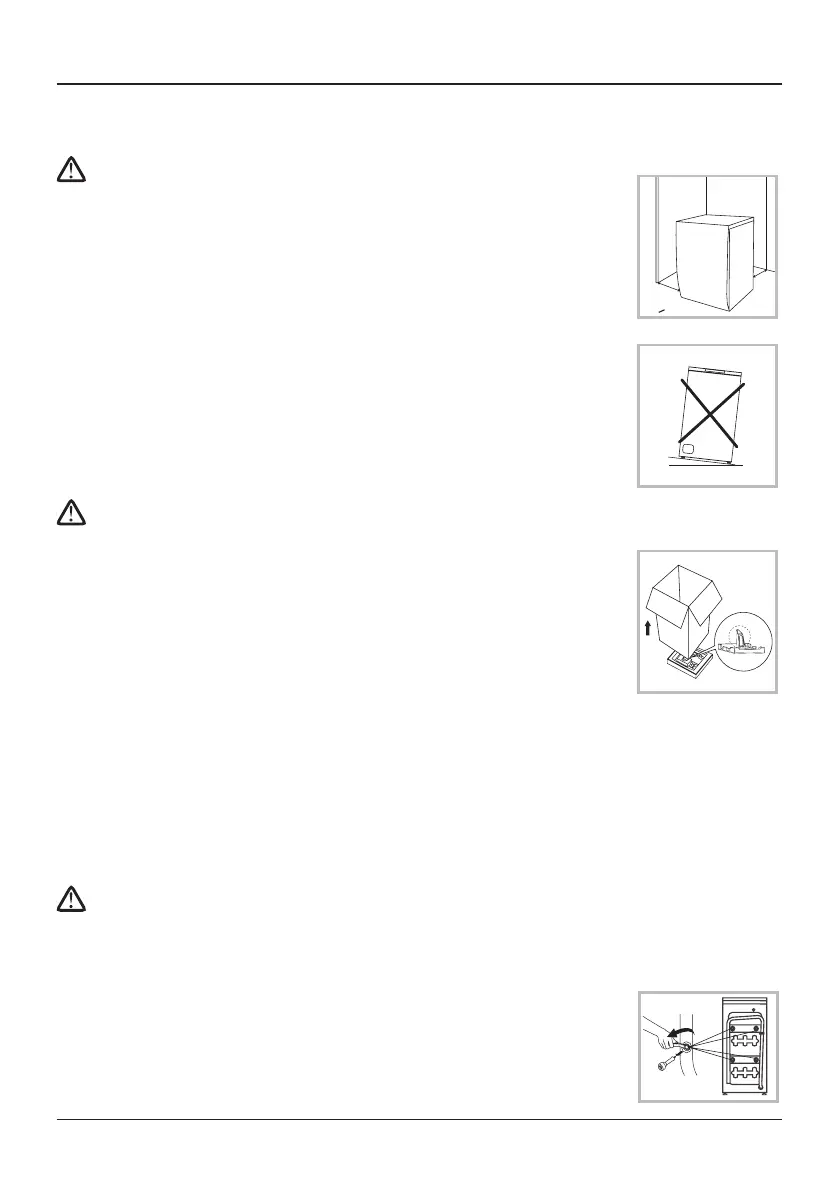
Warning!!
• Stabilityisimportanttopreventtheproductfromwandering!
• Makesurethattheproductshouldnotstandonthepowercord.
Before installing the machine, the location characterized as follows
shall be selected:
1. Rigid, dry, and level surface
2. Avoid direct sunlight
3. Sucient ventilation
4. Room temperature is above 0 °C
5. Keep far away from the heat resources such as coal or gas.
Unpacking the washing machine
Warning!
• Packagingmaterial(e.g.Films,Styrofoam)canbedangerousfor
children.
• Thereisariskofsuocation!Keepallpackagingwellawayfrom
children.
1. Remove the cardboard box and styrofoam packing. Make
sure he small triangle foam is removed with the bottom one
together. If not, lay the unit down with side surface, then
remove the small foam from the unit bottom manually.
2. Lift the washing machine and remove the base packing.
3. Remove the tape securing the power supply cord and drain hose.
4. Remove the inlet hose from the drum.
Remove transport bolts
Warning!
• Youmustremovethetransportboltsfromthebacksidebeforeusingtheproduct.
• You’llneedthetransportboltsagainifyoumovethe,somakesurekeepthemina
safe place.
Please take the following steps to remove the bolts:
1. Loosen 4 bolts with spanner and then remove them.
2. Stop the holes with transport hole plugs.
3. Keep the transport bolts properly for future use.
w
w
W> 20mm


 To Next Page