GB
11
SETTING THE TIME
How to adjust the clock:
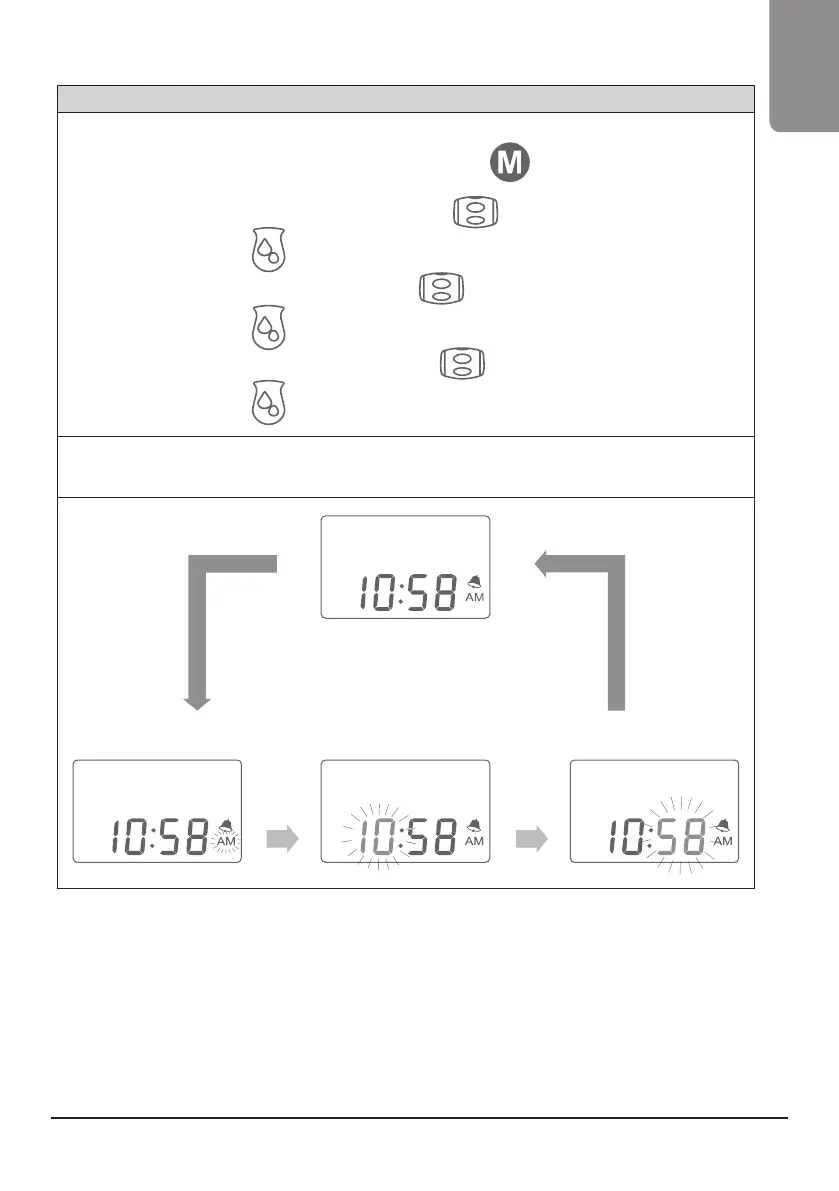
1. While in the clock/standard by mode, press and hold the M button
for 3 seconds to go into clock
setting mode. A beep will sound and the AM/PM icon will ash.
2. To change between AM/PM, use the vacuum adjustment wheel
up (+) or down (-).
3. Press the let-down button
once to change from AM/PM to the hour. The hour number will ash.
4. To change the hour, use the vacuum adjustment wheel
to increase (+) or decrease (-) the hour.
5. Press the let-down button
again to change the minutes. The minute number will ash.
6. To change the minutes, use the vacuum adjustment wheel
to increase (+) or decrease (-) the minutes.
7. Press the let-down button
one last time to save your settings.
NOTE: While in any clock setting mode, if no adjustments are made within 10 seconds, the setting will automatically save
and the pump will return to clock/standby mode.
press and hold
the M button
for 3 seconds
setting the time AM/PM setting hour
clock
** Roll Adjustment Wheel
to adjust
setting minutes
press the
let-down button
press the
let-down
button
press the
let-down
button
GB


 To Next Page