40
41
Chart Operation | HOOK series
Chart Operation | HOOK series
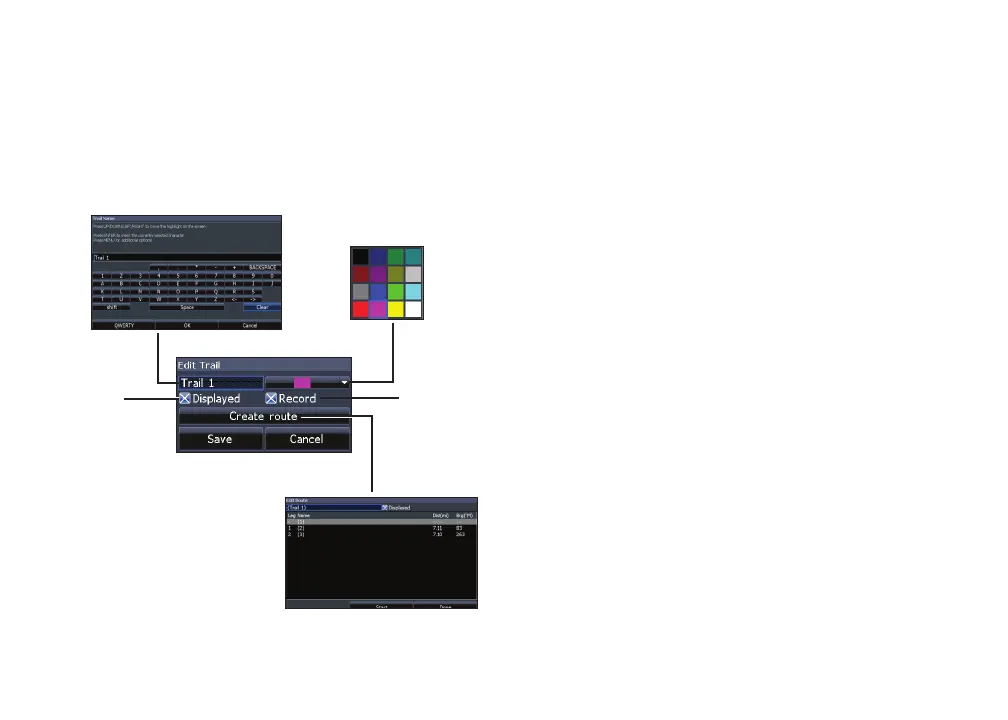
Edit and New Trail menus
Allows you to edit/create trails, select trails names,
trail color, trail display and the trail being recorded.
You can also convert a trail into a route from the
Edit Trail menu.
Navigating a trail
A trail must be saved as a route before it can be
navigated.
To save a trail as a route:
1. Highlight the desired trail on the Trails
screen and press ENTER. The Edit
Trail menu will appear.
2. Highlight Create Route and press
ENTER. The Edit Route menu will
appear.
3. Highlight Done and press ENTER.
4. For navigation instructions refer to the
Navigating a route segment.
Displayed and Record
Displayed allows you to show/hide trails on the
map display, preventing the screen from being
cluttered with trails.
Turns on/
off trail
display
on map
Turns on/
off trail
recording
Edit Trails menu









 To Next Page