Chapter 6. CPU Functions
6-3
Category Item Description Note
Basic
operations
Set the time of fixed period operation. 1~999 ㎳
Watchdog timer Set the time of scan watchdog. 10~1000 ㎳
Standard input filter Set the time of standard input filter. 1,3,5,10,20,70,100 ㎳
Restart mode Set restart mode Allowance/Prohibition
Set whether to allow output actually during
debugging operation.
Allowance/Prohibition
Keep output when
an error occurs
Set whether to preserve output holding
function set in I/O parameter in case of error.
Allowance/Prohibition
area
Select latch area Set Retain range about M area Pause/Resume
6.2.2 I/O parameter setting
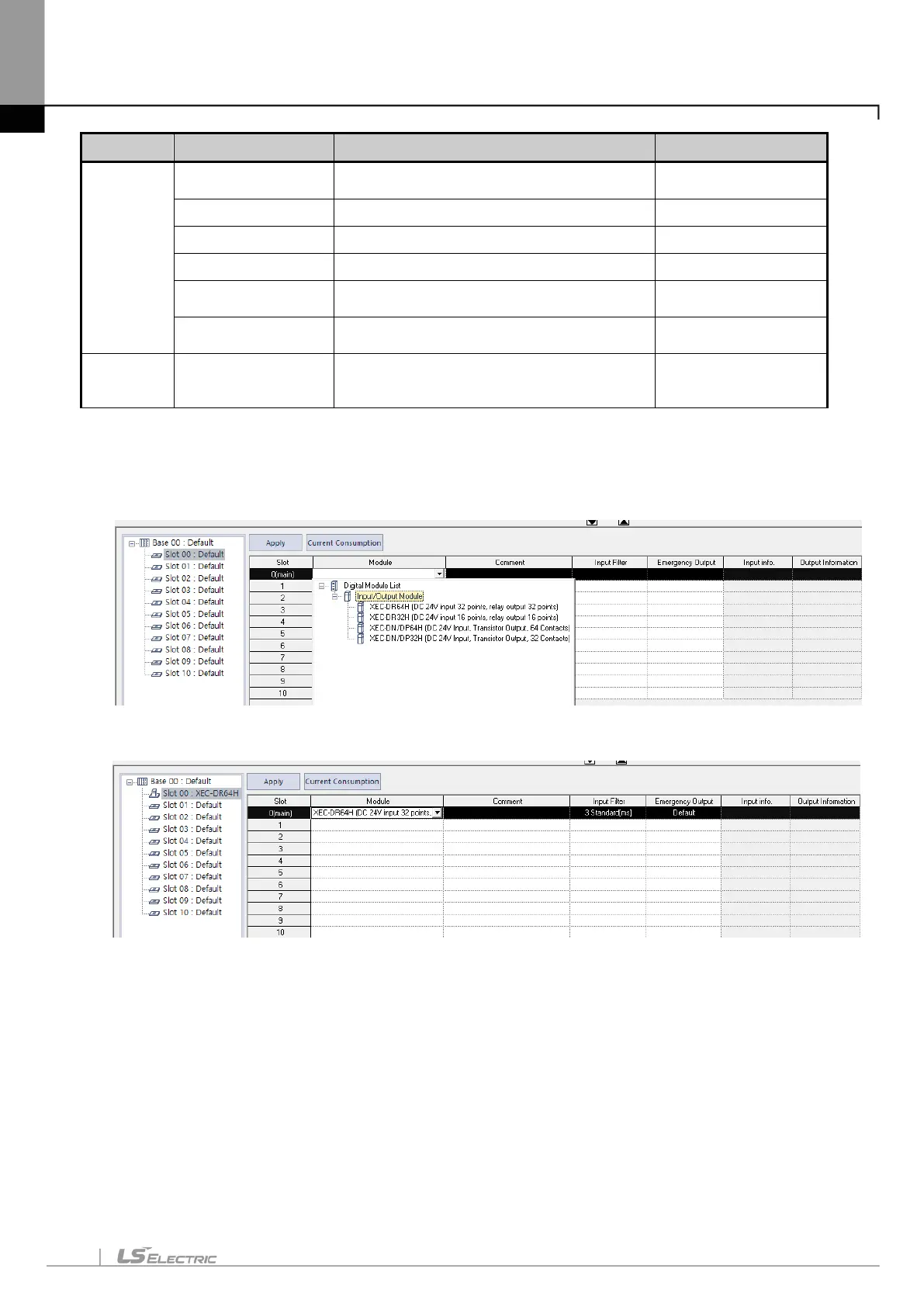
This setting is to set and reserve each I/O information. Clicking 『I/O Parameter』 in the project window
shows the following setting window.
Clicking 『Module』 in 『Slot Position』 indicates a list of modules, in which you may set I/O corresponding
to the actual system. Then, the following window is displayed.
Clicking 『Details』 in 『Slot Position』 shows the following window to set filter and emergency output.


 To Next Page