3 -5
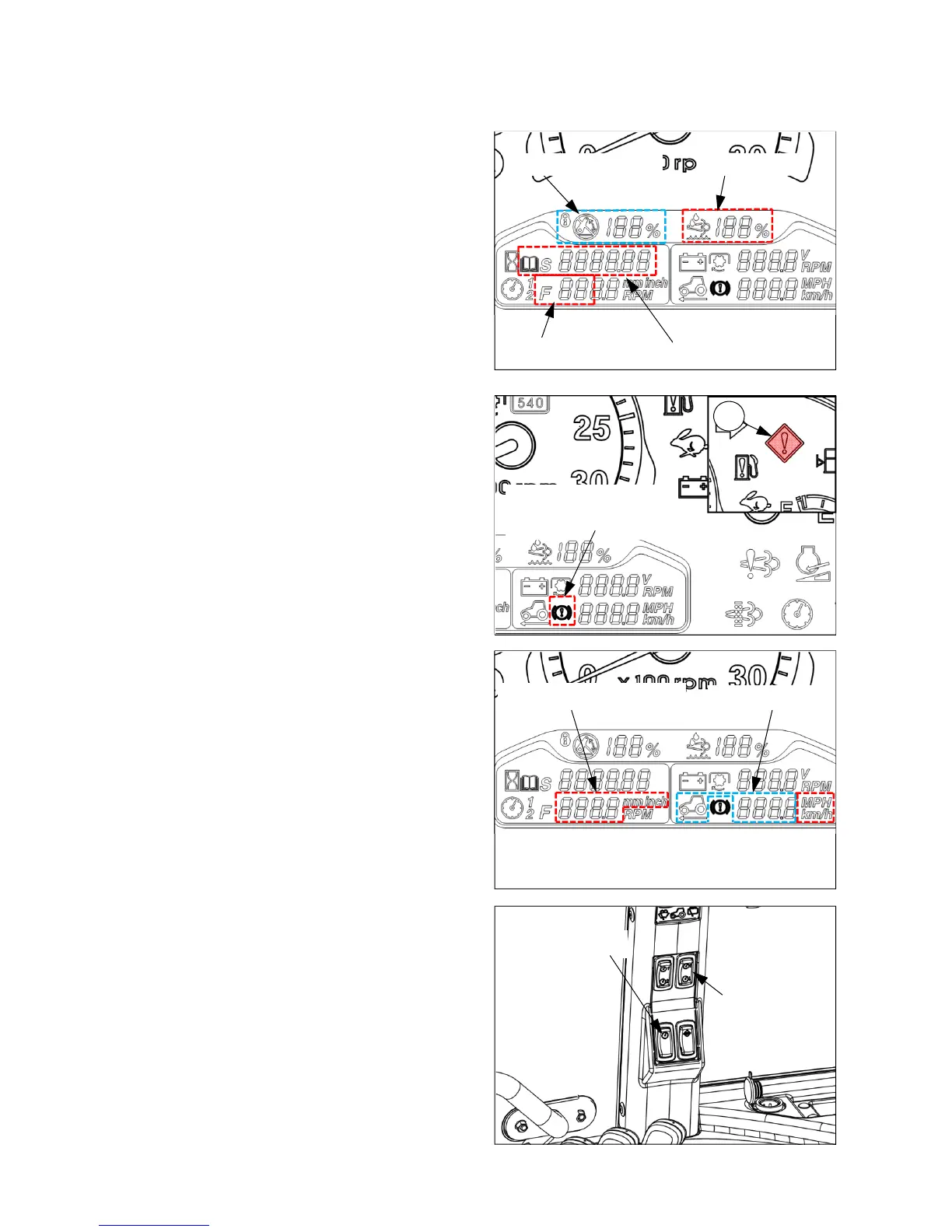
DEF/urea levelEHL display(optional)
Error Diagnostic Code
Trailer brake pressure
warning indicator
Vehicle speed
Tire rolling circumference
ESC main switch
ESC speed
up/down switch
FMI Code
z The RPM stored on ECU for Engine Speed
Cruise control(ESC) is displayed in normal status.
z If any errors related to the vehicle control are
happened, FMI code to be able to know the error
type or pattern shall be displayed by turns
additionally with error diagnosis code.
ⓓ EHL mode display (optional)
z For only Electro-Hydraulic Lift (EHL) models,
this display shows the current lifting position per
maximum upper limit in percent ratio.
ⓔ DEF/urea level display
z This display shows the DEF/urea level in
percent ratio.
z It is a catalyst for engine after-treatment process.
ⓕ Trailer brake pressure warning indicator
z If the trailer brake air pressure is lower than the
designate level, this display shall be turned on
with red vehicle control error warning indicator
(28).
28
ⓖ Tire rolling circumference and Vehicle speed
z The rolling circumference of rear tire and vehicle
speed is displayed in mm/inch and km/h/mph.
z Changing Unit(km/h
ÅÆ
mph, mm
ÅÆ
inch):
Press the upper side of the ESC main switch
shortly(within one second). The unit change is
only available before editing the tire rolling
circumference.
z Entering edit mode: Turn key switch to “ON”
position with pressing the upper side of the ESC
main switch. At this time, the tire rolling
circumference, “CAL”, and vehicle speed shall
be displayed.
z Editing tire rolling circumference: In edit mode,
the first digit shall blink at first. If pressing the
upper side of the ESC speed up/down switch,
the next digit shall blink. If pressing the lower
side of the switch, the number is changed from”9”
to “0” each time you press.
ⓒ Engine Speed Cruise control(ESC) and FMI code



 To Next Page