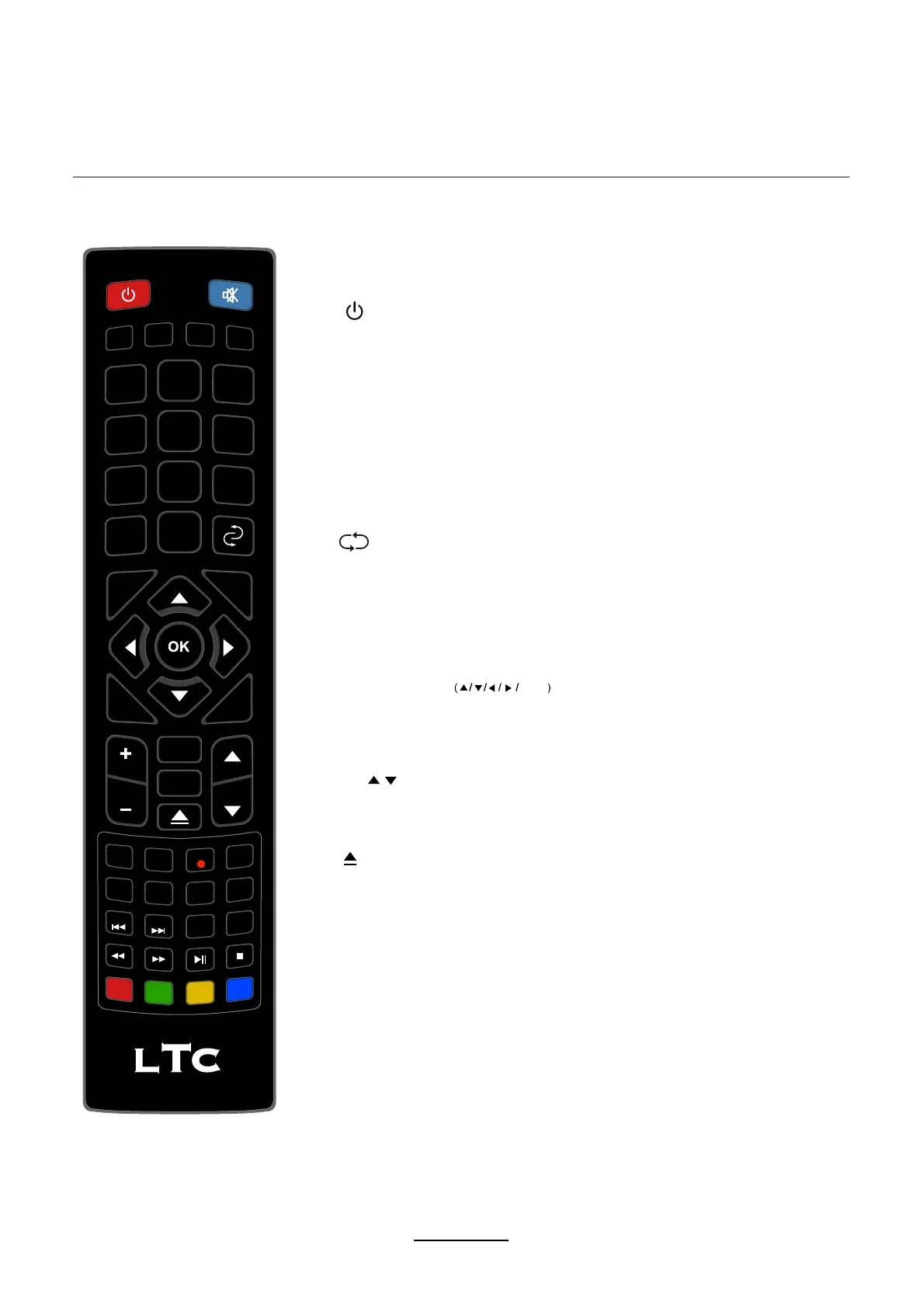
EPG: To show the Electronic Program Guide during no-menu
state only in DTV mode.
: Turn the TV on/standby.
MUTE: Press to mute the sound, press again or press
VOL+ to unmute.
PICTURE: Select the picture mode.
ASPECT: Change the screen display mode.
SOUND: Select the sound mode.
SLEEP: Standby timer.
FAV: Display the favorite program list.
NUMBER BUTTONS
Press 0-9 to select a TV channel directly when you
are watching TV.
Return to the previous channel viewed.
INPUT: Press to display the input source menu.
MENU: System setup menu.
EXIT: Exit the OSD menu.
DISPLAY: Press to display the current mode’s information.
Allows you to navigate the on-screen menus and adjust the
system settings to your preference.
CURSOR KEYS OK
TV/RADIO: Switch to TV/RADIO.
CH / : Scan through channels.
VOL+/-: Adjust the volume.
: Load/eject DVD disc.
Remote Control
The remote control is using Infra-Red(IR). Point it towards the front of the LED TV. The remote
control may not work correctly if it is operated out of range or out of angle.
PICTURE
ASPECT
SOUND
SLEEP
SUBTITLE
CH.LIST
REC.LIST
REC
1
2
3
4
5
6
7
8
9
0
VOL CH
INPUT
DISPLAY
EPG
TV/RADIO
FAV
MENU
TV/TXT
D.PRO
D.REP
D.ZOOM
D.SET
D.MENU
D.SUB
D.LAN
D.TITLE
D.GOTO
D.SLOW
CANCEL
REVEAL
NICAM/A2
INDEX
HOLD SIZE
SUBPAGE
EXIT
6


 To Next Page