OSD Menu
14
Satellite System
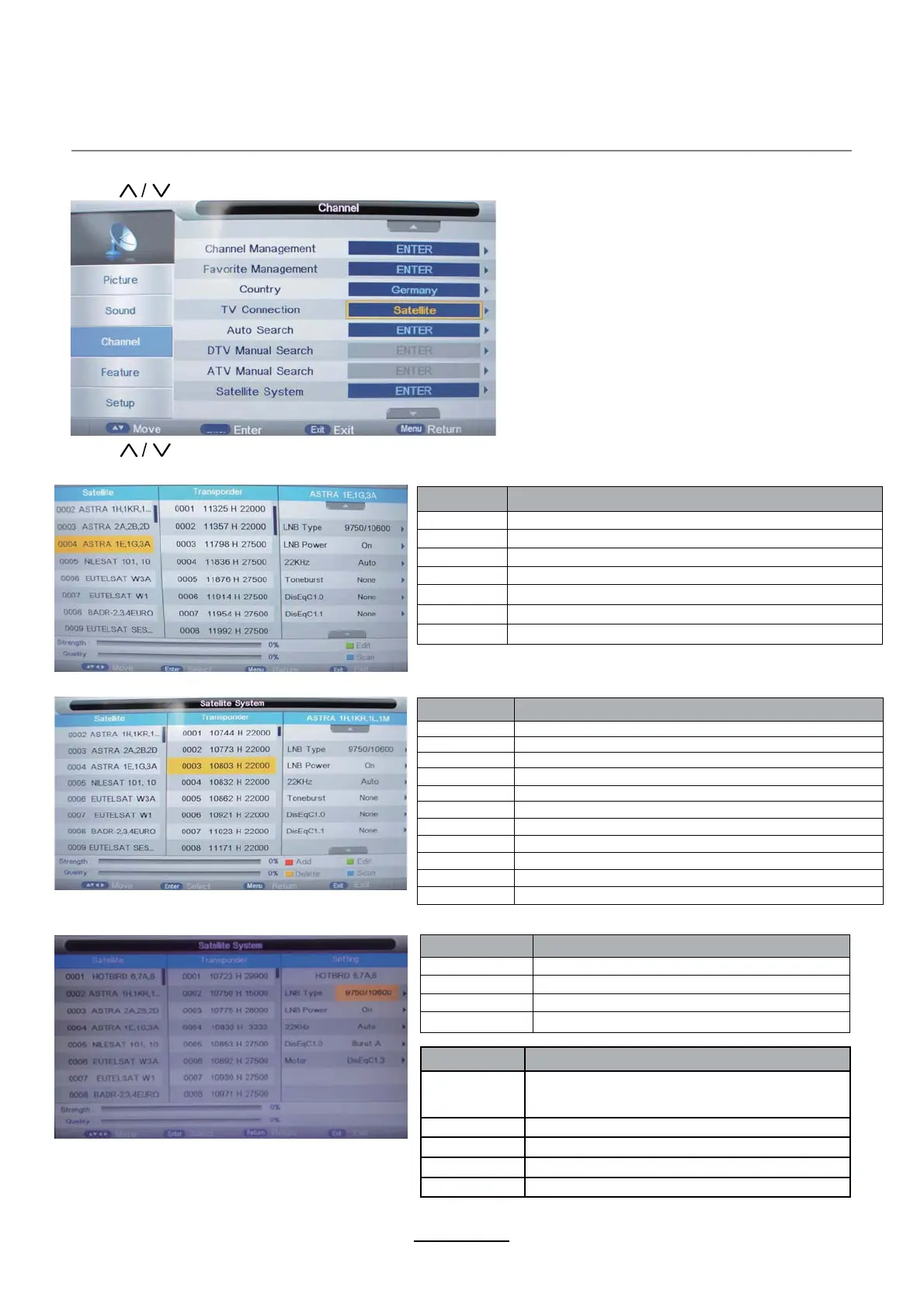
Press button to select the “TV Conection” , and set it on “Satellite”.
Press button to select the “Satellite System” , show as follow:
Operations in Satellite List Menu are shown in the following table:
Operations in Transponder List Menu are shown in the following table:
Operations in Setting Menu are shown in the following table:
noitcAekortSyeK
KEY_UP use cursor to up
KEY_DOWN
use cursor to down
KEY_LEFT
switch operation to satellite system parameters setting list
KEY_RIGHT switch operation to Transponder list
KEY_MENU Back to Main Menu.
KEY_EXIT
Exit Main Menu.
KEY_GREEN Enter satellite edit menu
noitcAekortSyeK
KEY_UP use cursor to up
KEY_DOWN use cursor to down
KEY_LEFT switch operation to Satellite list
KEY_RIGHT switch operation to satellite system parameters setting list
KEY_ENTER Select/unselect cursor item Transponder.
KEY_MENU Back to Satellite list.
KEY_EXIT Exit Main Menu.
KEY_RED Enter Transponder Add menu
KEY_GREEN Enter Transponder Edit menu
KEY_YELLOW Enter Transponder Delete confirm menu
KEY_BLUE Enter Transponder scan menu
noitcAekortSyeK
KEY_UP use cursor to up
KEY_DOWN use cursor to down
KEY_MENU Back to Transponder liat.
KEY_EXIT Exit Main Menu.
Option
Value
LNB Type
9750/10600,9750/10750,05150,05750,09750,
10600,10750,11300,11475,User Single,User
Dual
LNB Power On,Off
22KHz Auto,off,on
DisEqC Mode Off,LNB1,LNB2,LNB3,LNB4,Burst A,Burst B
Motor None,DisEqC1.2,DisEqC1.3
OK
5V antenna power
Turn on / off the 5V antenna power output.


 To Next Page