EasyManua.ls Logo

Lucky FF918-180S - User Manual

Lucky FF918-180S
10 pages
Print Icon
To Next Page IconTo Next Page
Loading...
FF918-180S Boat Fish
Finder Operations Manual
Question and Answer IconNeed help?

Do you have a question about the Lucky FF918-180S and is the answer not in the manual?

Summary

Display View

Powering ON and OFF

Procedure for turning the fish finder on and off using the power/menu key.

The Menu System

Sensitivity

Controls display detail; higher sensitivity shows more returns, lower reduces clutter.

Depth Range

Sets the display's depth measurement range, with automatic and manual options.

Zoom Functionality

Magnifies the area around the bottom to reveal fish and structure near the seabed.

Depth Alarm Settings

Configures an audible alarm for when the depth is equal to or less than a set value.

Fish Alarm Configuration

Sets an audible alarm for when specific types of fish are detected by the unit.

Fish ID+ Feature

Enables display of fish symbols based on advanced signal processing.

Contrast Adjustment

Allows adjustment of display contrast from 1 to 5 for optimal viewing.

Units of Measure

Selects units for depth, temperature, and distance (e.g., Feet/Meters, Celsius/Fahrenheit).

Battery Alarm Setting

Sets an alarm for low battery voltage, configurable from 8.5 to 13.5 Volts.

Bottom View Options

Determines how the bottom and structure are represented on the display (e.g., Structure ID, Black).

Buzzer Control

Enables or disables audible alarms; turning off silences all alarm sounds.

Backlight Adjustment

Controls the display backlight for night fishing, with various on/off settings.

Maintenance

Troubleshooting

Common Operational Issues

Addresses common problems like unit not turning on, no transducer detection, or no bottom reading.

Specifications

Installation Guide

Transducer Assembly

Step-by-step guide for assembling the transducer components and bracket.

Connecting Transducer and Power

Procedure for attaching the transducer and connecting the power cable to the unit.

Portable Transducer Mounting

Guidance on mounting the transducer using the suction cup mount for temporary use.

Overview

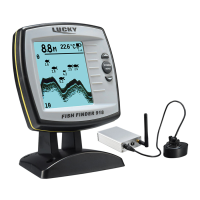
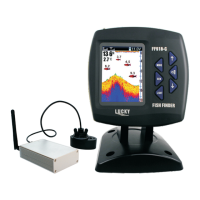
The FF918-180S Boat Fish Finder is a portable electronic device designed for both amateur and professional fishermen to locate fish, determine water depth, and understand the bottom contour of various bodies of water, including oceans, rivers, and lakes. It utilizes sonar technology to provide a visual representation of the underwater environment.

Function Description:

The FF918-180S operates by sending sound waves from a transducer into the water. These sound waves, or "echoes," bounce off underwater objects such as the bottom, fish, and structure, and are then received by the transducer. The unit processes these echoes and plots them on its display, creating a real-time picture of the underwater world. The display shows the water surface at the top and automatically adjusts the depth range to keep the bottom visible. Digital readouts provide precise information on depth, fish location, and water temperature. As the boat moves, the display updates to show variations in terrain and bottom composition. It can also detect and display fish, baitfish, and thermoclines (underwater temperature changes). The device is designed to be user-friendly, automatically determining depth and making adjustments to ensure the bottom and fish are visible.

The FF918 is a combo unit offering two user modes: Transducer mode and Simulation mode. This manual specifically focuses on the Transducer user mode, which allows operation with the Portable Cable Transducer. When the sensitivity indicator { III } is displayed on the screen, the unit is in transducer mode.

Important Technical Specifications:

  • Depth Capability: Up to 540 feet (180m)
  • Power Output: 100 Watts
  • Sonar Operating Frequency: 200 kHz
  • Sonar Coverage: 45°
  • LCD Matrix: 160 V x 132 H
  • Transducer Cable Length: 24 ft (8m)
  • Control Head Power Requirement: 11V to 13V DC

Usage Features:

Powering ON and OFF:

To power on, press and release the POWER-MENU key. To power off, press and hold the POWER-MENU key until the unit shuts down.

Start-Up Options:

Upon powering on, the unit temporarily displays "LUCKY BOAT FISH FINDER FF918" for 3 seconds, then presents a start-up menu. Users can select "Start-Up" for on-the-water use or "Simulator" for learning how to use the system with simulated sonar data. If no selection is made, the unit defaults to normal on-the-water use.

The FF918 features a simple menu system for adjusting settings. Pressing the POWER-MENU key repeatedly cycles through the menu settings. Once a setting is displayed, use the UP and DOWN arrow keys to adjust it. Menu settings automatically disappear after a few seconds. Most settings saved in normal operating mode are retained even after the unit is turned off. The backlight momentarily illuminates each time the POWER-MENU key is pressed, aiding night viewing.

Key Menu Settings:

  • Sensitivity (1-9): Controls the level of detail shown on the display. Higher sensitivity reveals more sonar returns from small baitfish and suspended debris, but can clutter the display. Lower sensitivity reduces clutter in murky water but may hide weaker fish returns.
  • Depth Range (Auto, 1-180m): In "Auto" mode, the unit automatically adjusts the lower depth range to follow the bottom. Manual ranges (1-180m) can also be selected. If the depth exceeds the manual setting, the bottom will not be visible.
  • ZOOM (Off, Auto, Depth Ranges): Magnifies the area around the bottom to reveal fish and structure that might not be visible during normal operation. In "Auto" zoom, upper and lower depth ranges adjust to keep the area above and below the bottom on display. "Off" returns to normal operation.
  • Depth Alarm (Off, 1-180 meters): An audible alarm sounds when the water depth is equal to or less than the set value.
  • Fish Alarm (Off, Large, Large/Medium, All): An alarm sounds when the FF918 detects fish corresponding to the selected size (Large fish only, Large/Medium fish only, All fish). This alarm only functions if Fish ID+ is set to "On."
  • Fish ID+ (On, Off): When "On," the unit uses advanced signal processing to interpret sonar returns and displays fish symbols with their associated depth. When "Off," it shows "raw" sonar returns.
  • Contrast (1-5): Adjusts the contrast of the display.
  • Units (Feet/F, Meters/C, Feet/C, Meters/F): Selects the units of measure for depth and temperature (F for Fahrenheit, C for Celsius).
  • Battery Alarm (Off, 8.5 to 13.5 Volts): An alarm sounds when the input battery voltage drops to or below the set value.
  • Bottom View (Structure ID, Black, WhiteLine, Inverse): Selects how the bottom and structure are represented on the display:
    • Structure ID: Weak returns are light pixels, strong returns are dark pixels, ensuring strong returns are clearly visible.
    • Black: All pixels below the bottom contour are black, providing high contrast.
    • White Line: Highlights the strongest sonar returns in white, creating a distinctive outline of the bottom.
    • Inverse: Weak returns are dark pixels, strong returns are lighter pixels, ensuring weak signals are visible.
  • BUZZER (On, Off): Controls all alarm sounds. Setting to "Off" mutes all alarms.
  • LIGHT (Off, Side On, Top On, Bottom On 7): Activates the backlight for night fishing. Using all 8-LED lights significantly reduces battery life, so it's recommended for low light or open side light conditions only.

Transducer Assembly and Installation:

The transducer assembly involves aligning two ratchet pieces at position 1 with the beads aligned with the rib on the transducer, then assembling other transducer parts. The plastic bracket is assembled using a washer, wing nut, Phillips head screw, and bolt to attach the suction cup and portable transducer assembly.

Attaching the Transducer and Connecting Power:

  1. Plug the transducer cable into the "TRANSDUCER" socket on the back of the fish finder.
  2. Push down the cable cover to conceal the cable.
  3. Attach the suction cup transducer assembly to the back of the case.
  4. Plug the power cable connector into the back of the portable fish finder.
  5. Plug the cable into the "POWER" socket on the back of the fish finder.
  6. Verify the transducer is plugged into the portable case.
  7. The unit is then ready for use.

Mounting the Portable Transducer:

The suction cup mount is designed for quick, easy installation and removal, suitable for trolling speeds. For operation at higher boat speeds, the suction cup transducer should be removed from the water.

Maintenance Features:

  • Salt Spray: If the unit comes into contact with salt spray, wipe affected surfaces with a cloth dampened in fresh water.
  • Cleaning Lens: Do not use chemical glass cleaner on the lens to avoid cracking. When cleaning the LCD protective lens, use a chamois and a non-abrasive, mild cleaner. Avoid wiping while dirt or grease is on the lens to prevent scratching.
  • Transducer Cleaning: If the boat remains in the water for extended periods, marine growth can reduce transducer effectiveness. Periodically clean the transducer face with liquid detergent.
  • Transducer Wetting: If the boat has been out of water for a long time, it may take time for the transducer to wet when returned to the water. Small air bubbles can cling to the surface, interfering with operation. These bubbles dissipate over time, or you can wipe the transducer face with your fingers after it's in the water.

Troubleshooting:

The manual provides solutions for common issues:

  • Unit not turning on: Check power cable connection and ensure it's correctly plugged into a reliable power source. Inspect contacts for corrosion.
  • No transducer detected: Ensure the transducer connector is properly plugged in. Inspect the transducer cable for breaks, kinks, or cuts. Ensure the transducer is fully submerged. If using a switch, try connecting directly.
  • No bottom reading: In deep water, increase sensitivity. Inspect transducer cable for damage.
  • Gaps in bottom reading/inconsistent depth in shallow water: The FF918 works reliably in water 3 feet (1 meter) or deeper. Remember depth is measured from the transducer.
  • Unit turns on automatically/won't turn off: Check transducer cable for cuts or bare metal contact. Disconnect transducer to see if the problem resolves.
  • Display fading/images not sharp: Check input voltage; the unit requires 10 VDC or higher.
  • Black dots at high speeds/sensitivity: This is noise/interference from electronic devices, the engine (intensifies at higher RPMs), or propeller cavitation (transducer mounted too close to propeller). Turn off nearby electronics, increase engine speed while stationary to isolate engine noise, or ensure transducer is mounted at least 15" (380mm) from the propeller.

Lucky FF918-180S Specifications

General IconGeneral
BrandLucky
ModelFF918-180S
CategoryFish Finder
LanguageEnglish

Related product manuals