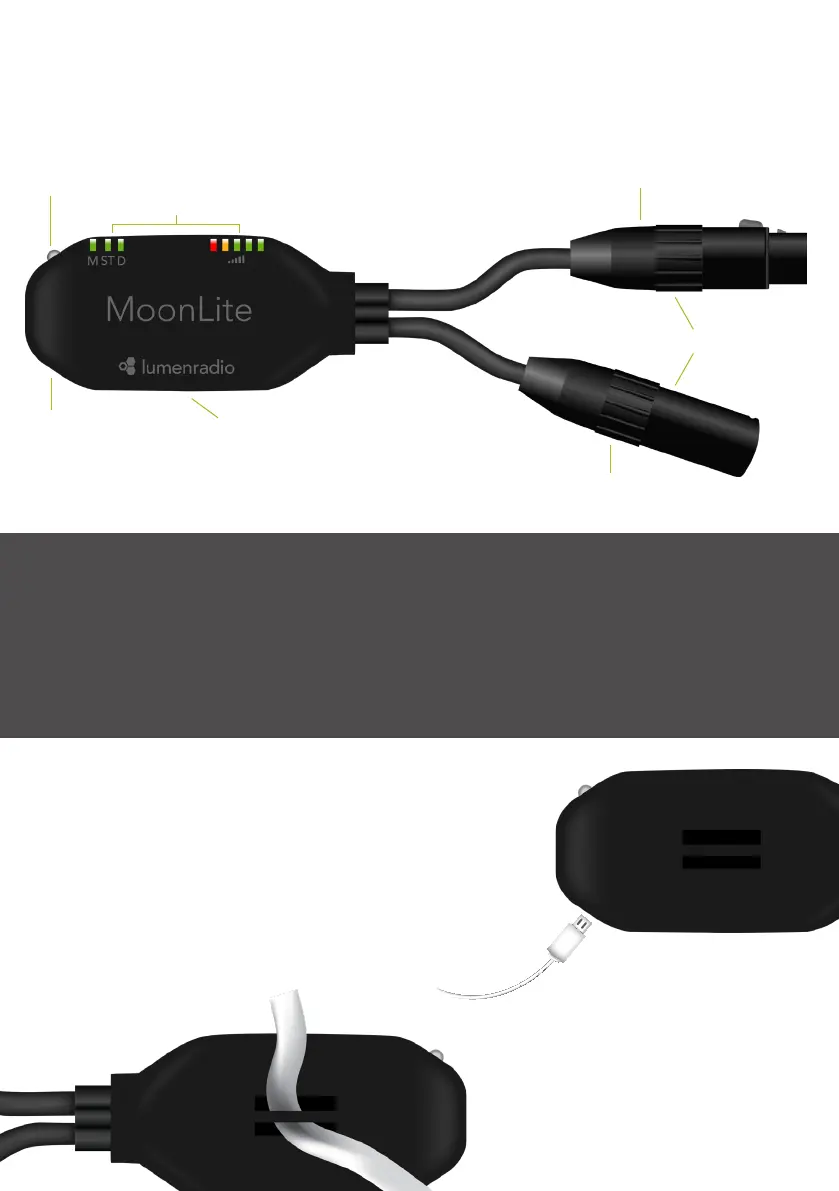
Link button
Male XLR
DMX passthrough
Status LEDs
USB Micro-B
Female XLR
Velcro fastening
MOUNTING
MoonLite comes with a velcro strap to
simplify mounting.
CHARGING
If you are running low on battery MoonLite can be charged
through the Micro USB port. The adaptor used for charging can
be any standard 5V USB with minimum 500mA output capability.
Charging time is about 3h.
During charging MoonLite will be fully functional and can be
powered through the Micro USB.
PRODUCT SPECIFICATIONS
MoonLite comes with Bluetooth connectivity and an internal
antenna. The rechargeable battery provides up to 12h operation
in receiver mode, with a charging time of only 3h.
UNIVERSE COLOR
To keep track of wich MoonLites belongs to which universe you can use the color pairing function available
in the CRMX Toolbox app.
1. Open the app and select the MoonLite congured for TX mode.
2. In the settings for this unit, select the color of your choice in the options shown.
3. The Status LED on your TX will now display your selected color.
4. All RX units linked to this TX will also show your selected color.
Until selecting a color, all units will have the green color by default.


 To Next Page