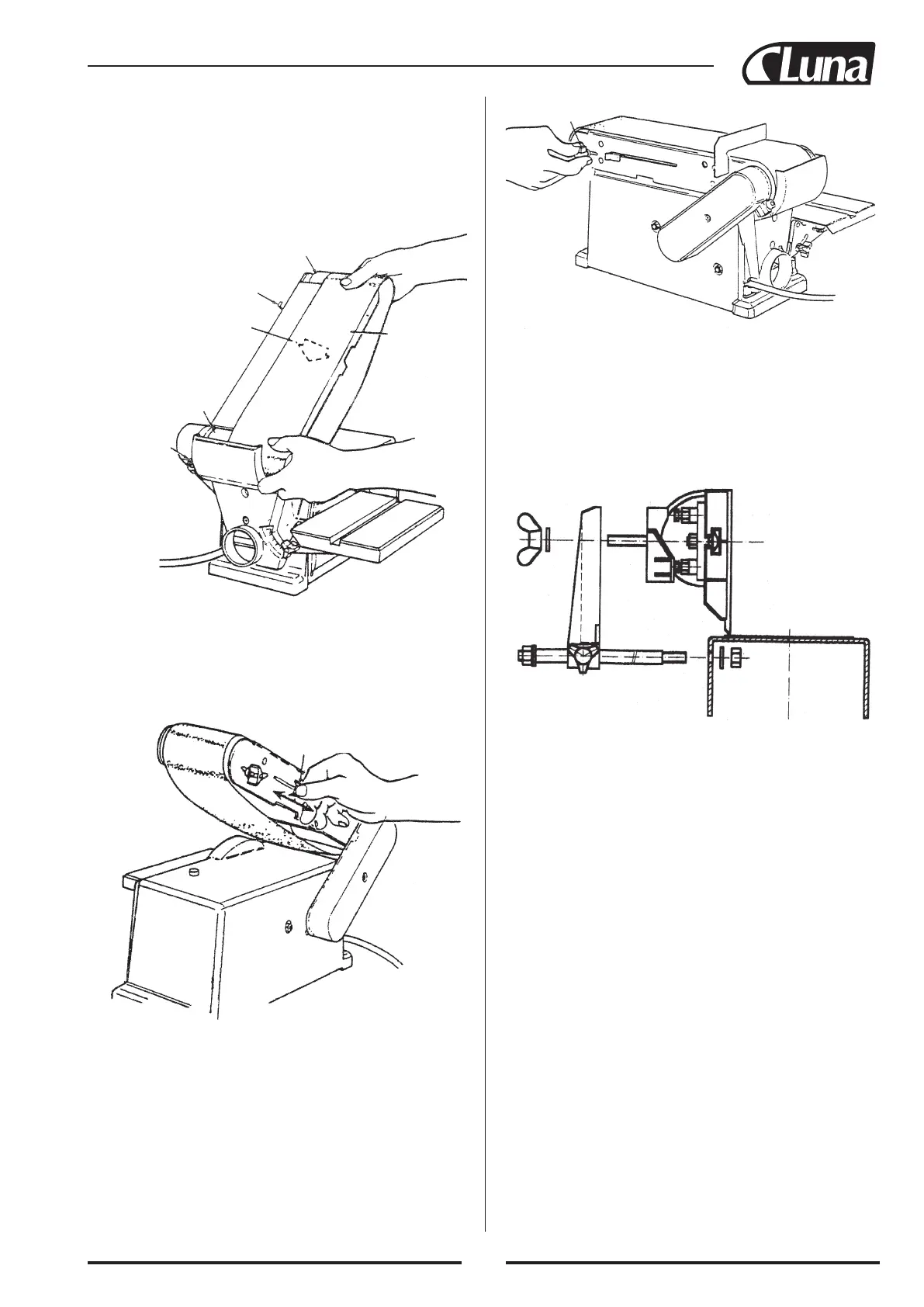
Tension lever
Tracking knob
Tension lever
Directional arrow
Idler drum
Sanding belt
Drive drum
Bed locking
hex socket
screw
On the smooth side of the sanding belt, you will find a “directional
arrow”. The sanding belt must run in the direction of this arrow so
that the splice does not come apart.
1. Slide tension lever to the right to release the belt tension.
2. Place the sanding belt over the drums with the directional arrow
pointing as shown. Make sure the belt is centered on both
drums.
3. Slide tension lever to the left to apply belt tension.
4. Tighten hex socket screw when bed is in desired position.
5. Plug in the power cord. Turn switch “on” and immediately
“off”, noting if the belt tends to slide off the idler drum or drive
drum. If it did not tend to slide off, it is TRACKING properly.
35
6. If the sanding belt moves toward the disc, turn the tracking knob
clockwise 1/4 turn.
7. If the sanding belt moves away from the disc, turn the tracking
knob counterclockwise 1/4 turn.
8. Turn switch “on” and immediately “off” again, noting belt
movement. Readjust tracking knob if necessary.


 To Next Page