32
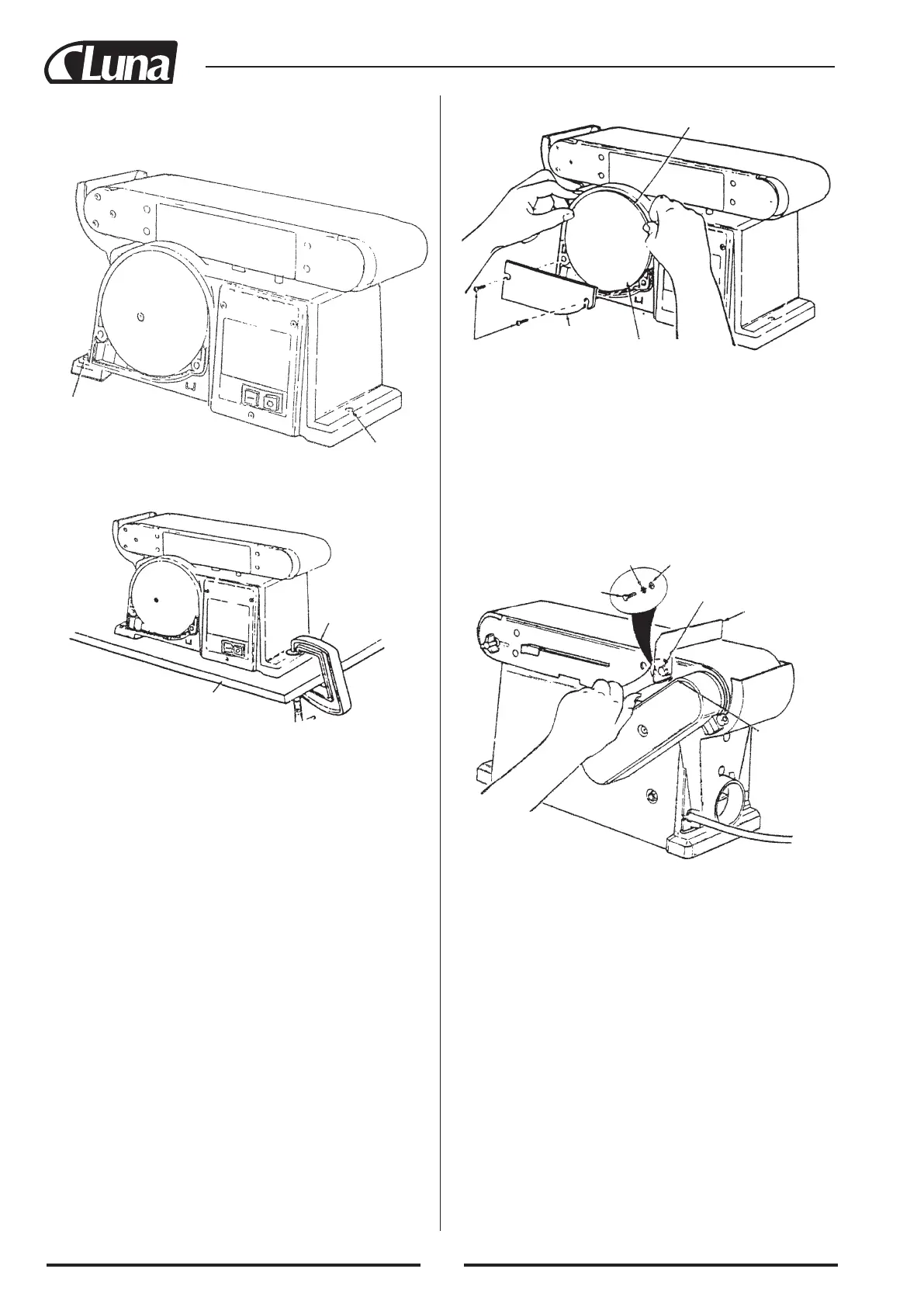
Mounting hole
Mounting hole
Workbench
“C” clamp
ASSEMBLY
The belt and disc sander can be clamped directly to a workbench
using two (2) or more “C” clamps on base of unit (one clamp on
each end of unit.
Installing sanding disc and guard
1. Locate sanding disc and peel backing from disc. Align perime-
ter of disc with plate and press disc firmly into postion all the
way around.
2. Locate disc guard and two pan head screws, M4.2x1.4-12, from
loose parts bag.
3. Position disc guard against lower 1/3 of disc aligning holes as
shown.
4. Using phillips type screwdriver, fasten the pan head screws
securely applying slight pressure to thread the holes.
Sanding plate
Screws
Disc guard
Sanding disc
Hex screw
Flat washer
Lock washer
Work support
hex screw
Work support
Wrench
Installing work support
1. Locate work support and hex screw M6x1.0-14, washer and
lockwasher.
2. Hold work support into position and fasten as shown. Do not ov
ertighten.


 To Next Page