Step 5: Connect Remote Control and other Electrical Accessory
Devices
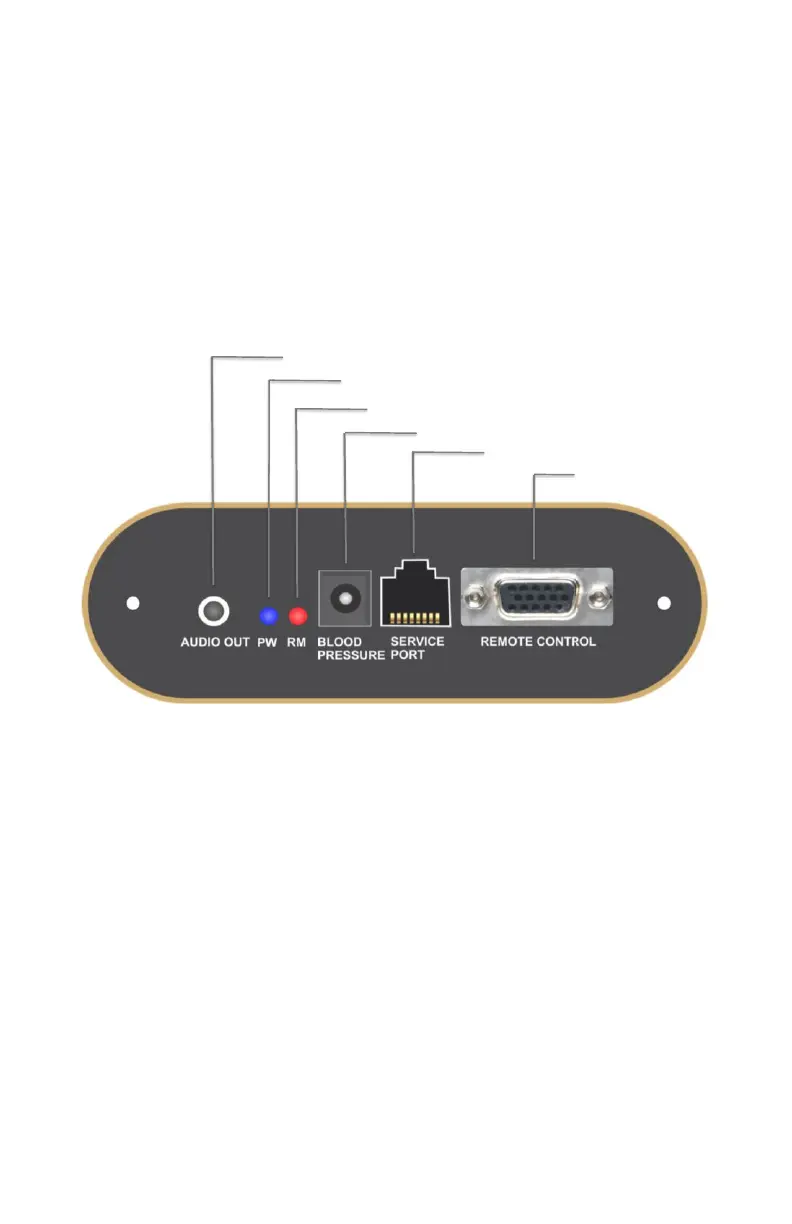
1. Please refer to Fig.7&8 for remote control and other accessory
devices connections. Be sure the remote
cable is inserted through the leather loop located on the remote
pouch. This will prevent remote damage from dropping on the
floor. Note: This panel is located on the right side of the chair
slightly below the armrest
Fig.8: Side Panel
2. Plug the power cord to the back of the chair.
3. Power is turned on/off by a switch on the back (Switch to position “I”
to turn on and position “0” to turn off).
4. Use the remote to choose the massage functions.
5. For Bluetooth music streaming, please follow the instructions (see
Page. 16).
6. If you use headphones, please insert the connector to the audio out
port as indicated on the side panel of
the chair. (Fig. 8)
RemoteControl
Port
ReservedForServiceTech
BloodPressureMonitorPort
RemoteControlErrorIndicator(needa reboot)
PowerIndicator
AudioOutput



 To Next Page