EasyManua.ls Logo

Luxul XAP-1440 - User Manual

Luxul XAP-1440
8 pages
Print Icon
To Next Page IconTo Next Page
Loading...
Fo ld Fo ld Fo ld
READ ME FIRST
QUICK INSTALL GUIDE
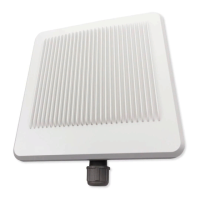
AC1200 Dual-Band Outdoor
Wireless Access Point
XAP-1440
Includes:
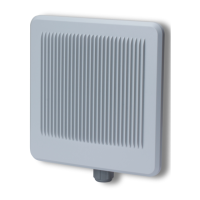
XAP-1440 Wireless Access Point
PoE Injector and Power Cord
Mounting Bracket and Hardware
Ethernet Cable
READ ME FIRST - CONTROLLER COMPATIBILITY
This XAP-1440 is compatible with the Luxul Wireless Controller for fast, easy
configuration and deployment of wireless networks with multiple APs.
n Note: If you’ll be using this AP with a Wireless Controller, refer to
the Quick Install Guide included with the Wireless Controller for
setup instructions.
AP SETUP AND CONFIGURATION
1
Physical Installation
The XAP-1440 access point is designed for simple and ecient installation.
However, due to the inherent complexity of outdoor installation, installation
should be be performed only by experienced professionals.
Because the signal generated by the XAP-1440 is directional, the unit should
be located at the perimeter of the desired coverage area, with the large flat
surface aimed toward the center.
Mounting the Access Point
Mounting the access point is a simple process outlined in the following steps.
1. Refer to the included Mounting Guide leaflet to assemble the mount and
secure the AP to a pole or wall mount.
2. Thread the Ethernet cable through the cable gland assembly as shown,
connect it to the Ethernet connector, secure the cable gland to the
threaded recess on the access point, then tighten the cable gland nut to
secure and seal the cable gland.
Cable gland exploded view
3. Adjust the access point for best performance. The vertical elevation
angle can be adjusted with the four hex screws on the mount, while the
horizontal angle can be adjusted by loosening the clamp and rotating the
assembly on the pipe.
c CAUTION: To comply with RF regulations, the AP should be adjusted
from 0 to -20 degrees (horizontal to downward-facing).
w Warning: Do not locate the access point where it can come into
contact with overhead power lines or other electric circuits. When
installing the antenna, take extreme care not to come into contact
with such circuits, as they may cause serious injury or death.
n Note: For proper installation and grounding of the antenna, please
refer to national and local codes (e.g. U.S.: NFPA 70, National
Electrical Code, Article 810, Canada: Canadian Electrical Code,
Section 54). Statement 280.
Sales
801-822-5450
sales@luxul.com
Technical Support
801-822-5450
support@luxul.com
LUX-QIG-XAP-1440-v1 05111701
Copyright and Trademark Notices
No part of this document may be modified or adapted in any way, for any purposes without permission in
writing from Luxul. The material in this document is subject to change without notice. Luxul reserves the
right to make changes to any product to improve reliability, function, or design. No license is granted, either
expressly or by implication or otherwise under any Luxul intellectual property rights. An implied license
only exists for equipment, circuits and subsystems contained in this or any Luxul product.
© Copyright 2017 Luxul. All rights reserved. The name Luxul, the Luxul logo, the Luxul logo mark and Simply
Connected are all trademarks and or registered trademarks of Luxul Wireless, Inc. All other trademarks and
registered trademarks are property of their respective holders.
Question and Answer IconNeed help?

Do you have a question about the Luxul XAP-1440 and is the answer not in the manual?

Summary

Physical Installation

Mounting the Access Point

Instructions for assembling the mount and securing the access point to a pole or wall.

Connecting Ethernet and Power

Ethernet and Power

Details on connecting the access point using PoE and the included injector.

Preparing for Access

IP Addressing

Configuring the IP address for the access point and client devices.

Access and Setup

Getting Connected

Methods for connecting to the access point via Ethernet or wireless.

Logging In

Steps to access the AP's web configuration using default credentials.

Hardware Operation

LED Indicators

Explanation of the status lights on the access point and PoE injector.

Reset Button

Procedure for restoring the access point to factory default settings.

Summary

Physical Installation

Mounting the Access Point

Instructions for assembling the mount and securing the access point to a pole or wall.

Connecting Ethernet and Power

Ethernet and Power

Details on connecting the access point using PoE and the included injector.

Preparing for Access

IP Addressing

Configuring the IP address for the access point and client devices.

Access and Setup

Getting Connected

Methods for connecting to the access point via Ethernet or wireless.

Logging In

Steps to access the AP's web configuration using default credentials.

Hardware Operation

LED Indicators

Explanation of the status lights on the access point and PoE injector.

Reset Button

Procedure for restoring the access point to factory default settings.

Overview

The Luxul XAP-1440 is an AC1200 Dual-Band Outdoor Wireless Access Point designed for robust and efficient outdoor wireless network deployments. This quick install guide provides essential information for its physical installation, setup, configuration, and operation.

Function Description:

The XAP-1440 serves as a wireless access point, extending network connectivity wirelessly in outdoor environments. It operates on dual bands (AC1200), supporting both 2.4 GHz and 5 GHz frequencies for enhanced performance and reduced interference. Its primary function is to provide reliable wireless access to devices within its coverage area. The device is compatible with Luxul Wireless Controllers, which facilitates fast and easy configuration and deployment of wireless networks, especially in setups involving multiple access points. When used with a controller, users are advised to refer to the controller's Quick Install Guide for specific setup instructions. The XAP-1440 is not a router and requires connection to a network with a router to provide internet access.

Important Technical Specifications:

  • Model: XAP-1440
  • Wireless Standard: AC1200 Dual-Band
  • PoE Support: 802.3at PoE (Power over Ethernet)
  • Default IP Address: 192.168.0.10
  • Default Username: admin
  • Default Password: admin
  • Ethernet Cable Recommendation: Luxul recommends at least Cat-5e unshielded twisted pair (CAT5e UTP) cabling. For optimal performance and stable data transmission at 1000 Mbps, Category-6 unshielded twisted pair (CAT6 UTP) is recommended.
  • Maximum Ethernet Cable Length: Up to 300 feet (91 meters) when using a PoE injector.
  • Signal Directionality: The XAP-1440 generates a directional signal.
  • RF Regulations Compliance: The AP should be adjusted from 0 to -20 degrees (horizontal to downward-facing) to comply with RF regulations.

Usage Features:

  • Outdoor Installation: The XAP-1440 is specifically designed for outdoor use. Due to the inherent complexity of outdoor installations, it is recommended that installation be performed by experienced professionals.
  • Directional Signal Placement: Given its directional signal, the unit should be strategically located at the perimeter of the desired coverage area, with its large flat surface aimed toward the center of that area for optimal signal distribution.
  • Mounting Flexibility: The access point can be secured to a pole or wall mount using the included mounting bracket and hardware. The mounting guide leaflet provides detailed instructions for assembly and secure attachment.
  • Adjustable Angles:
    • Vertical Elevation: The vertical elevation angle can be adjusted using four hex screws on the mount, allowing for precise aiming of the signal.
    • Horizontal Angle: The horizontal angle can be adjusted by loosening the clamp and rotating the entire assembly on the pipe.
  • PoE Powering: The device supports 802.3at PoE, allowing power and data to be transmitted over a single Ethernet cable. A PoE injector is included for this purpose.
    • PoE Injector Connection:
      • Data In: Connect an Ethernet cable from your router or switch to the "Data In" port of the PoE injector.
      • Data & PWR Out: Connect an Ethernet cable from the "Data & PWR Out" port of the PoE injector to the PoE Port of the XAP-1440.
      • AC Power: Connect the included AC cord to the power input of the injector, then to an AC outlet.
  • Connectivity Options:
    • Ethernet Connection: The preferred method of connection is via an Ethernet cable, connecting your computer to the PoE switch or PoE injector to which the XAP-1440 is connected.
    • Wireless Connection: Client devices can connect to the XAP-1440's default wireless network, named "Luxul_XAP-1440." Initially, this network operates in Open Security mode, meaning no passphrase is required until wireless security is configured by the user.
  • Web-Based Configuration: The access point's settings can be configured via a web browser by entering its default IP address (192.168.0.10) into the address field. Users log in with the default username "admin" and password "admin." The "Quick Setup" feature and online help guide users through the configuration process.
  • IP Addressing:
    • If the network uses a 192.168.0.X address scheme and the computer shares a similar address, users can proceed directly to access and setup.
    • If another device on the network uses the 192.168.0.10 address, it must be temporarily reassigned or removed during XAP-1440 configuration.
    • For networks using a different address scheme, a temporary static IP address in the 192.168.0.X range must be set on the computer used for configuration. After configuration, the computer's IP settings should be reverted to "Obtain Automatically/DHCP." Luxul provides resources at http://luxul.com/ip-addressing for guidance on changing computer IP addresses.

Maintenance Features:

  • LED Indicators: The device features LED indicators on the bottom portion of the enclosure, near the cable gland, to provide status information:
    • PWR (Green LED):
      • On: XAP-1440 is powered.
      • Off: XAP-1440 is not receiving power.
      • Blinking: XAP-1440 is booting.
    • WLAN (Blue LED):
      • On: Wireless radio is active, and wireless access is enabled.
      • Off: Wireless radio is not active, and wireless access is disabled.
    • PoE Injector (Green ON LED):
      • Illuminated: Power is connected to the injector.
      • Not Lit: Injector is not receiving power.
  • Reset Button: A reset button is located inside the cable gland opening.
    • Function: Used to restore the access point to factory default settings.
    • Procedure: With the XAP-1440 powered on, press and hold the Reset button for approximately 10 seconds, then release.
    • Caution: Holding the Reset button for more than a few seconds will restore the AP to factory defaults, erasing any custom configuration.
  • Cable Gland Assembly: The Ethernet cable is threaded through a cable gland assembly, which is then secured to the access point's threaded recess and tightened to ensure a secure and sealed connection, protecting against environmental elements.
  • Safety Warnings:
    • Overhead Power Lines: Do not locate the access point where it can come into contact with overhead power lines or other electric circuits. Extreme care must be taken during antenna installation to avoid contact with such circuits, as this can cause serious injury or death.
    • Grounding: For proper installation and grounding of the antenna, users must refer to national and local codes (e.g., U.S.: NFPA 70, National Electrical Code, Article 810; Canada: Canadian Electrical Code, Section 54).

Luxul XAP-1440 Specifications

General IconGeneral
BrandLuxul
ModelXAP-1440
CategoryWireless Access Point
LanguageEnglish

Related product manuals