3
3. Using the SmartGuider
The SmartGuider’s control paddle features a wide pixel
matrix screen, whose
colors (amber on a black background) and brightness do not compromise the
eye’s delicate adaptation to darkness.
In this section we describe the content and functionality of all of the available
user screens: for a quick and effective overview of their usage, please check out
the flowchart available in the download section of LVI’s web site. Most screens
can have up to three different options on their bottom line, which can be activated
by pressing the corresponding button on the control paddle (from left to right).
After connecting the power supply, turn the camera on by pressing and
holding the central button until the LVI logo shows up; shortly thereafter, the
message “YOUR SMARTGUIDER IS READY” informs you that the startup phase
is complete and the camera has come online.
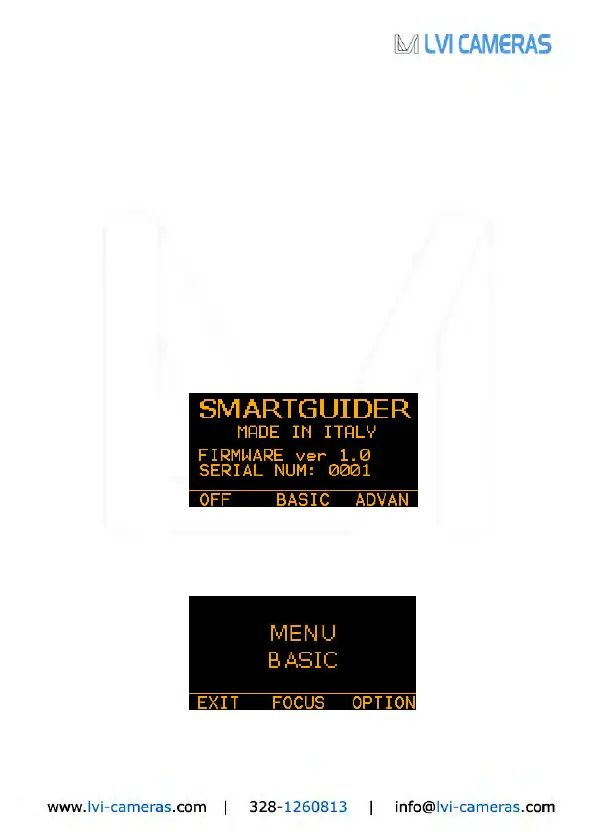
Press OK to go to the first user screen:
In the above screen, you can turn off the camera by pressing and holding the
left button (OFF), while selecting BASIC with the central button will take you to
the basic settings screen (MENU BASIC):


 To Next Page