7
of view by a wind gust or even because the telescope has b
een touched. If the
star remains invisible for up to 30 seconds, the camera will still be able to
resume autoguiding; otherwise, the current session is aborted and the execution
flow goes back to the MENU BASIC screen to search for a new guide star.
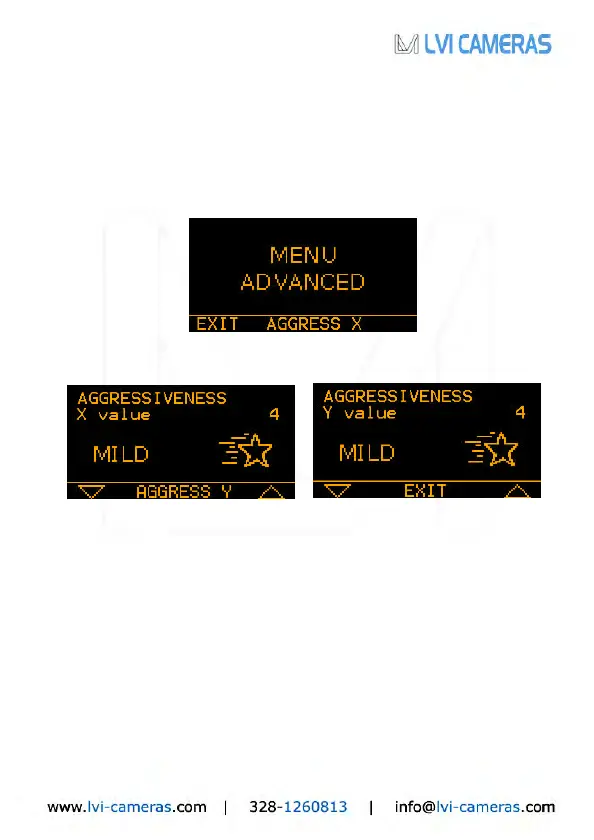
From the autoguiding screen, pressing the ADVAN menu item brings up the
advanced settings screen:
EXIT will take us back to the previous menu, while by pressing AGGRESS X we
come to the following screens:
With the two triangular arrows (UP and DOWN), you can adjust the
aggressiveness in the X axis (upper left) and in the Y axis (upper right).
The aggressiveness in both axes can range from 1 to 6 (1-2=LOW, 3-4=MILD, 5-
6=HIGH) and expresses the degree of reactivity of corrections: a high value will
urge the camera to immediately correct for the slightest displacement, whereas a
low value will yield a much smoother behavior. See more details at page 10.
4. Tips and Tricks
The SmartGuider is very simple and intuitive to use. How
ever there are some
phases, namely selection of a suitable guide star, focusing and calibration, which
are critical in maximizing the performance of your SmartGuider and therefore
deserve special attention. For further details, please contact LVI.


 To Next Page
 Loading...