6
T
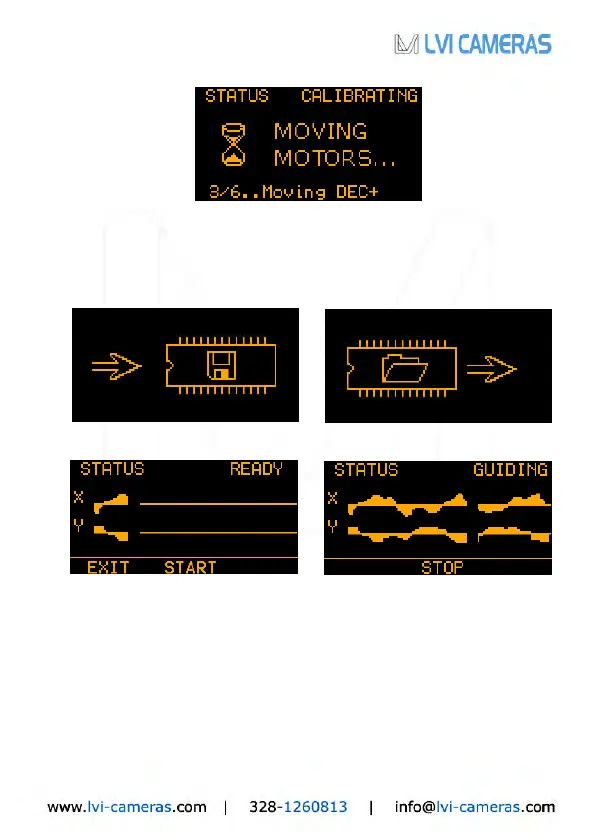
he calibration process can last up to a few minutes. Upon completion, the new
calibration parameters are automatically stored into the camera’s non-volatile
memory (the SAVE icon showed here on the bottom left). In case you want to
reuse the parameters from last calibration, just choose LOAD from the focusing
menu (screen on the lower right). Please see note on calibration on page 9.
At this point we come to the autoguiding screens:
The SmartGuider is standing by (Status: READY, screen on the upper left)
before starting the actual autoguiding phase (Status: GUIDING, screen on the
upper right) by selecting START. The two graphs allow real-time monitoring of
guiding corrections issued to the mount. You can interrupt the autoguiding
process by pressing STOP at any time, while EXIT will take you back to the basic
settings screen.
It might happen the guide star get lost (1 beep per second and STAR LOST):
this can be due to a number of different reasons, e.g. because the sky has
clouded over, the optics have dewed up, or the star has been thrown off the field


 To Next Page