0 – internal controller fault 0
1 – internal controller fault 1
2 – pressed / stuck button “down”
3 – pressed / stuck button “up”
4 – pressed / stuck button “start”
5 – pressed / stuck button “stop”
6 – inverter communication error
7 – inverter fault
4. Technical specifications
Number of manual modes: 2
Number of automatic modes: 10
Maximum duration of automatic program:800s (30
minutes)
Manual mode speed adjustment range: 10% - 100%
Automatic mode speed adjustment range: 60% - 100%
5.3. Manual for handling the premium controlling
1. Manual mode operation.
Manual mode operation is characterised by the
engine spinning in one direction that has been previously
selected and the user can influence the speed of spinning.
In order to commence manual mode operation , by means
of the buttons
• „ARROW UP”
• „ARROW DOWN”
• „ARROW LEFT”
• ”ARROW RIGHT,
One must select the relevant programme: P:1 or p:2
spinning in a selected direction and subsequently it must be
activated by means of the START button.
Stoppage is possible any time – by pressing the STOP
button.
By default, the time of operation in manual mode is
not defined , i.e. the honey extractor drum shall spin until
deactivated by pressing the STOP button.
Such a solution remains the most frequent standard,
however in some cases the timer function may appear to
be helpful.
The timer function is a delay in spinning deactivation, i.e.
operation stoppage, once the set up time has expired.
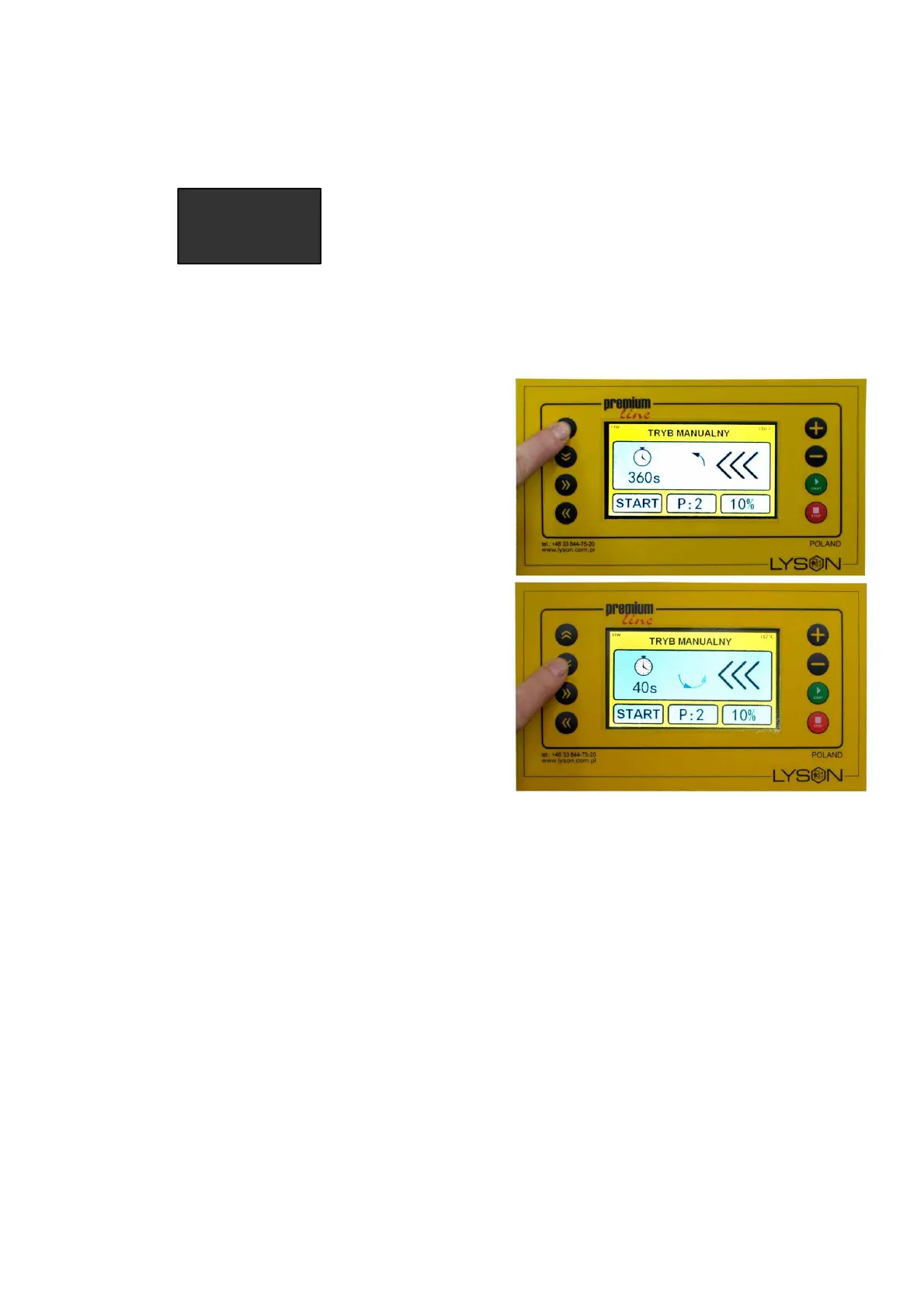
In order to activate the timer function, with one out of two
manual mode programme selected (programme 1 or 2) and
activate operation (START state), the button ARROW UP or
ARROW RIGHT must be pressed .
One-touch pressing of the ARROW UP button increases
the time which must flow until stoppage by 60 seconds.
One-touch pressing of the ARROW RIGHT button
increases the preset time by 15 seconds. Respectively7,
the buttons ARROW DOWN/ ARROW LEFT shall shorten
the preset time.
The maximum time to be set equals 900 seconds. Once the
timer function has been activated, an icon of the stopwatch
shall appear on the manual mode screen, below it the time
until the operation stoppage will be displayed.
First, press the „START” button, next by pressing
„ARROW UP” or
„ARROW DOWN”
activate the Timer.
PAUSE function – it is activated when the controller is in
START state and the START button is pressed. In manual
mode, the pause function stops the counting of time
until deactivation, i.e. it “freezes” the timer function. If the
timer has not been activated, activation of the pause
function does not influence the device operation. Pause
deactivation shall occur once the START button is pressed
again or by pressing the STOP button.


 To Next Page
 Loading...