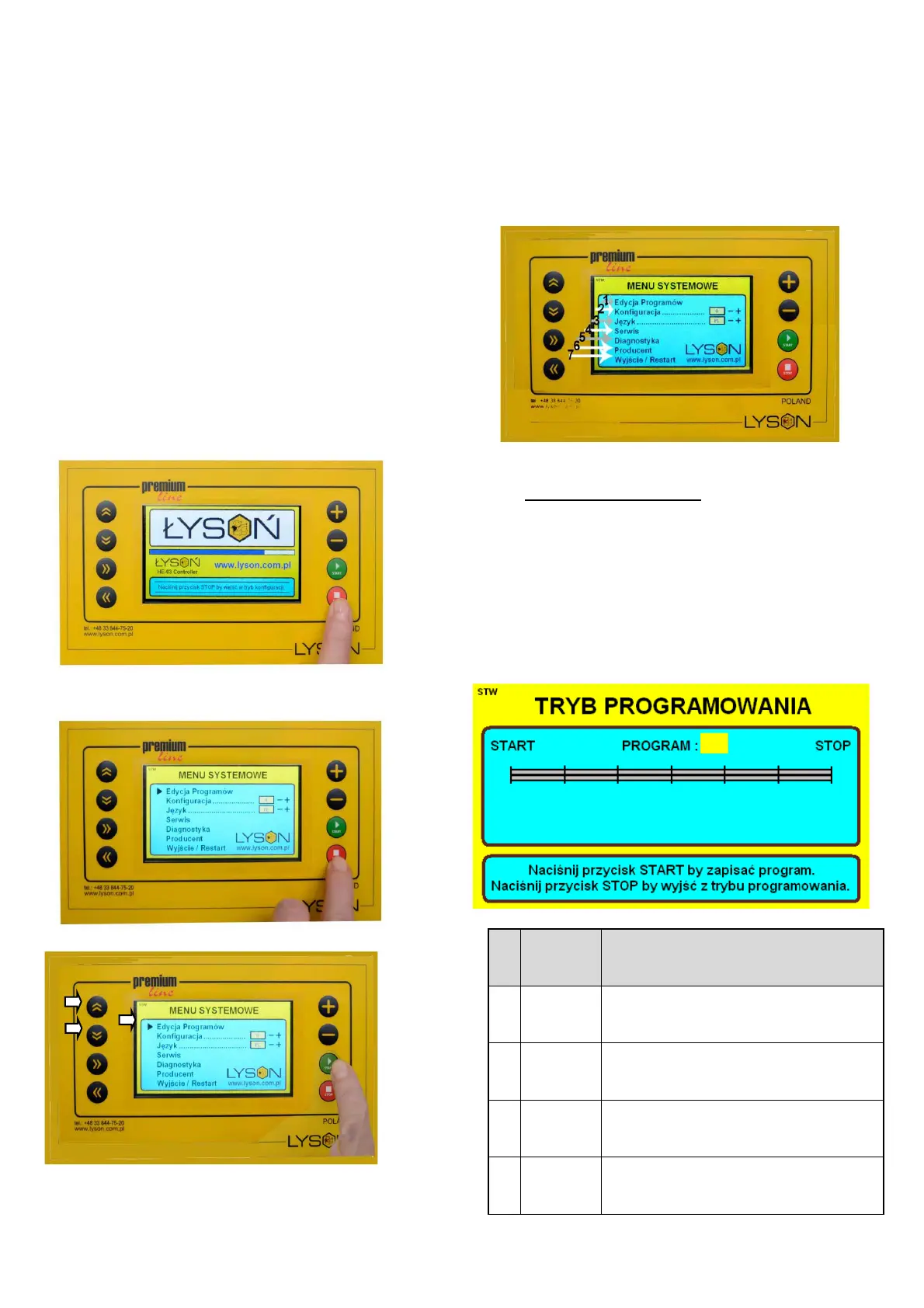
The aforementioned messages will not be displayed
when:
• The controller is in the system menu or in any item of
the system menu
• The controller displays the error report screen
• There is an error in the electric connection of the
connectors
2. The controller’s system menu
Entering the controller’s system menu.
While the controller is activated, the message “Press the
STOP button in order to enter the configuration mode” shall
appear in the bottom part of the screen. While the said
message is displayed , the STOP button must be pressed
and held. The button may be released after the system
menu of the controller has appeared on the screen.
Photo 6
Photo 5 Entering the programming menu
Photo 6. Controller’s menu
Photo 7
By means of the buttons ARROW UP/ ARROW DOWN a
relevant item in the menu is selected (specified by a red
arrow).
By means of the START button selection is confirmed –
entering the relevant function Photo 8
Photo 8
• 1 . Programme editing.
Item in the menu called Programme editing makes it
possible to create your own frame spinning cycles. While
establishing your own spinning cycle the following is to be
set: the programme number, time, spinning speed and
direction. Currently changed (edited) parameter is
highlighted in yellow. The buttons presented in the table
below are used on the programme editor screen:


 To Next Page