© 2016 Lytx, Inc. – Confidential & Proprietary 16
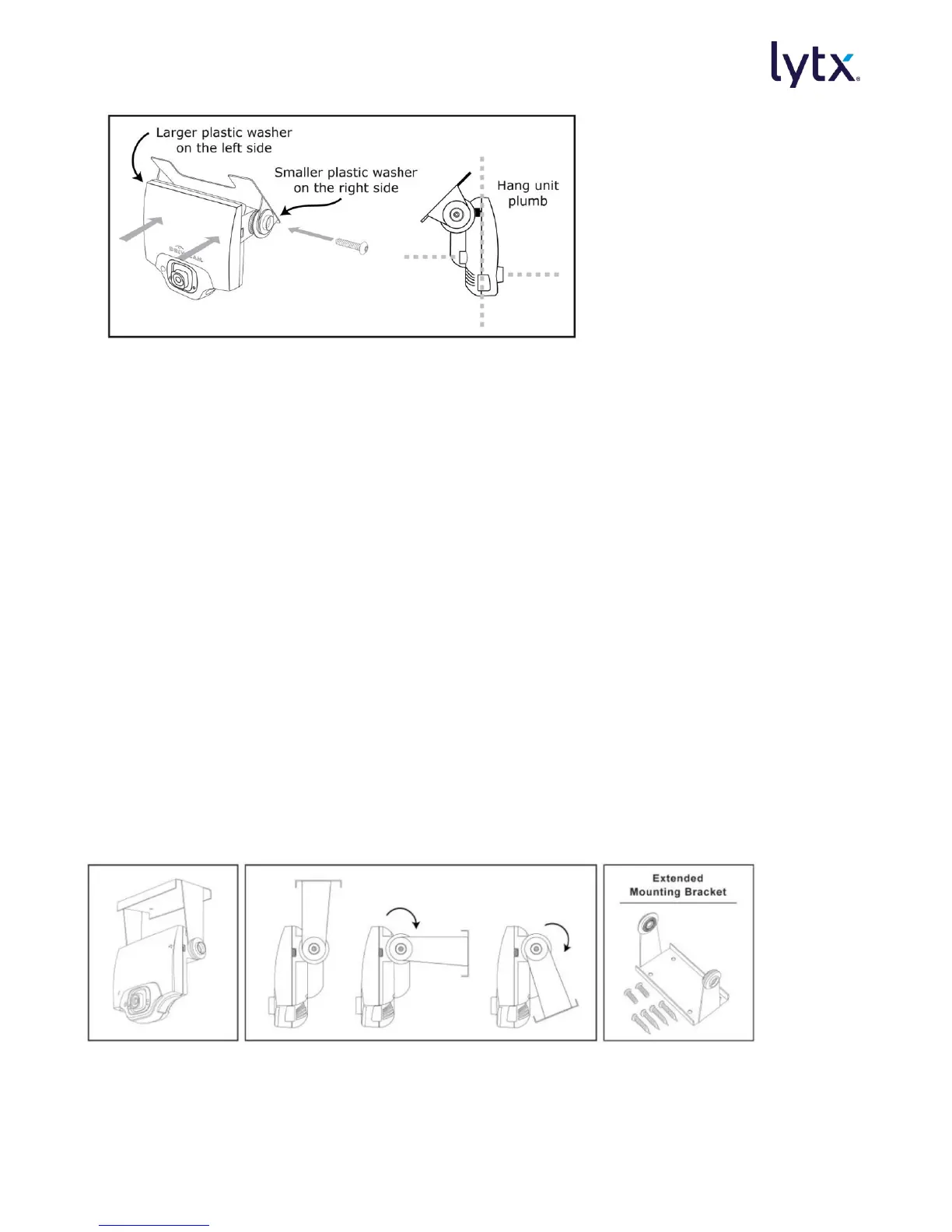
1. Place the event recorder in the bracket.
2. Adjust the event recorder so it hangs vertically (plumb).
3. Secure the event recorder in the bracket using the two Torx screws and Torx wrench
(provided).
Bracket Washer Placement:
The large plastic washer on the left side of the bracket is designed to partially cover the
power cable connector so that it cannot be unplugged by the driver.
The plastic washers can be removed from the metal bracket if you need to switch sides
after mounting.
Make sure the larger of the two washers is on the left side.
Mounting Overhead with the Extended Bracket (Bulkhead)
The DC3P Extended Mounting Bracket is most commonly used in large commercial vehicles where
the windshield mount is not always an option. It is also used in vehicles operating in jurisdictions
where windshield mounting is restricted. The bracket can be rotated, but is usually hung vertically
as close to the windshield and center of the vehicle as possible. There is no tape on the bracket.
Instead, four small screws secure it to a bulkhead or ceiling. Adjustment of the interior lens is
often required when using this bracket.



 To Next Page