This document is a user manual for the LyxPro Junior Electric Guitar & Starter Kit, which includes a junior electric guitar, a 20W amplifier, and various accessories. The kit is designed for household use and comes with a one-year limited warranty.
Function Description
The LyxPro Junior Electric Guitar & Starter Kit provides a complete package for aspiring guitarists, offering a junior electric guitar, an amplifier, and essential accessories to get started. The guitar is available in two sizes: 30 inches and 36 inches, catering to different age groups or preferences. The kit aims to provide a safe and user-friendly experience for learning and playing the electric guitar.
The electric guitar features standard components:
- Tuning Pegs: Used to adjust the tension of the strings for tuning.
- Truss Rod Hole: Allows for adjustment of the guitar neck's curvature.
- Nut: Supports the strings at the headstock end of the neck.
- Neck: The long, slender part of the guitar where the frets are located.
- Frets: Metal strips embedded in the fretboard that divide the neck into semitones.
- Pickups: Electromagnetic devices that convert string vibrations into electrical signals.
- Body: The main resonant part of the guitar.
- Pickup Switch: Selects which pickups are active, influencing the tone.
- Volume/Tone Controls: Dials to adjust the output volume and tonal characteristics.
- Bridge: Anchors the strings at the body end and transmits string vibrations to the body.
- Input Jack: Where the guitar cable connects to the amplifier.
The included 20W amplifier is designed to amplify the guitar's signal and features:
- AUX Input: Allows connection of external audio sources (e.g., MP3 player, mobile phone) to play along with recorded music.
- Instrument Input: For connecting the guitar via the provided guitar cable.
- Grind Button: Activates or deactivates the gain control for a distorted sound.
- Gain Control: Adjusts the amount of amplifier gain, affecting distortion and sustain.
- Bass Control: Adjusts the low-frequency output.
- Treble Control: Adjusts the high-frequency output.
- Volume Control: Adjusts the overall output volume of the amplifier.
- Headphones Jack: A 1/4" TRS jack for connecting headphones for private practice.
- Power Switch: Turns the amplifier on and off.
The digital mini clip-on tuner helps users accurately tune their guitar. It features an LCD screen, a function button to select tuning modes (chromatic, guitar, bass, violin, ukulele), an axis, and a rotating clip for attachment to the guitar's headstock. It indicates whether a note is flat, sharp, or in tune.
Important Technical Specifications
Guitar Specifications:
- Dimensions (30 inch): 29.9" x 10.2" x 1.7"
- Weight (30 inch): 8.6 lbs.
- Dimensions (36 inch): 34.6" x 11" x 1.7"
- Weight (36 inch): 9.7 lbs.
- Number of Strings: 6
- Body Shape: Double cutout
- Body Wood: Paulownia wood
- Orientation: Right-handed
- Neck Wood: Canadian maple
- Joint: Bolt-on
- Truss Rod: Standard
- Fingerboard Material: Engineer wood
- Number of Frets: 21
- Inlays: Dots
- Pickup Controls (36 inch guitar): 3 way
- Control Dials: Volume, tone
- Bridge: Fixed
Tuner Specifications:
- A4 Frequency: 440 Hz
- Tuning Items: Chromatic, guitar, bass, violin, ukulele
- Tuning Range: 0A (27.5 Hz) - 8C (4186.01 Hz)
- Dimensions: 2.1" x 1.1" x 3.1"
- Weight: 1.1 oz.
- Battery: CR2032 (included)
- Auto Power-Off: After 3 minutes of inactivity
Amplifier Specifications:
- Power: 20 W
- Speaker: 6.5"/4 ohm
- Equalization: Treble, bass, gain, grind
- Jacks: Headphone, MP3
- Dimensions: 11.6" x 11.2" x 4.1"
- Weight: 5.7 lbs.
General Specifications:
- Product Type: Guitar starter kit
- Location: Indoor or outdoor use
- Installation/Assembly Required: No (for the kit itself)
- Country of Origin: China
- Warranty Length: 1 year
Usage Features
Tuning:
- Guitars can be tuned manually using a tuning fork, electronic tuner, pitch pipe, or app.
- It's recommended to tune from a pitch below the correct pitch up to the correct pitch to prevent string slack and slippage.
- Standard tuning is E-A-D-G-B-E (from thickest to thinnest string).
- The digital mini clip-on tuner simplifies tuning:
- Clip it onto the guitar's headstock.
- Press the power button to turn it on (hold for 2 seconds to turn off).
- Select the desired instrument mode (chromatic, guitar, bass, violin, ukulele) using the function button.
- Pluck a string; the LCD will display the note name and indicate if it's flat (indicator bar points left, white readout), sharp (indicator bar points right, white readout), or in tune (indicator bar points straight up, green readout).
- Tighten or loosen the string via the tuning peg until the note is in tune.
Truss Rod Adjustment:
- The guitar features an adjustable truss rod to correct neck bowing caused by environmental conditions or string tension.
- Tightening the truss rod clockwise causes the neck to curve upward.
- Tightening the truss rod counterclockwise causes the neck to curve downward.
- Adjustments should be made to keep the neck as straight as possible.
Changing Strings:
- Replace strings one at a time to maintain neck tension.
- Unwind the old string from the tuning machine.
- Remove the old string through the hole on the back of the guitar.
- Insert a new string through the corresponding hole.
- Run the new string over the neck and the nut.
- Feed the string through the hole in the tuning machine.
- Bend the string around the post and wind it using the tuning peg.
Amplifier Use:
- Connect the guitar to the "Instrument input" using the provided guitar cable.
- Use the "AUX input" to connect an MP3 player or phone to play along with music.
- Adjust "Gain," "Bass," "Treble," and "Volume" controls to shape the sound.
- Engage the "Grind" button for a distorted tone.
- Use the "Headphones" jack for silent practice.
- Turn the amplifier on/off using the "Power switch."
Maintenance Features
Guitar Care:
- Store the instrument in a case or carrying bag when transporting or storing to protect it.
- Avoid placing objects on top of the instrument.
- Regularly clean the guitar, including the fingerboard, with a clean, dry, soft cloth.
- Polish the finished surface with an appropriate guitar polish.
- Protect the guitar from extreme temperatures, high humidity, and excessively dry environments, as these conditions can affect the instrument.
General Safety Precautions:
- Do not attempt to open or repair the units yourself; service should be performed by qualified personnel.
- Ensure outlet voltage matches the product's rating label before connecting electrical equipment.
- Align plugs properly and insert fully; avoid overloading power outlets.
- Replace damaged power cords with manufacturer-approved replacements.
- Do not expose products, power cords, or plugs to liquids or moisture. Avoid touching power plugs or units with wet hands.
- Switch off and unplug the guitar and amplifier when not in use.
- Store products away from high humidity, high temperature, dust, or static electricity.
- Avoid dropping the products.
- Do not use strong cleaners or solvents to clean the products.

 Need help?
 General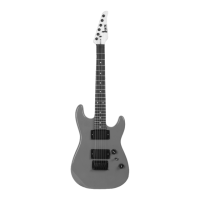

 To Next Page