5
CONTROL PANEL OVERVIEW
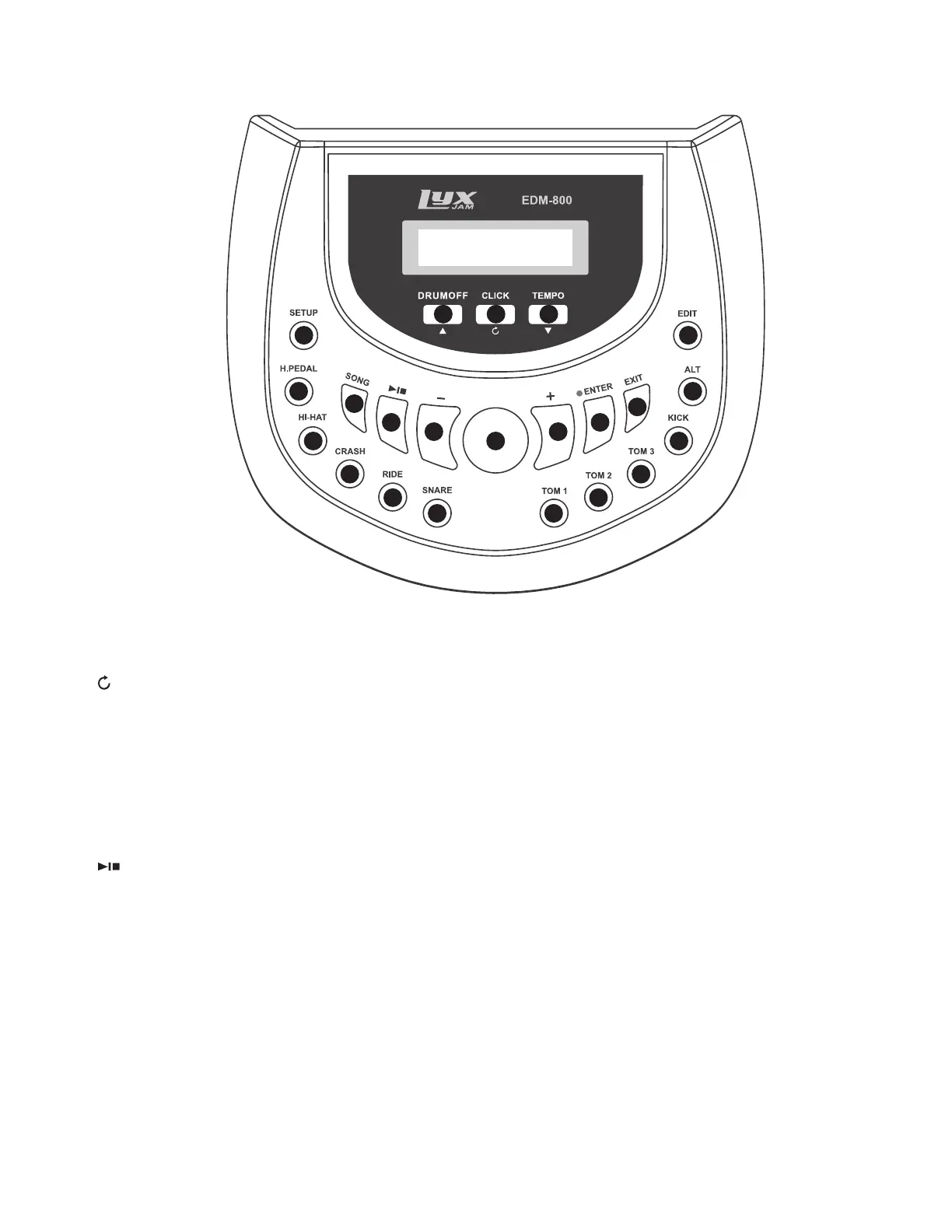
1. DRUMOFF: Mutes the drum track of the current song.
▲ (UP): Return to the previous option in the menu.
2. CLICK: Activates or deactivates the metronome.
(UNDO): Restore the current parameter to its previous status before being modiied.
3. TEMPO: Press this button, then use the Value Rotary dial or the +/- buttons to change the tempo. Repeatedly
tap this button at the tempo you want to activate the Tap Tempo and literally play to the beat of your own
drum.
▼ (DOWN): Move to the next option in the menu.
4. SETUP: Make changes to system settings, such as BACK VOLUME, PLAY MODE, AUTOOFF, LOCAL, ADVANCED
(SENSITIVITY, HEADROOM, TRIGGER, XTALK, NOTE, RIM VELOCITY, HIHAT PEDAL, SPLIT POINT, etc.), CLICK,
EQ, COMPRESSOR, REVERB, and RESET.
5. SONG: Enter song mode to play, practice, or record with songs.
6. (PLAY/STOP): Play or stop the current song.
7. — (MINUS): Decrease the value, or switch to the previous kit.
8. VALUE ROTARY: Rapidly changes values or kits. Rotate clockwise to increase, counterclockwise to decrease.
9. + (PLUS): Increase the value, or switch to the next kit.
10. ENTER: Proceed to the submenu or conirm an operation. If you see [ENTER] on the display, you are able to
open a submenu.
•: In KIT or SONG mode, press this button, set your desired tempo and time signature, and the module will
start recording. Press PLAY/STOP, ENTER, or EXIT while recording to stop and save (ENTER), or cancel (EXIT)
according to the tips displayed on screen.
11. EXIT: Return to the root menu or cancel the operation in progress.
12. EDIT: Edit the current drum kit, including GROUP, VOICE, VOLUME, PITCH, PAN, FX send, etc.
13. DRUM BUTTONS: In the EDIT and SETUP > ADVANCED menus, these buttons will light up according to the
drum you’re playing. Pressing these buttons also allows you to preview the sounds of each drum. Use ALT to
select different triggers on the same drum pad.
14. ALT: Select different triggers on the same drum pad in the EDIT and SETUP > ADVANCED menus.
1
4 12
144
13 13
13
13
13 13
13
13
5
6
7
8
9
10
11
2 3


 To Next Page