3938
the same type to be synchronised. Two
synchronised B.Beats will have the same
contents (Library, Playlists, Shows) and
can play the same Backing Tracks syn-
chronously. In Sync mode one of the two
B.Beats will be the MAIN unit and the
other will be the SPARE unit. ATTENTION:
two B.Beats can be synchronised where
the Spare has the same or higher memory
capacity as the Main unit. B.Beat can be
synchronised with B.Beat - B.Beat PRO16
with B.Beat PRO16.
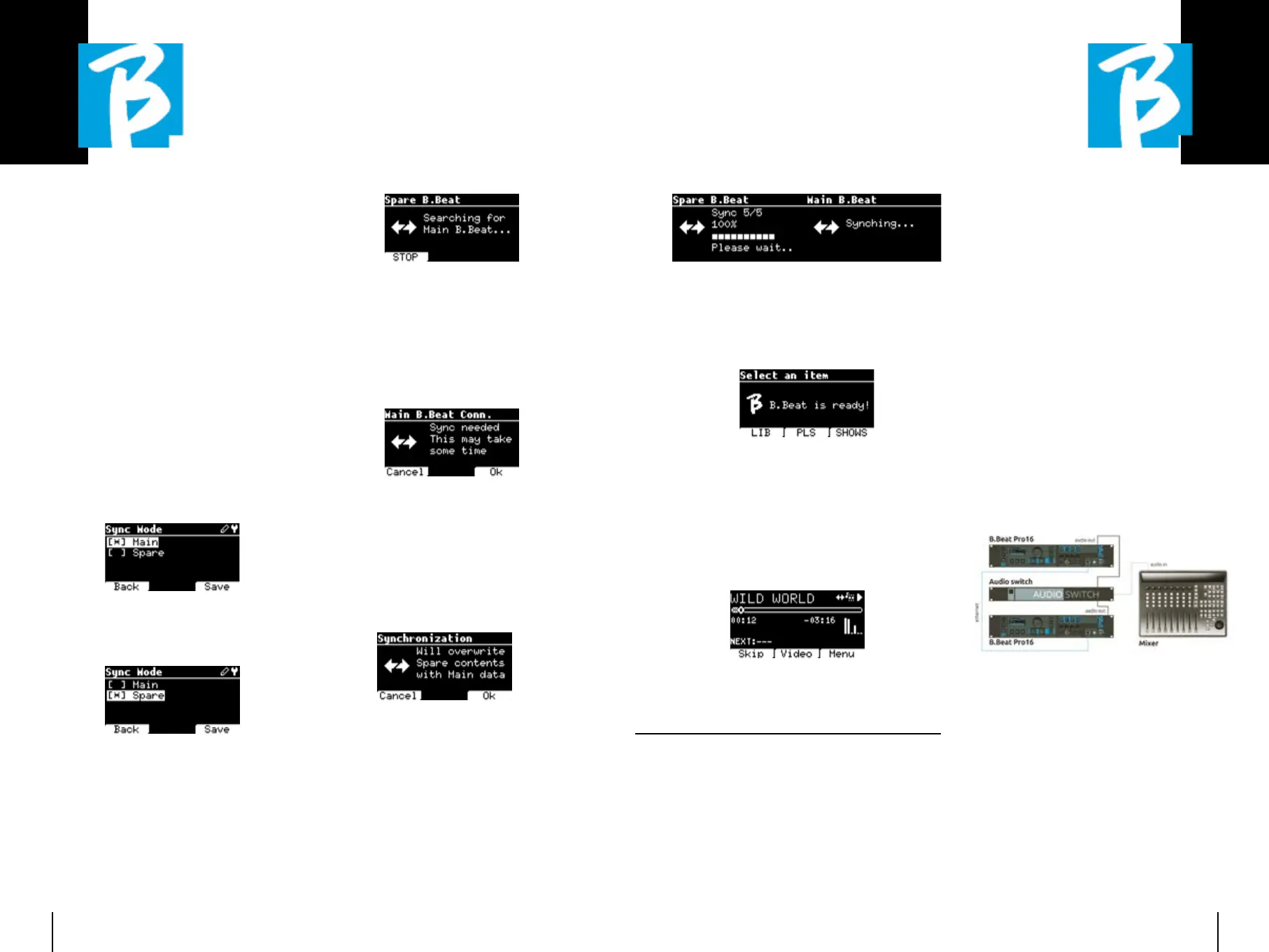
B.Beat is normally configured as Main; the
configuration can be seen in System >
Options > Sync Mode as in the following
picture.
To configure a device in Spare mode,
change the configuration value to Spare.
The Spare device will be restarted and
will start searching for a Main device. The
search takes a few seconds. If STOP (F1)
is pressed, the search will be interrupted
and it will not be possible to use the de-
vice in Spare mode.
When the Main device is detected, a
screen appears asking for confirmation of
Synchronisation. Press OK (F3) to launch
the synchronisation of the two B.Beats.
Press Cancel (F1) to exit synchronisation
and leave B.Beat in stand-alone mode.
You are then asked to confirm with OK
(F3) because the synchronisation proce-
dure deletes all data on the Spare device.
Again, it is possible to exit the procedure
by pressing Cancel (F1).
During the synchronisation in the B.Beat
configured as Spare the progress of the
operation will be visible, while in the Main
a message about the synchronisation will
be shown for the duration of the synchro-
nisation.
At the end of the operation, which lasts
from a few seconds to tens of minutes de-
pending on the size of the repertoire, the
Home page will be shown.
From now on, the devices are synchro-
nised and any command executed on the
Main will also be reproduced on the Spare.
During playback of an audio project, the
synchronisation icon will be shown when
this is active.
SYNC MODE: USE WITH AN AUTO-SYNC MODE: USE WITH AN AUTO-
MATIC SWITCHING DEVICE (E.G. RA-MATIC SWITCHING DEVICE (E.G. RA-
DIAL SW8)DIAL SW8)
Two B.Beat units configured in Synch
mode can play synchronously, following
commands given on either unit.
This feature is useful if you want to avoid
player crashes during a live performance
by using a switch that automatically
switches the audio outputs related to the
Spare machine, should the main machine
crash for some reason.
To realise this configuration, it is neces-
sary to generate with the DAW within the
projects a track called DRONE. The track
must contain a specific service signal
dependent on the switching device used
(e.g. a 1 kHz sinusoidal signal of the same
duration as the audio project). This DRONE
track will be assigned to an output chan-
nel dedicated to the automatic switching
device (e.g. Radial SW8).
If the DRONE track is assigned to the
SERVICE family, the volume control via
B.Beat's Vol potentiometer does not act
on the DRONE track (the output level is
always the maximum) and the signal is
not played on the headphone.


 To Next Page
 Loading...

