4342
The maximum number of tracks that
are manageable per B.Beat is 16. When
16 tracks are assigned to one of the 2
B.Beat, the Audio Output selection area
will be disabled when new tracks are add-
ed. The Output channel of a track can be
changed at any time in the editing page of
the Audio project. The headphone output
for shared projects is only active on the
Main; therefore, it is not possible to as-
sign the music tracks that will play on the
Expansion to the headphone.
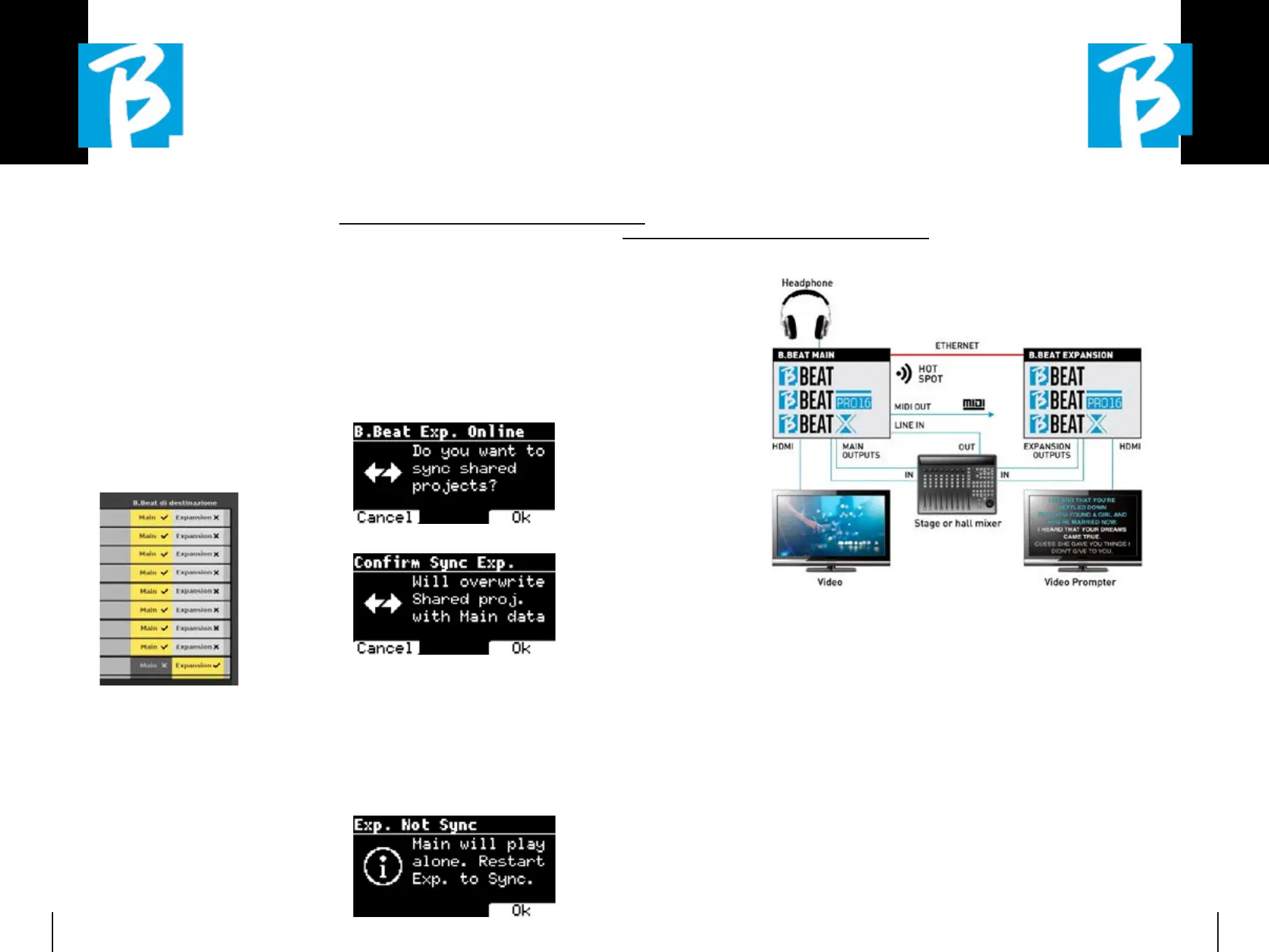
In the B.Beat manager, tracks that are man-
aged on the Main and Expansion will be high-
lighted.
All Shows and playlists involving shared pro-
jects are manageable from B.Beat Main.
After the creation of the shared projects we
have to “synchronise” the two B.Beat, i.e.
the Main and the Expansion. After synchro-
nisation between Main and Expansion, all
shared project information resides on the
two devices.
B.BEAT SYNCHRONISATIONB.BEAT SYNCHRONISATION
1. 1. Connect the two B.Beat with the
Ethernet cable provided.
2. 2. Switch on the two units.
3. 3. As soon as the B.Beat Expansion
detects a connected B.Beat Main,
confirmation will be required (on
Main)
for the synchronisation
of shared projects.
4. 4. Choose OK to start
synchronisation
Then the required confirmation:
Upon confirmation, all shared projects are
synchronised to the version on the B.Beat
Main. If a shared project is present on the
Expansion but not on the Main, it is de-
leted. Two B.Beat cannot play together if
they are not synchronised. If the “Cancel”
option is chosen, the following message
appears on the Main:
OPERATION OPERATION
OF THE EXPANSIONOF THE EXPANSION
When the two B.Beat are connected and synchronised, their connection diagram is as shown:
Once correctly connected, the music
tracks are routed partly in the Main and
partly in the Expansion. The hotspot will
be generated by Main only, in order to con-
nect the prompter and the Remote con-
troller.
Commands (Play, Stop, etc.) can only be
given by the MAIN unit.
VIDEO OUTPUTSVIDEO OUTPUTS
The video output of the B.Beat can be set
to transmit video files or lyrics when they
are present within the project. Having two
devices in Expansion mode we can choose
to use the two video outputs separately:
one for video and the other for prompter.
MIDI OUTMIDI OUT
In expansion mode, both B.Beat Main and
Expansion transmit Midi information, so
both Midi outputs can be used indiscrim-
inately.
PEDALPEDAL
The B.Beat MAIN pedal is the one that will
be active to control the two machines.


 To Next Page
 Loading...

