7
Display & Control Maps
The Display
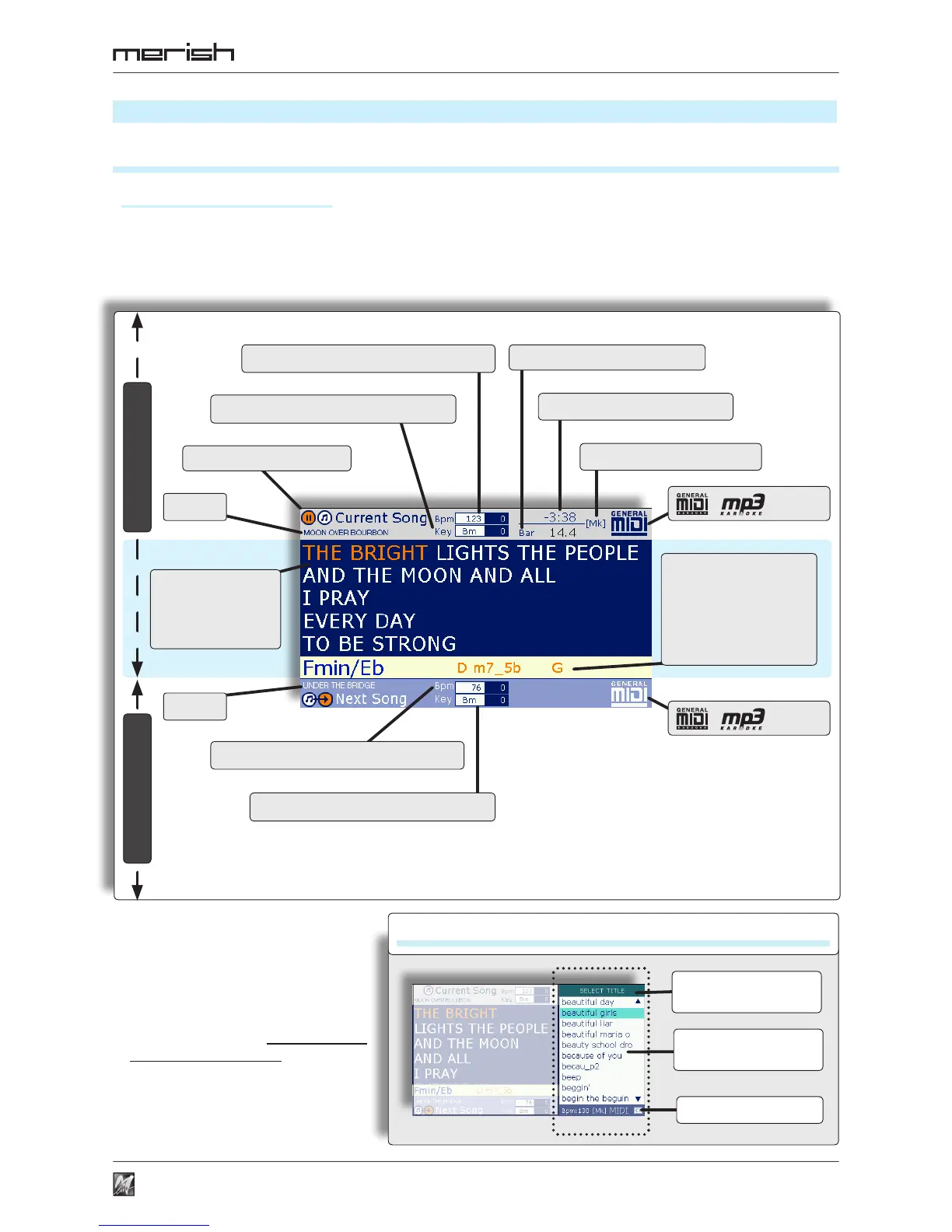
Current Song & Next Song
z In the main area, the display always shows the lyrics with the syllable highlighting (and the chords) following the
tempo of the current song.
z The display also shows marker, tempo, key and other data of the current song and/or the next one.
Playing status
Title
Title
C ur r e n t Song
S o n g l y r i c s
w i t h s y l l a b l e
hig hli ghtin g i n
time with the song
N e x t S o n g
Chord of the song with
highlighting in sync with
the rhythm.
Options: Italian, International,
D i s a b l e d i n M ENU >
Midi Settings > Chord mode
Bpm: tempo (and manual alteration)
Bpm: tempo (and manual alteration)
(Time): min:sec remaining
main parameters/
functions
function/panel name
Function Panels
info/instructions
Key: key (and manual alteration)
Key: key (and manual alteration)
Bar: song position point
[Mk]: markers in song
/ : format
/ : format
z The display also shows the panels of
a series of operating and setting
functions: list of Artist, Title and
Genre, searches, playlists, markers,
system setting, etc.
z The panels can be used in an
interactive manner, even while the
songs are being played.
z Each panel is normally enabled via
the corresponding key, has peculiar
functions and displays specific
information or instructions.
Display & Control Maps



 To Next Page