38 MT-500
Distress ACK sent to another vessel
If your MT-500 transceiver intercepts a distress ACK from a coast station, an
alarm sounds and the following screen appears in the display.
USA INT
Name or ID of
Coast Station
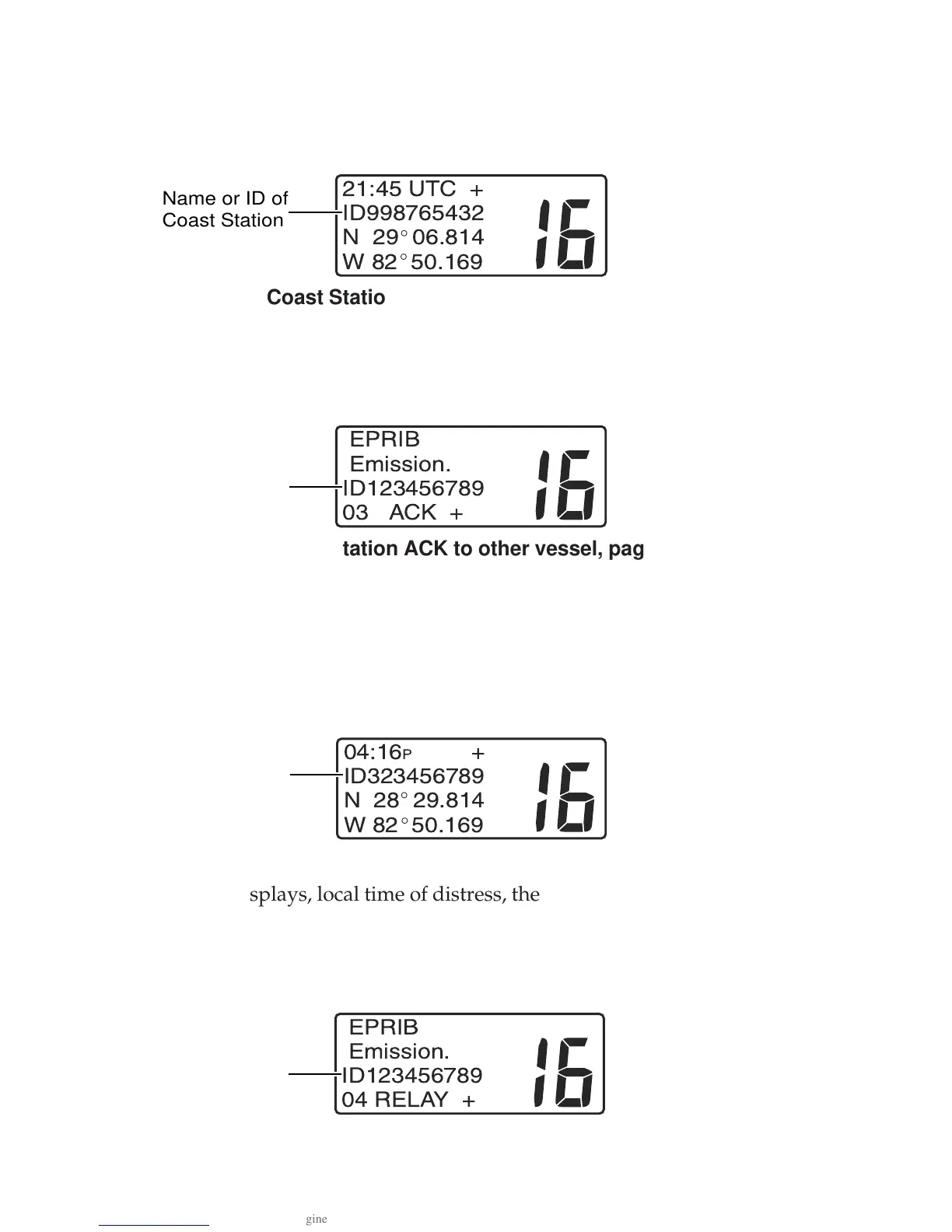
Coast Station ACK to other vessel, page 1
The screen presents time of ACK and Lat/Lon coordinates. The plus sign (+)
indicates there is another page of information available.
• Push the SELECT/ENT knob to toggle between page 1 and page 2.
INT
EPRIB
Emission.
ID123456789
03 ACK +
Name or ID of
Vessel in Distress
Coast Station ACK to other vessel, page 2
The distressed vessel’s MMSID and ACK appear on the second page. Main-
tain a listening watch on channel 16 and standby to lend assistance.
Distress Relay from another vessel
If your MT-500 transceiver intercepts a distress relay from another vessel, an
alarm sounds and the following screen appears in the display.
USA INT
Name or ID of
Vessel sending
message
Distress Relay, page 1
The screen displays, local time of distress, the MMSID of the vessel sending
the relay message and Lat/Lon coordinates of the vessel in distress. The plus
sign (+) indicates there is another page of information available.
• Push the SELECT/ENT knob to toggle between page 1 and page 2.
INT
EPRIB
Emission.
ID123456789
04 RELAY +
Name or ID of
Vessel in Distress
Distress Relay, page 2


 To Next Page