40 MT-500
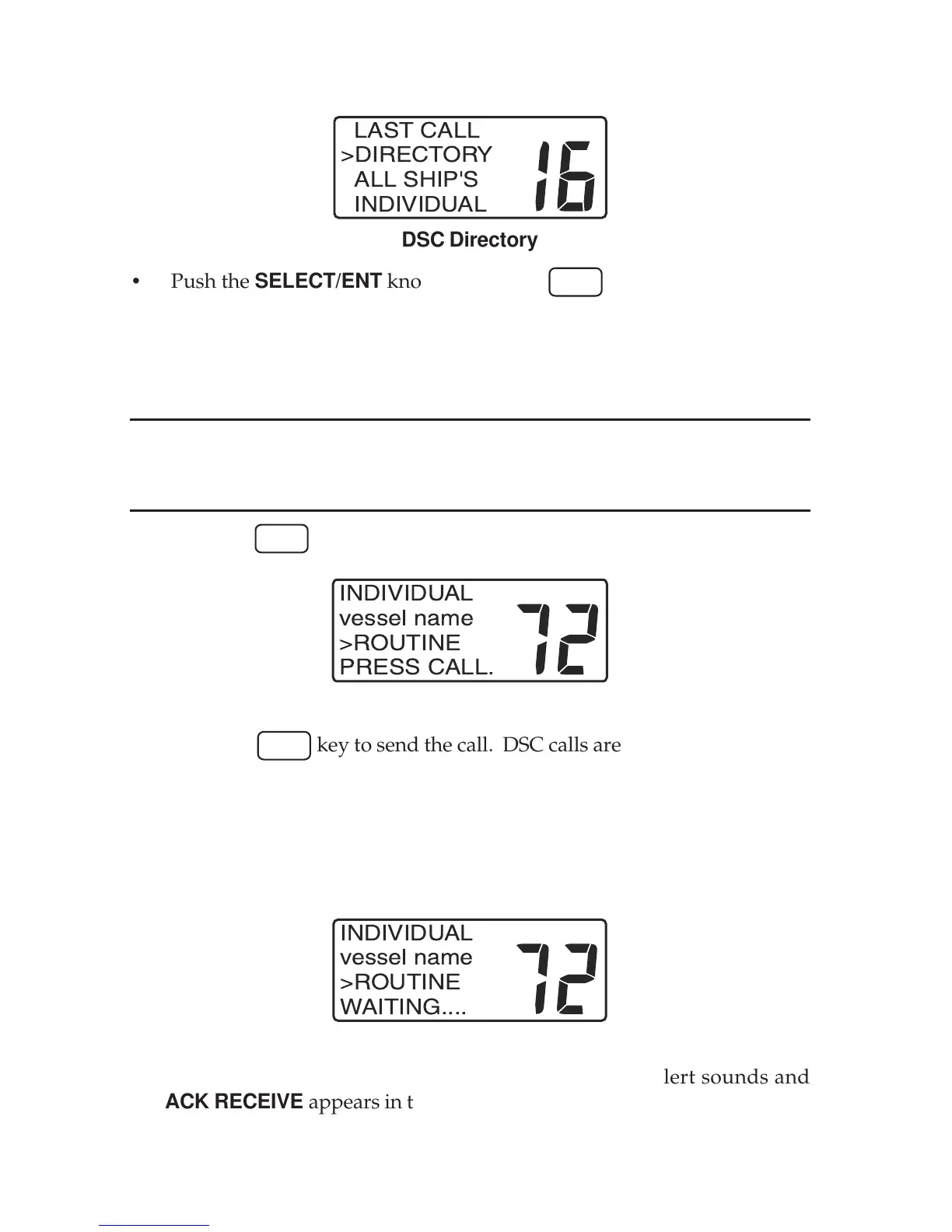
• Use the SELECT/ENT knob to select the DIRECTORY topic.
INT
LAST CALL
>DIRECTORY
ALL SHIP'S
INDIVIDUAL
DSC Directory
• Push the SELECT/ENT knob or press the
CALL
key. The directory list
appears in the display.
• Use the SELECT/ENT knob to select the desired vessel or station name.
Note: The MMSID’s for each entry do not appear in the list.
• Use the microphone keys to select a working channel.
NOTE
If the call is to the coast station, you should not select a working channel. Even
if you select, MT-500 ignores it when transmits the call.
• Press the
CALL
key. The INDIVIDUAL call screen appears in the display.
INT
Individual Call Screen
• Press the
CALL
key to send the call. DSC calls are made on channel 70.
If you observe the display closely, you will see the channel number change
to channel 70 momentarily and then revert to the selected working chan-
nel.
• While waiting for acknowledgment from the called vessel,
WAITING . . . . appears in the lower line of the display.
INT
Waiting For Acknowledge
• When the called vessel acknowledges your call, an alert sounds and
ACK RECEIVE appears in the lower line of the display.


 To Next Page