42 MT-500
INT
SET CH
06 08 72 77
SET MMSID
INT
SET MMSID
00
CALL
TO STATION
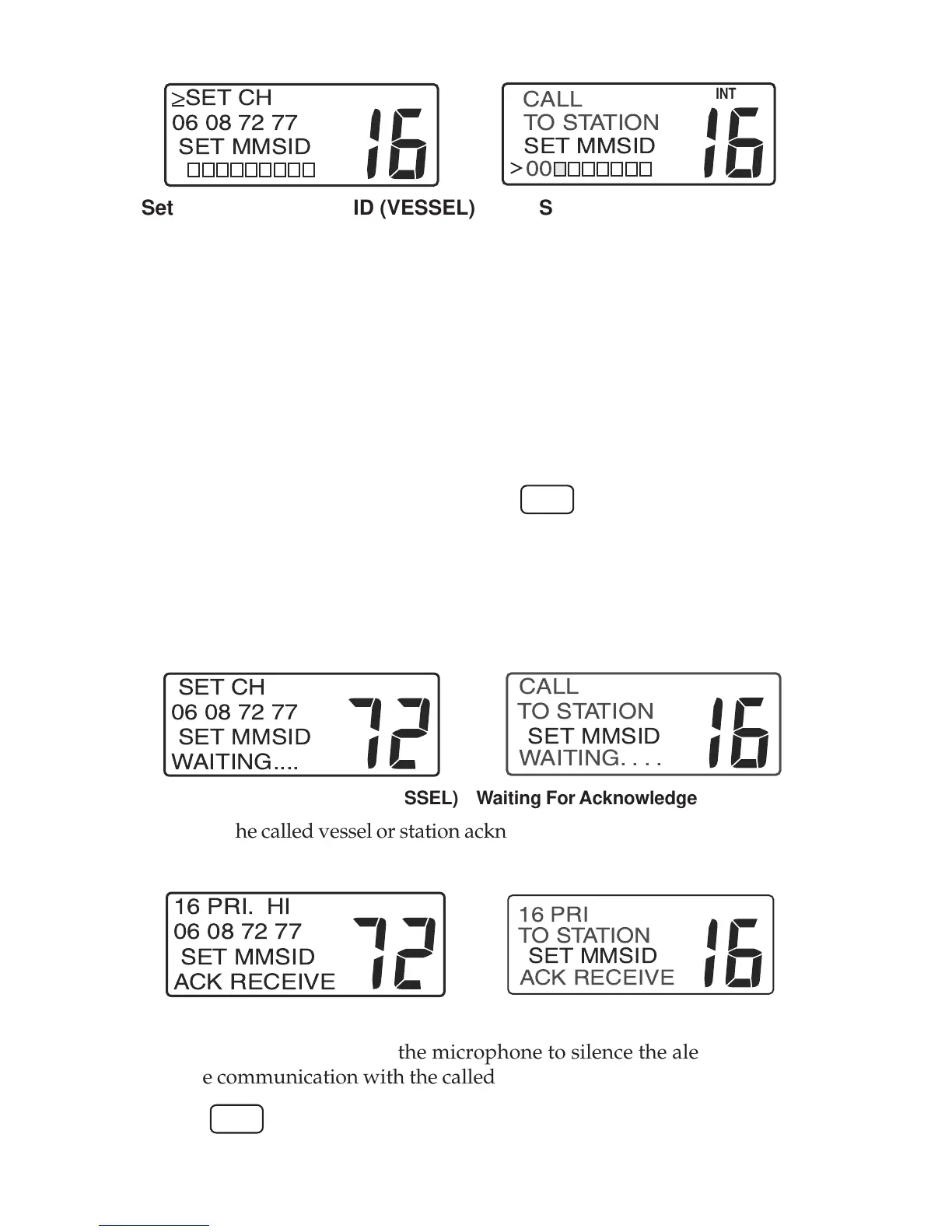
Set Channel/Set MMSID (VESSEL) Set MMSID (STATION)
• Use the SELECT/ENT knob or microphone keys to select a working chan-
nel. Four channel numbers appear in the display as suggested channels
authorized for the call to vessel. Other channels may be used if autho-
rized in your area. No channel number appears for the call to station.
• Push the SELECT/ENT knob. The blinking cursor moves to the first digit
in the MMSID entry field. If the last used manual MMSID is displayed,
push the SELECT/ENT knob once again.
• Use the SELECT/ENT knob or microphone keys to change the MMSID for
the vessel or station to call.
• When the MMSID is correct, press the
CALL
key to send the call. DSC
calls are made on channel 70. If you observe the display closely, you will
see the channel number change to channel 70 momentarily and then re-
vert to the selected working channel.
• While waiting for acknowledgment from the called vessel or station,
WAITING . . . . appears in the lower line of the display.
INT
SET CH
06 08 72 77
SET MMSID
WAITING....
INT
SET MMSID
WAITING....
CALL
TO STATION
Waiting For Acknowledge (VESSEL) Waiting For Acknowledge (STATION)
• When the called vessel or station acknowledge your call, an alert sounds
and ACK RECEIVE appears in the lower line of the display.
INT
16 PRI. HI
06 08 72 77
SET MMSID
ACK RECEIVE
INT
SET MMSID
ACK RECEIVE
16 PRI
TO STATION
Acknowledge Received (VESSEL) Acknowledge Received (STATION)
• Press the PTT button on the microphone to silence the alert and begin
voice communication with the called vessel or station.
• The
END
key may be used to exit the DSC calling procedure at any time
prior to sending the call.


 To Next Page