MT-700 21
Frequency Bank
Annunciators
U I C
Channel is
being used
4 lines, 11 characters each
for alphanumeric information
Channel
Number
Mic Key Loc
Annunciator
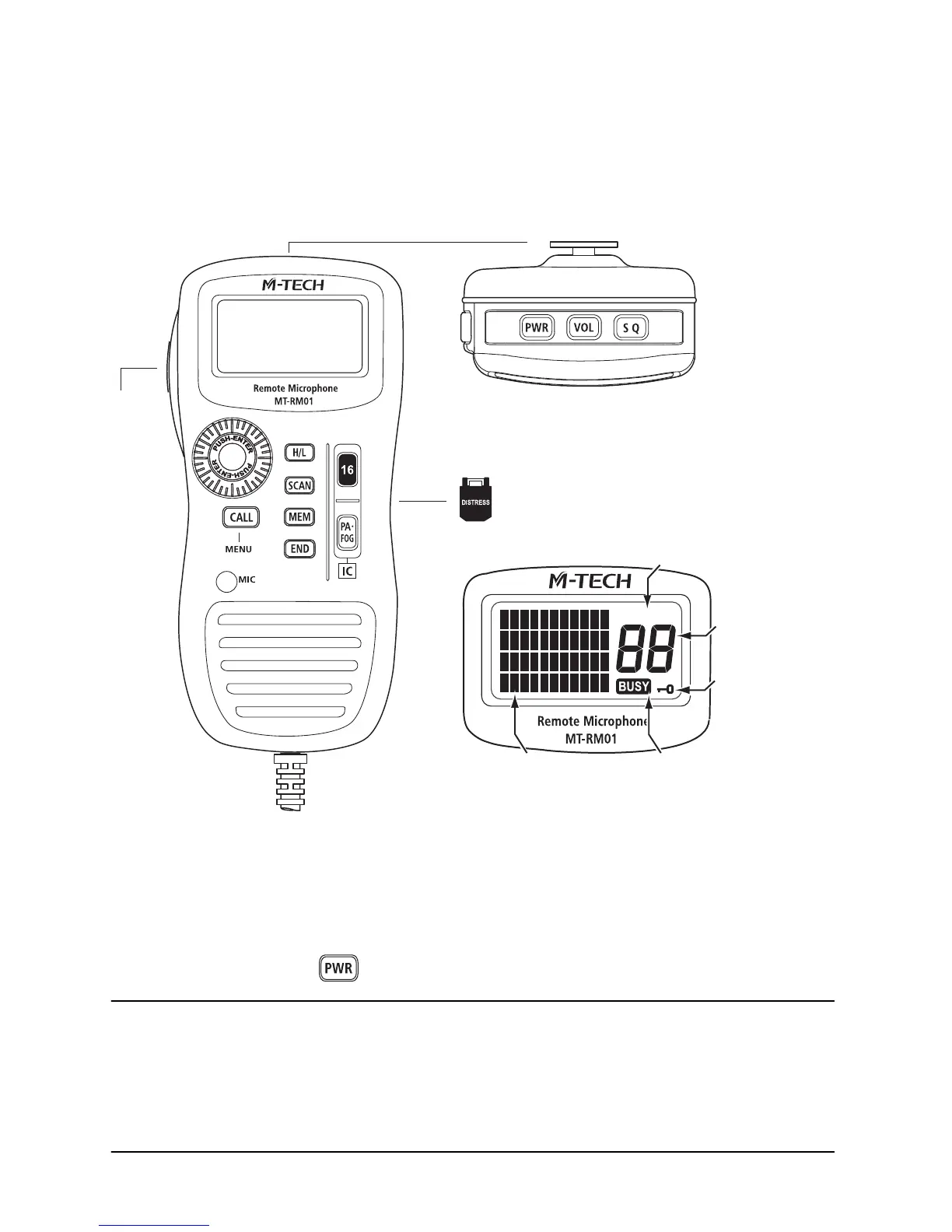
5.4 Optional MT-RM01 Remote Mic
The optional
MT-RM01
Remote Mic works as a second station of your
MT-700
transceiver. You can operate all functions including DSC, PA Hail, Fog Horn and
Intercom. It has common usability to your
MT-700
transceiver (except some
operations) with same Keypad,
SELECT/ENT
dial and four lines LCD display.
Distress Key (Back)
Top Keys
PTT
Button
Power On/Off
To turn the
MT-RM01
Remote Mic On/Off:
•
Press and hold the
key.
NOTE
Power On/Off of
MT-RM01
Remote Mic is working together with your
MT-700
transceiver. When powering On/Off the
MT-RM01
Remote Mic,
MT-700
transceiver
is also powered On/Off. When powering On/Off the
MT-700
transceiver,
MT-RM01
Remote Mic is also powered On/Off.
MT-RM01
Li


 To Next Page