4
Front panel
EN
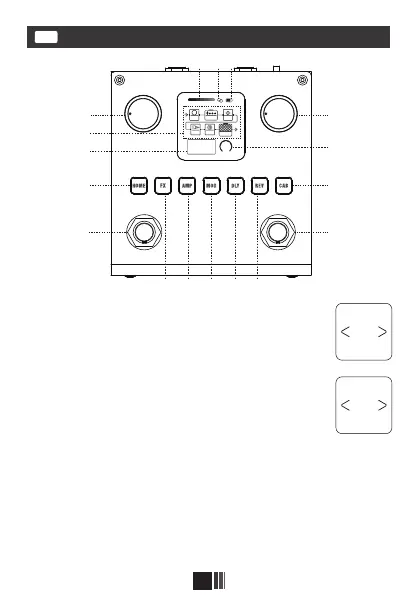
③ IN jack input volume real-time display bar.
④ Wireless BT pattern, When the pattern is o, it indicates that BT
is not enabled. A white pattern indicates that BT has staed but is
not connected. The blue pattern indicates that BT is successfully
connected.
⑤ Batte status pattern.
⑥ This diagram shows the order and the on/o state of the 6
eect Modules.
① Master, You can use it to control BLACKBOX's nal
output volume.
② PARA knob(Rota encoder with button), Rotate
it to select items or adjust parameters, Click it to enter,
exit, or conrm the items, Press and hold for 1 second
to display the “Save to” screen, Press and hold for 2
second to display the “Swap to” screen. When on the
"Save to" or "Swap to" screen, if you click the HOME
button, you can exit and return to "Main Display Screen".
P08 Swap to
P09
Save to
P08
①
②
⑧
⑥
⑦
⑨
⑩
③ ④⑤
FX
AMP
MOD
D LY
CAB
REV
P14
097
VOL
⑪ ⑫ ⑬ ⑭
⑮
⑯ ⑰


 To Next Page