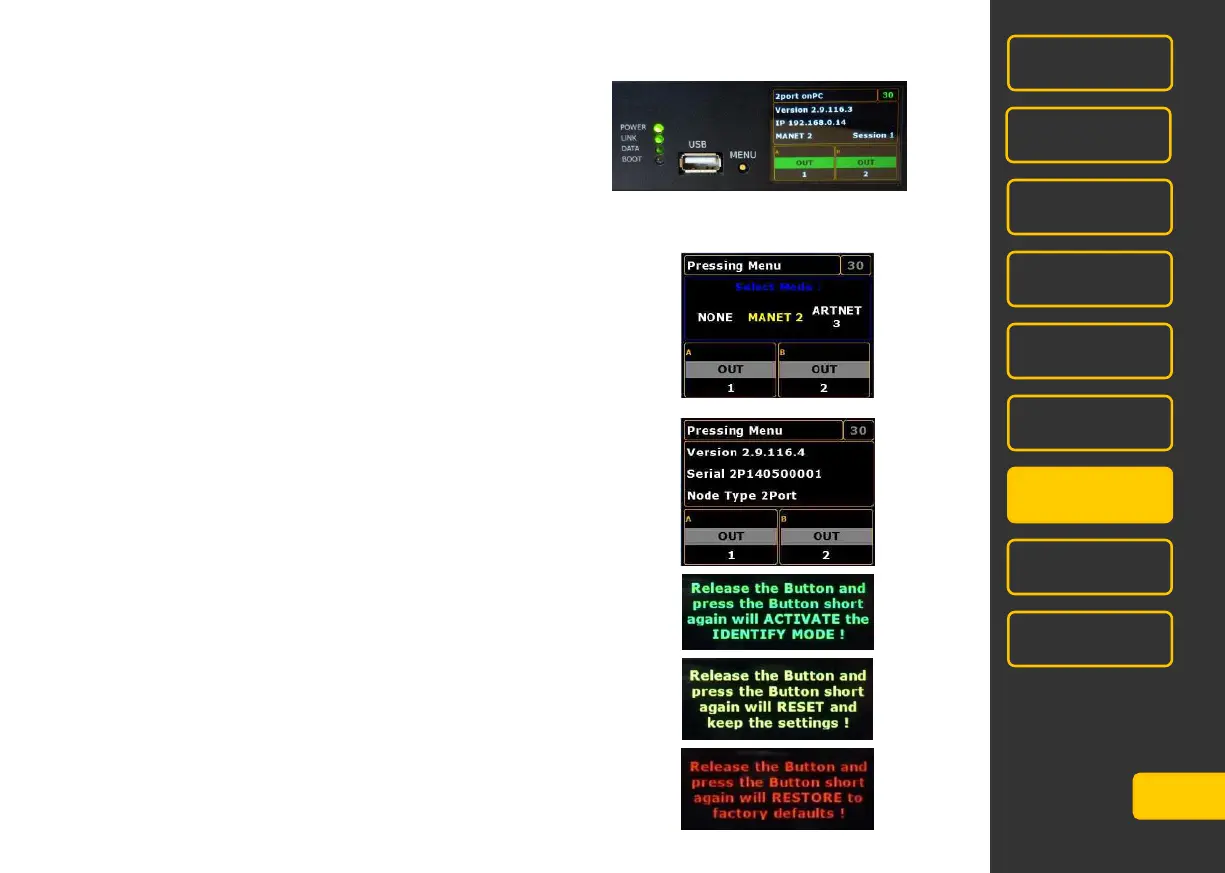
Display
After switching on this menu is displayed:
Hold button MENU as long until the desired menu appears. Release the button when in a menu adjustment is to
be made. To change the setting, press the button briefly, the new setting is color-coded. After a short time display
returns to the above menu.
Select Mode:
Use the MENU-button to select NONE, MANET 2 or ARTNET.
Info Mode: no settings possible
Identify Mode: identifies this MA 2Port Node by flashing the respective
configuration line in the console/onPC
Reset Mode: the MA 2Port Node will be reseted, all settings will remain.
Restore Mode: the MA 2Port Node will be reseted to factory default.
In the factory setting the node is reset to a standard MA-Net IP address
as 192.168.0.x. The name is reset, the operating mode is MA-Net1 and
XLR A and B are assigned to Out 1 and Out 2.



 To Next Page