EasyManua.ls Logo

MAC TOOLS MW13O - Installing Welding

MAC TOOLS MW13O
20 pages
Print Icon
To Next Page IconTo Next Page
To Previous Page IconTo Previous Page
Loading...
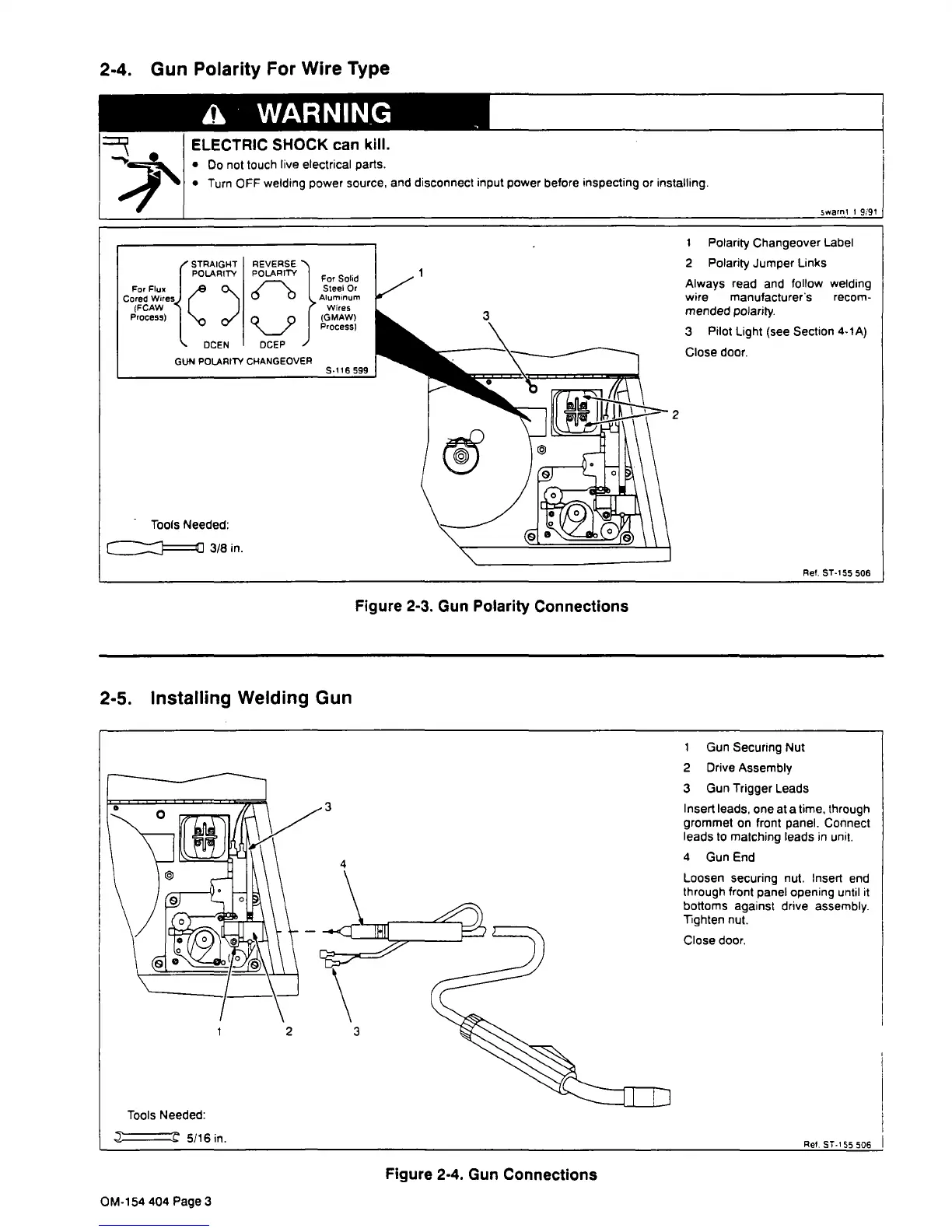
2-4.
Gun
Polarity
For
Wire
Type
a
WARNING
ELECTRIC
SHOCK
can
kill.
Do
not
touch
live
electrical
parts.
Turn
OFF
welding
power
source,
and
disconnect
input
power
before
inspecting
or
installing.
2-5.
Installing
Welding
Gun
Figure
2-3.
Gun
Polarity
Connections
swami
I
9/91
Tools
Needed:
~
5/16
in.
3
I
Gun
Securing
Nut
2
Drive
Assembly
3
Gun
Trigger
Leads
Insert
leads,
one
at
a
time,
through
grommet
on
front
panel.
Connect
leads
to
matching
leads
in
unit.
4
Gun
End
Loosen
securing
nut.
Insert
end
through
front
panel
opening
until
it
bottoms
against
drive
assembly.
Tighten
nut.
Close
door.
Ret.
ST.155
506
Tools
Needed:
~
3/8
in.
1
Polarity
Changeover
Label
2
Polarity
Jumper
Links
Always
read
and
follow
welding
wire
manufacturers
recom
mended
polarity.
3
Pilot
Light
(see
Section
4-lA)
Close
door.
2
Ref.
ST-155
506
2
Figure
2-4.
Gun
Connections
OM-154
404
Page
3

Related product manuals